PHP入门菜鸟询问数据库配置问题(提示错误SQLSTATE[HY000] [1045] )

使用的是windows下的xampp集成环境!从服务器上下载了网站的源代码,但是在本地环境里启动的时候就出现如下信息!好像是数据库配置的问题!但是完全不知道在哪里进行数据库的配置!非常烦扰。恳请前辈们指点!!

错误文本内容提示:
🙁
SQLSTATE[HY000] [1045] Access denied for user ‘wenhua’@’localhost’ (using password: YES)
错误位置
FILE: C:\xampp\htdocs\public_html\Core\Library\Think\Db\Driver.class.php  LINE: 109
TRACE
#0 C:\xampp\htdocs\public_html\Core\Library\Think\Db\Driver.class.php(109): E(‘SQLSTATE[HY000]…’)
#1 C:\xampp\htdocs\public_html\Core\Library\Think\Db\Driver.class.php(1042): Think\Db\Driver->connect()
#2 C:\xampp\htdocs\public_html\Core\Library\Think\Db\Driver\Mysql.class.php(50): Think\Db\Driver->initConnect(true)
#3 C:\xampp\htdocs\public_html\Core\Library\Think\Model.class.php(134): Think\Db\Driver\Mysql->getFields(‘cms_hooks’)
#4 C:\xampp\htdocs\public_html\Core\Library\Think\Model.class.php(122): Think\Model->flush()
#5 C:\xampp\htdocs\public_html\Core\Library\Think\Model.class.php(1432): Think\Model->_checkTableInfo()
#6 C:\xampp\htdocs\public_html\Core\Library\Think\Model.class.php(97): Think\Model->db(0, ”, true)
#7 C:\xampp\htdocs\public_html\Core\Common\functions.php(563): Think\Model->__construct(‘Hooks’, ”, ”)
#8 C:\xampp\htdocs\public_html\Application\Common\Behavior\InitHookBehavior.class.php(25): M(‘Hooks’)
#9 C:\xampp\htdocs\public_html\Core\Library\Think\Hook.class.php(119): Common\Behavior\InitHookBehavior->run(NULL)
#10 C:\xampp\htdocs\public_html\Core\Library\Think\Hook.class.php(89): Think\Hook::exec(‘Common\Behavior…’, ‘app_init’, NULL)
#11 C:\xampp\htdocs\public_html\Core\Library\Think\App.class.php(191): Think\Hook::listen(‘app_init’)
#12 C:\xampp\htdocs\public_html\Core\Library\Think\Think.class.php(120): Think\App::run()
#13 C:\xampp\htdocs\public_html\Core\ThinkPHP.php(97): Think\Think::start()
#14 C:\xampp\htdocs\public_html\index.php(39): require(‘C:\xampp\htdocs…’)
#15 {main}

同中招,密码是对的,是没设置权限
mysql5.7版本:
mysql>GRANT ALL PRIVILEGES ON *.* TO ‘用户名’ @’%’ IDENTIFIED BY ‘密码’ WITH GRANT OPTION;
mysql>flush privileges;

MySQL中mysql.sock找不到的解决方法

链接MySQL时,报错:

cant connect to mysql server through socket ‘/tmp/mysql.sock’

本质上这个问题是mysql.sock在其他路径导致的。

有文章说可以通过修改my.cnf的socket路径,但个人尝试后发现,这样可能导致mysql的服务起不来。

笔者认为,还是用软连接比较安全,方法如下:

1、找到mysql.sock

使用 find / -name mysql.sock进行寻找。如果找不到,那么说明该socket可能不是这个名字。

因此,需要先找到my.cnf,输入:

find / -name my.cnf

vim //my.cnf

在里面找到该sock的名字。例如笔者的就是mysqld.sock.

然后通过 find 定位,找到sock的路径。

2、软链接

把sock软链接到目标路径。以笔者的问题为例,就是:

ln -s /run/mysqld/mysqld.sock /tmp/mysql.sock

MySQL服务进程占用系统CPU达100%

故障现象:ping云主机严重丢包,丢包率达99%,仅有一两个包可到达;更无法远程;

mysql

排查:云主机 CentOS6.4 后台查看CPU占用高达99% 还好能登入系统,操作也并不卡顿;
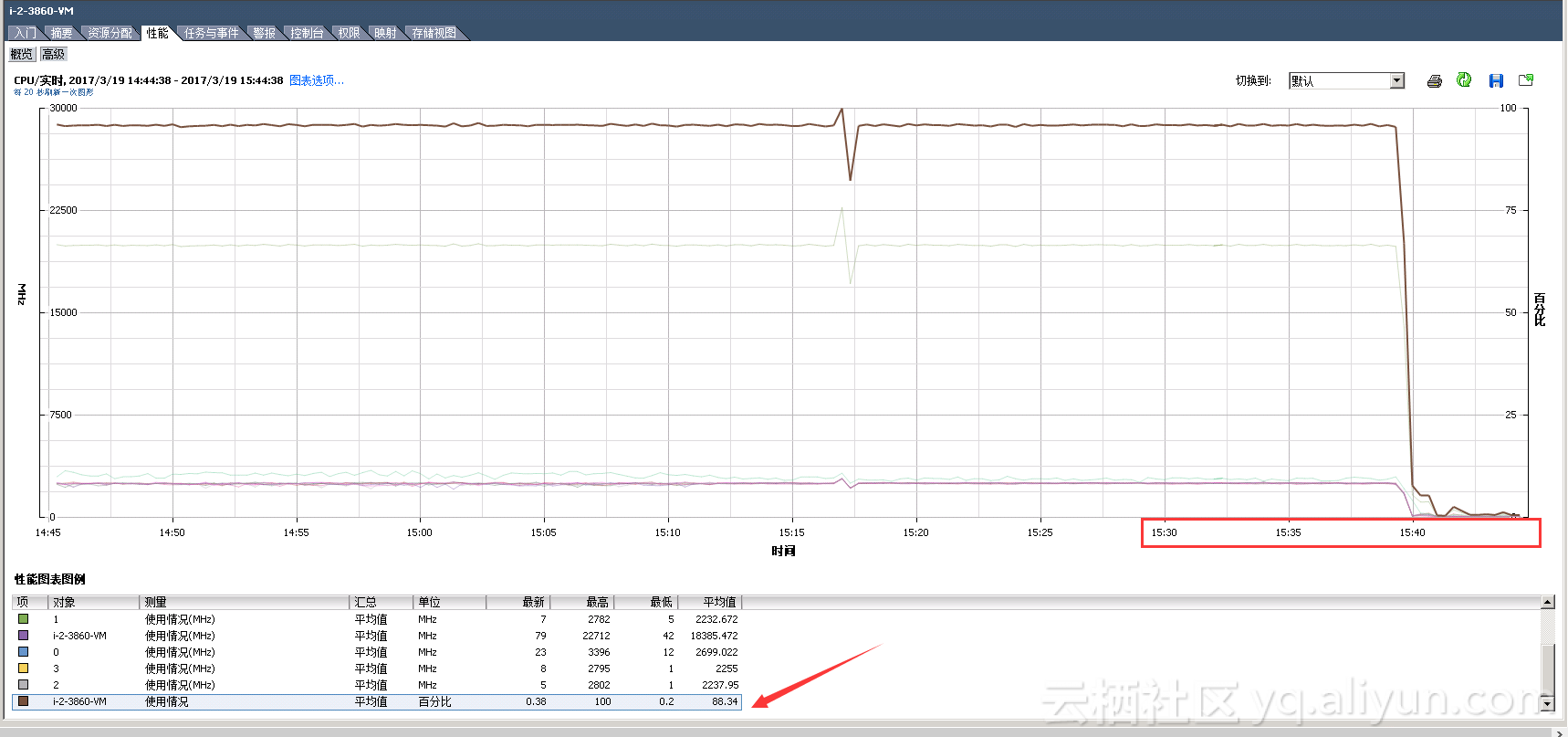
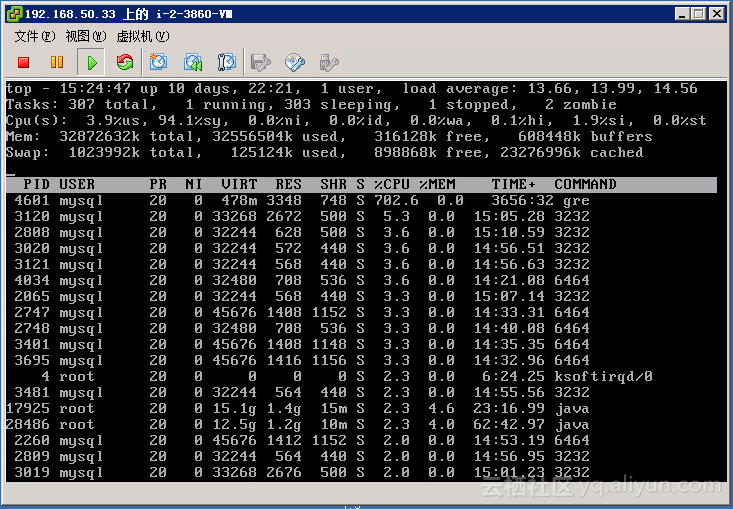
top查看 mysql服务进程占用CPU达100% 
如图:

两分钟后,系统卡死;
(若是系统没有卡死的话还可以经确认后重启mysql服务,以结束连接;)

系统卡死无奈只能重启系统;
重启后CPU直线下降:

CPU_hou

不再丢包,远程服务正常;

分析:MySQL服务为何严重占用系统资源?
与MySQL服务配置与管理有关!
登录mysql数据库:
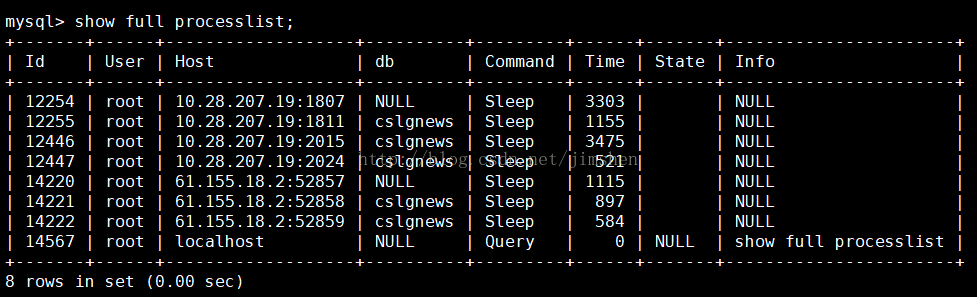
mysql> show processlist;

show processlist 命令的输出结果显示了有哪些线程在运行,可以帮助识别出有问题的查询语句。
IdUserHostdbCommandTimeStateInfo
207root192.168.0.20:51718mytestSleep5NULL

第一列,id,不用说了吧,一个标识,你要kill一个语句的时候很有用。
user列,显示单前用户,如果不是root,这个命令就只显示你权限范围内的sql语句。
host列,显示这个语句是从哪个ip的哪个端口上发出的。呵呵,可以用来追踪出问题语句的用户。
db列,显示这个进程目前连接的是哪个数据库。
command列,显示当前连接的执行的命令,一般就是休眠(sleep),查询(query),连接(connect)。
time列,此这个状态持续的时间,单位是秒。state列,显示使用当前连接的sql语句的状态,很重要的列,后续会有所有的状态的描述,请注意。
state只是语句执行中的某一个状态,一个sql语句,已查询为例,可能需要经过copying to tmp table,Sorting result,Sending data等状态才可以完成。
info列,显示这个sql语句,因为长度有限,所以长的sql语句就显示不全,但是一个判断问题语句的重要依据。
常见问题 :
一般是睡眠连接过多,严重消耗mysql服务器资源(主要是cpu, 内存),并可能导致mysql崩溃。
(所以说DBA要尽职尽责)
解决办法 :
mysql的配置my.ini文件中,有一项: 
wait_timeout, 即可设置睡眠连接超时秒数,如果某个连接超时,会被mysql自然终止。 
wait_timeout过大有弊端,其体现就是MySQL里大量的SLEEP进程无法及时释放,拖累系统性能,不过也不能把这个指设置的过小,否则你可能会遭遇到“MySQL has gone away”之类的问题,通常来说,我觉得把wait_timeout设置为10是个不错的选择,但某些情况下可能也会出问题,比如说有一个CRON脚本,其中两次SQL查询的间隔时间大于10秒的话,那么这个设置就有问题了(当然,这也不是不能解决的问题,你可以在程序里时不时mysql_ping一下,以便服务器知道你还活着,重新计算wait_timeout时间):
mysql> show global variables like ‘wait_timeout’; 
+—————————-+——-+ 
| Variable_name | Value | 
+—————————-+——-+

mysql> set global wait_timeout=20;
至此,mysql占用cpu下降了

拓展:停止MySQL服务后进程若还在,则可以杀死进程

查找让mysql cpu达到100%的罪魁祸首

今天服务器速度非常慢我开始查找原因

free -m
total used free shared buffers cached
Mem: 64376 63359 1016 14 3921 47879
-/+ buffers/cache: 11558 52817
Swap: 0 0 0
内存还有一个g不应该这么慢,于是我又使用top 命令查找查看使用cpu情况

top

12303 root 20 0 109m 2112 1040 S 3.0 0.0 0:10.76 iptraf
41025 mysql 20 0 9805m 4.2g 8128 S 1.7 6.6 38246:01 mysqld
4371 root 20 0 268m 14m 3108 S 0.3 0.0 15:21.91 php
1 root 20 0 19232 1392 1116 S 0.0 0.0 10:42.25 init
2 root 20 0 0 0 0 S 0.0 0.0 0:00.01 kthreadd
3 root RT 0 0 0 0 S 0.0 0.0 2:43.78 migration/0
4 root 20 0 0 0 0 S 0.0 0.0 6:24.98 ksoftirqd/0
5 root RT 0 0 0 0 S 0.0 0.0 0:00.00 stopper/0
6 root RT 0 0 0 0 S 0.0 0.0 1:50.76 watchdog/0
7 root RT 0 0 0 0 S 0.0 0.0 2:01.49 migration/1
8 root RT 0 0 0 0 S 0.0 0.0 0:00.00 stopper/1
9 root 20 0 0 0 0 S 0.0 0.0 2:29.09 ksoftirqd/1
10 root RT 0 0 0 0 S 0.0 0.0 1:24.89 watchdog/1
11 root RT 0 0 0 0 S 0.0 0.0 1:55.64 migration/2
12 root RT 0 0 0 0 S 0.0 0.0 0:00.00 stopper/2
13 root 20 0 0 0 0 S 0.0 0.0 3:30.81 ksoftirqd/2
14 root RT 0 0 0 0 S 0.0 0.0 1:26.45 watchdog/2
15 root RT 0 0 0 0 S 0.0 0.0 1:35.35 migration/3
16 root RT 0 0 0 0 S 0.0 0.0 0:00.00 stopper/3
17 root 20 0 0 0 0 S 0.0 0.0 2:35.25 ksoftirqd/3
18 root RT 0 0 0 0 S 0.0 0.0 1:25.91 watchdog/3
19 root 20 0 0 0 0 S 0.0 0.0 69:40.89 events/0
20 root 20 0 0 0 0 S 0.0 0.0 51:41.39 events/1
21 root 20 0 0 0 0 S 0.0 0.0 63:19.08 events/2
22 root 20 0 0 0 0 S 0.0 0.0 69:33.61 events/3
23 root 20 0 0 0 0 S 0.0 0.0 0:00.00 cgroup
可以看出mysql 的cpu 使用率达到100%,可以看出MySQL有优化的地方

第一步肯定是线看看是不是mysql使用的线程十分多,如果线程十分多可能出现两种情况 nginx 访问量比较大,要不就是程序架构出现问题,导致cpu占用十分高

show full processlist;

+——–+——+—————–+——–+———+——+——-+———————–+
| Id | User | Host | db | Command | Time | State | Info |
+——–+——+—————–+——–+———+——+——-+———————–+
| 386527 | root | 127.0.0.1:49172 | screen | Sleep | 1 | | NULL |
| 386528 | root | 127.0.0.1:49173 | screen | Sleep | 2 | | NULL |
| 386529 | root | 127.0.0.1:49174 | screen | Sleep | 1 | | NULL |
| 386530 | root | 127.0.0.1:49175 | screen | Sleep | 0 | | NULL |
| 524172 | root | localhost | NULL | Query | 0 | init | show full processlist |
+——–+——+—————–+——–+———+——+——-+———————–+
5 rows in set (0.00 sec)
可以看出只有5个线程,所以这不是mysql cpu占用100%的使用原因

show variables like ‘%slowquerylog%’;

查找慢日志查询

+---------------------+--------------------------------+

| Variable_name | Value |
+———————+——————————–+
| slow_query_log | ON |
| slow_query_log_file | /data/mysql/long_logs/long.log |
+———————+——————————–+
日志位置位于/data/mysql/long_logs/long.log

vim /data/mysql/long_logs/long.log
查看慢日志

Time: 170104 10:41:04

User@Host: root[root] @ [127.0.0.1] Id: 785264

Query_time: 2.082531 Lock_time: 0.000132 Rows_sent: 0 Rows_examined: 437963

SET timestamp=1483497664;
SELECT id,update_time,update_end_time,ctime FROM sg_point_log WHERE pid = 105 AND date(ctime) = curdate() AND (update_time != 0 OR update_end_time != 0) ORDER BY id DESC limit 1;

Time: 170104 10:42:06

User@Host: root[root] @ [127.0.0.1] Id: 785461

Query_time: 2.037191 Lock_time: 0.000162 Rows_sent: 0 Rows_examined: 438013

SET timestamp=1483497726;
SELECT id,update_time,update_end_time,ctime FROM sg_point_log WHERE pid = 203 AND date(ctime) = curdate() AND (update_time != 0 OR update_end_time != 0) ORDER BY id DESC limit 1;

Time: 170104 10:42:10

User@Host: root[root] @ [127.0.0.1] Id: 785549

Query_time: 2.003415 Lock_time: 0.000071 Rows_sent: 0 Rows_examined: 438016

SET timestamp=1483497730;
SELECT id,update_time,update_end_time,ctime FROM sg_point_log WHERE pid = 281 AND date(ctime) = curdate() AND (update_time != 0 OR update_end_time != 0) ORDER BY id DESC limit 1;

Time: 170104 10:42:14

User@Host: root[root] @ [127.0.0.1] Id: 785264

Query_time: 2.152803 Lock_time: 0.000127 Rows_sent: 0 Rows_examined: 438018

SET timestamp=1483497734;
SELECT id,update_time,update_end_time,ctime FROM sg_point_log WHERE pid = 8 AND date(ctime) = curdate() AND (update_time != 0 OR update_end_time != 0) ORDER BY id DESC limit 1;

Time: 170104 10:42:16

User@Host: root[root] @ [127.0.0.1] Id: 785264

Query_time: 2.040670 Lock_time: 0.000077 Rows_sent: 0 Rows_examined: 438021

SET timestamp=1483497736;
SELECT id,upload_img_time,ctime FROM sg_point_log WHERE pid = 7 AND date(ctime) = curdate() AND upload_img_time != 0 ORDER BY id DESC limit 1;

Time: 170104 10:42:18

User@Host: root[root] @ [127.0.0.1] Id: 785264

Query_time: 2.139948 Lock_time: 0.000124 Rows_sent: 0 Rows_examined: 438025

SET timestamp=1483497738;
SELECT id,update_time,update_end_time,ctime FROM sg_point_log WHERE pid = 7 AND date(ctime) = curdate() AND (update_time != 0 OR update_end_time != 0) ORDER BY id DESC limit 1;
可以看出罪魁祸首就是

SELECT id,upload_img_time,ctime FROM sg_point_log WHERE pid = 1105 AND date(ctime) = curdate() AND upload_img_time != 0 ORDER BY id DESC limit 1;
然后用mysql 执行这个sql语句速度居然慢到

mysql> SELECT id,upload_img_time,ctime FROM sg_point_log WHERE pid = 1105 AND date(ctime) = curdate() AND upload_img_time != 0 ORDER BY id DESC limit 1;
Empty set (20.65 sec)

mysql占用CPU超过100%解决过程

mysql占用CPU超过100%解决过程

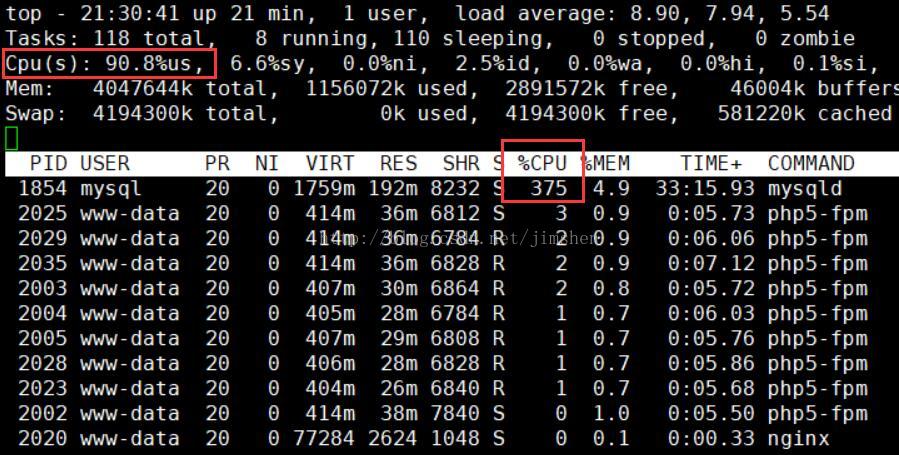
一、使用top命令看到的情况如下:

可以看到服务器负载很高,,mysql CPU使用已达到接近400%(因为是四核,所以会有超过100%的情况)。

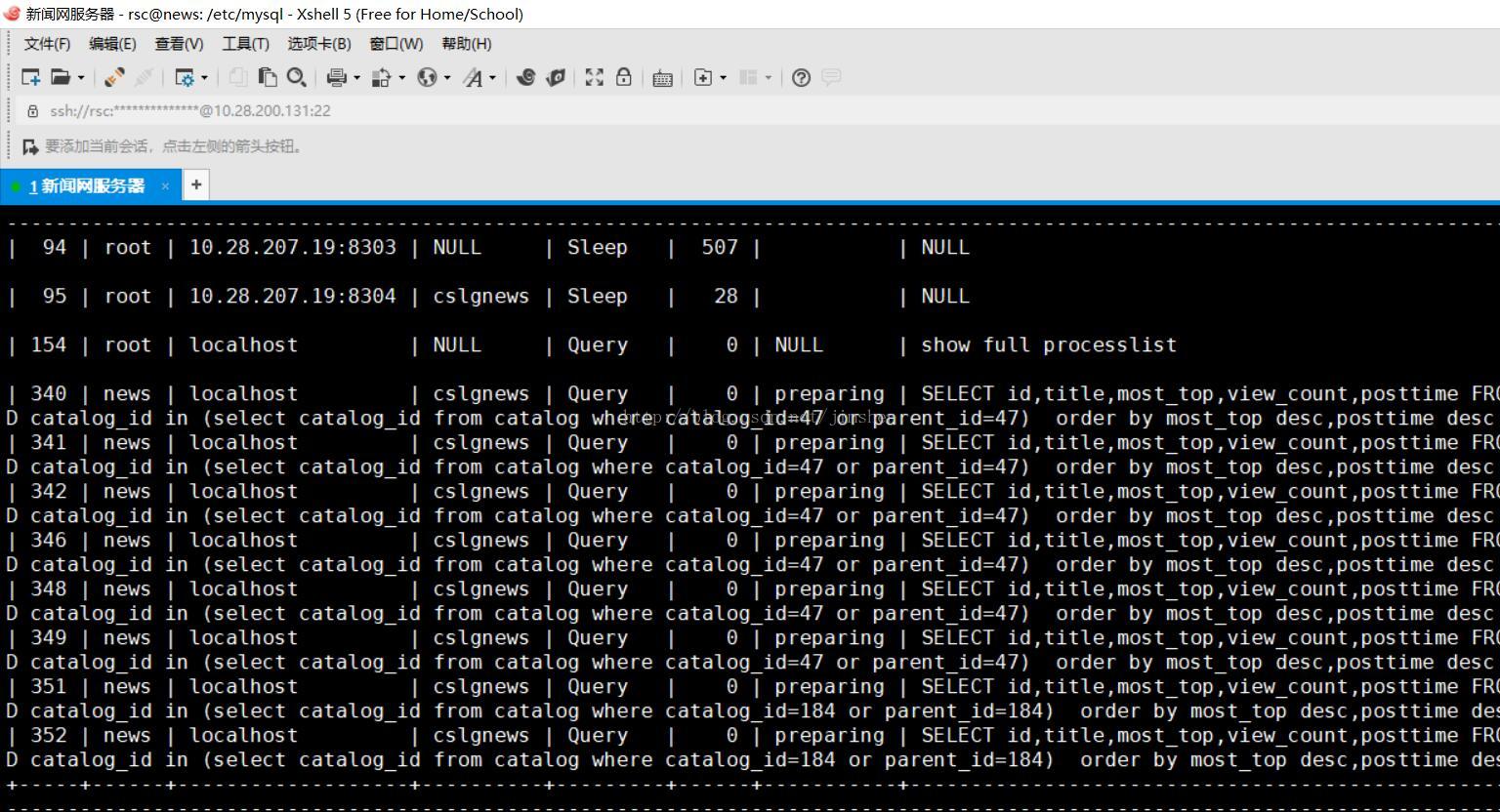
二、在服务器上执行mysql -u root -p之后,输入show full processlist; 可以看到正在执行的语句。

可以看到是下面的SQL语句执行耗费了较长时间。
SELECT id,title,most_top,view_count,posttime FROM article where status=3 AND catalog_id in (select catalog_id from catalog where catalog_id=17 or parent_id=17)  order by most_top desc,posttime desc limit 0,8
但是从数据库设计方面来说,该做的索引都已经做了,SQL语句似乎没有优化的空间。直接执行此条SQL,发现速度很慢,需要1-6秒的时间(跟mysql正在并发执行的查询有关,如果没有并发的,需要1秒多)。如果把排序依据改为一个,则查询时间可以缩短至0.01秒(most_top)或者0.001秒(posttime)。

三、修改mysql配置文件中的pool/buffer等数值,重启mysql都没有作用。

四、通过EXPLAIN分析SQL语句
EXPLAIN SELECT id,title,most_top,view_count,posttime FROM article where status=3 AND catalog_id in (select catalog_id from catalog where catalog_id=17 or parent_id=17)  order by most_top desc,posttime desc limit 0,8

可以看到,主select对27928条记录使用filesort进行了排序,这是造成查询速度慢的原因。然后8个并发的查询使CPU专用很高。
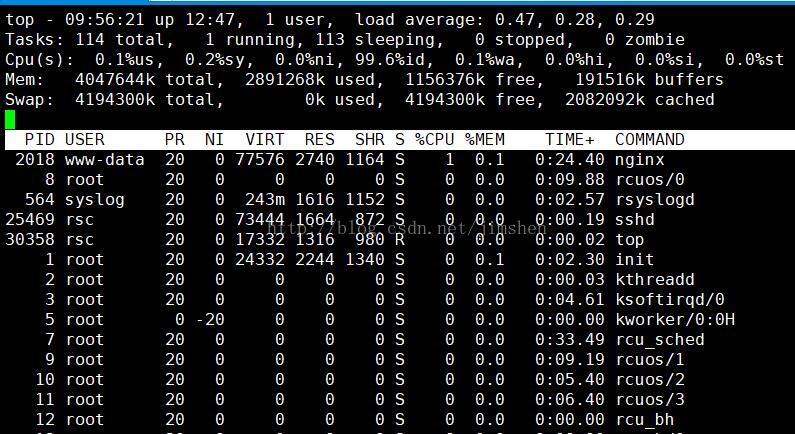
五、优化首先是缩减查询范围SELECT id,title,most_top,view_count,posttime FROM article where status=3 AND catalog_id in (select catalog_id from catalog where catalog_id=17 or parent_id=17)  and DATEDIFF(NOW(),posttime)<=90order by most_top desc,posttime desc limit 0,8发现有一定效果,但效果不明显,原因是每条记录都要做一次DATEDIFF运算。后改为SELECT id,title,most_top,view_count,posttime FROM article where status=3 AND catalog_id in (select catalog_id from catalog where catalog_id=17 or parent_id=17)  and postime>=’2017-09-05’order by most_top desc,posttime desc limit 0,8查询速度大幅提高。在PHP中,日期阈值通过计算得到$d = date(“Y-m-d”, strtotime(‘-90 day’));$sql = “SELECT id,title,most_top,view_count,posttime FROM article where status=3 AND catalog_id in (select catalog_id from catalog where catalog_id=17 or parent_id=17)  and postime>=’$d’order by most_top desc,posttime desc limit 0,8”
六、效果查询时间大幅度缩短,CPU负载很轻