基于java的网络抓包技术研究与实现

本实验是用java实现的网络抓包程序,在windows环境下安装winpcap4.0和jpcap6.0后,下载eclipse和jigloo插件(一种在eclipse底下作图形化开发的工具),将其安装好,然后就可以进行java的网络抓包图形化开发了。

二、原理与关键技术
2.1 网络抓包技术原理
网络层上有各种各样的数据包,它们以不同的帧格式在网络层上进行传输,但是在传输时它们都遵循相同的格式,即有相同的长度,如果一种协议的帧格式达不到这种长度,就让其补齐,以达到我们的要求。

2.2 网络抓包关键技术
无论是在windows操作系统下还是在linux操作系统下,要想捕获网络上的数据包,必须要对网卡进行控制,因为本机的数据报从网络上来到本机是通过网卡然后再保存到本地缓冲区上的,所以要抓获网包就必须调用网卡驱动中的对外函数,在linux系统中有net.h文件,可以调用net.h文件中的函数来操作网卡,可以直接编程实现,但为了更方便的使用,可以安装一个叫libpcap的软件,这样调用函数更好用,而在windows系统中,因为源代码不对外公开,所以要安装一个叫winpcap的软件,这样用C或VC++就可以实现了,但因为我用的是java语言来实现的,所以无论是在哪个系统都要安装一个叫jpcap的软件,它本身就把底层的函数又封装了一下,这样就可以让java来使用了。

三、设计与实现
3.1 基于java的设计方案
我的这个网络抓包程序是图形化操作界面,在菜单栏点击抓包按钮后选择网卡和过滤字还有最长字长,点击开始,然后就可以开始抓包了,在主界面中就会显示出一行又一行的数据,这些数据就是抓获到的数据包。

3.2 具体实现
1、安装winpcap4.0和jpcap6.0

2、下载eclipse3.3和jigloo,jigloo是eclipse底下的插件,是用来支持eclipse底下的java 图形化开发的。

3、编写java抓包程序:

建立三个文件,一个主程序,一个抓包程序,一个抓包选项程序对话框程序

第一个程序:主程序如下Java代码  

收藏代码
  1. package netcap;  
  2.   
  3. import java.awt.event.ActionEvent;  
  4.   
  5. import java.awt.event.ActionListener;  
  6.   
  7.    
  8.   
  9. import javax.swing.JSeparator;  
  10.   
  11. import javax.swing.JMenuItem;  
  12.   
  13. import javax.swing.JMenu;  
  14.   
  15. import javax.swing.JMenuBar;  
  16.   
  17.    
  18.   
  19. import java.awt.*;  
  20.   
  21. import java.awt.event.*;  
  22.   
  23. import javax.swing.*;  
  24.   
  25. import javax.swing.table.*;  
  26.   
  27. import netcap.*;  
  28.   
  29. import jpcap.*;  
  30.   
  31. import jpcap.packet.*;  
  32.   
  33. import java.util.*;  
  34.   
  35. import java.sql.Timestamp;  
  36.   
  37.    
  38.   
  39. /** 
  40.  
  41. * This code was edited or generated using CloudGarden’s Jigloo 
  42.  
  43. * SWT/Swing GUI Builder, which is free for non-commercial 
  44.  
  45. * use. If Jigloo is being used commercially (ie, by a corporation, 
  46.  
  47. * company or business for any purpose whatever) then you 
  48.  
  49. * should purchase a license for each developer using Jigloo. 
  50.  
  51. * Please visit www.cloudgarden.com for details. 
  52.  
  53. * Use of Jigloo implies acceptance of these licensing terms. 
  54.  
  55. * A COMMERCIAL LICENSE HAS NOT BEEN PURCHASED FOR 
  56.  
  57. * THIS MACHINE, SO JIGLOO OR THIS CODE CANNOT BE USED 
  58.  
  59. * LEGALLY FOR ANY CORPORATE OR COMMERCIAL PURPOSE. 
  60.  
  61. */  
  62.   
  63. public class JFrameMain extends javax.swing.JFrame implements ActionListener{  
  64.   
  65.    
  66.   
  67.        private JMenuItem exitMenuItem;  
  68.   
  69.        private JSeparator jSeparator2;  
  70.   
  71.        private JMenuItem saveAsMenuItem;  
  72.   
  73.        private JMenuItem saveMenuItem;  
  74.   
  75.        private JMenuItem stopMenuItem;  
  76.   
  77.        private JMenuItem startMenuItem;  
  78.   
  79.        private JMenu Menu;  
  80.   
  81.        private JMenuBar jMenuBar1;  
  82.   
  83.          
  84.   
  85.        JTable tabledisplay = null;  
  86.   
  87.        Vector rows,columns;  
  88.   
  89.        DefaultTableModel tabModel;  
  90.   
  91.        JScrollPane scrollPane;  
  92.   
  93.        JLabel statusLabel;  
  94.   
  95.          
  96.   
  97.        Netcaptor captor = new Netcaptor();  
  98.   
  99.    
  100.   
  101.        /** 
  102.  
  103.        * Auto-generated main method to display this JFrame 
  104.  
  105.        */  
  106.   
  107.        public static void main(String[] args) {  
  108.   
  109.               JFrameMain inst = new JFrameMain();  
  110.   
  111.               inst.setVisible(true);  
  112.   
  113.        }  
  114.   
  115.          
  116.   
  117.        public JFrameMain() {  
  118.   
  119.               super();  
  120.   
  121.               initGUI();  
  122.   
  123.        }  
  124.   
  125.          
  126.   
  127.        private void initGUI() {  
  128.   
  129.               try {  
  130.   
  131.                      setSize(400, 300);  
  132.   
  133.                      {  
  134.   
  135.                             jMenuBar1 = new JMenuBar();  
  136.   
  137.                             setJMenuBar(jMenuBar1);  
  138.   
  139.                             {  
  140.   
  141.                                    Menu = new JMenu();  
  142.   
  143.                                    jMenuBar1.add(Menu);  
  144.   
  145.                                    Menu.setText(“\u6293\u5305”);  
  146.   
  147.                                    Menu.setPreferredSize(new java.awt.Dimension(35, 21));  
  148.   
  149.                                    {  
  150.   
  151.                                           startMenuItem = new JMenuItem();  
  152.   
  153.                                           Menu.add(startMenuItem);  
  154.   
  155.                                           startMenuItem.setText(“开始”);  
  156.   
  157.                                           startMenuItem.setActionCommand(“start”);  
  158.   
  159.                                           startMenuItem.addActionListener(this);  
  160.   
  161.                                    }  
  162.   
  163.                                    {  
  164.   
  165.                                           stopMenuItem = new JMenuItem();  
  166.   
  167.                                           Menu.add(stopMenuItem);  
  168.   
  169.                                           stopMenuItem.setText(“停止”);  
  170.   
  171.                                           stopMenuItem.setActionCommand(“stop”);  
  172.   
  173.                                           stopMenuItem.addActionListener(this);  
  174.   
  175.                                    }  
  176.   
  177.                                    {  
  178.   
  179.                                           saveMenuItem = new JMenuItem();  
  180.   
  181.                                           Menu.add(saveMenuItem);  
  182.   
  183.                                           saveMenuItem.setText(“保存”);  
  184.   
  185.                                    }  
  186.   
  187.                                    {  
  188.   
  189.                                           saveAsMenuItem = new JMenuItem();  
  190.   
  191.                                           Menu.add(saveAsMenuItem);  
  192.   
  193.                                           saveAsMenuItem.setText(“保存为 …”);  
  194.   
  195.                                    }  
  196.   
  197.                                    {  
  198.   
  199.                                           jSeparator2 = new JSeparator();  
  200.   
  201.                                           Menu.add(jSeparator2);  
  202.   
  203.                                    }  
  204.   
  205.                                    {  
  206.   
  207.                                           exitMenuItem = new JMenuItem();  
  208.   
  209.                                           Menu.add(exitMenuItem);  
  210.   
  211.                                           exitMenuItem.setText(“Exit”);  
  212.   
  213.                                           exitMenuItem.setActionCommand(“exit”);  
  214.   
  215.                                           exitMenuItem.addActionListener(this);  
  216.   
  217.                                    }  
  218.   
  219.                             }  
  220.   
  221.                      }  
  222.   
  223.                        
  224.   
  225.                      rows=new Vector();  
  226.   
  227.                      columns= new Vector();  
  228.   
  229.                        
  230.   
  231.                      columns.addElement(“数据报时间”);  
  232.   
  233.                      columns.addElement(“源IP地址”);  
  234.   
  235.                      columns.addElement(“目的IP地址”);  
  236.   
  237.                      columns.addElement(“首部长度”);  
  238.   
  239.                      columns.addElement(“数据长度”);  
  240.   
  241.                      columns.addElement(“是否分段”);  
  242.   
  243.                      columns.addElement(“分段偏移量”);  
  244.   
  245.                      columns.addElement(“首部内容”);  
  246.   
  247.                      columns.addElement(“数据内容”);  
  248.   
  249.    
  250.   
  251.                        
  252.   
  253.                      tabModel=new DefaultTableModel();  
  254.   
  255.                      tabModel.setDataVector(rows,columns);  
  256.   
  257.                      tabledisplay = new JTable( tabModel );  
  258.   
  259.                      scrollPane= new JScrollPane(tabledisplay);  
  260.   
  261.                      this.getContentPane().add( new JScrollPane(tabledisplay),BorderLayout.CENTER);  
  262.   
  263.                        
  264.   
  265.                      statusLabel=new JLabel(“06610班 张琛雨 066100583”);  
  266.   
  267.                      this.getContentPane().add(statusLabel,BorderLayout.SOUTH);  
  268.   
  269.               } catch (Exception e) {  
  270.   
  271.                      e.printStackTrace();  
  272.   
  273.               }  
  274.   
  275.        }  
  276.   
  277.          
  278.   
  279.        public void actionPerformed(ActionEvent event){  
  280.   
  281.               String cmd=event.getActionCommand();  
  282.   
  283.                 
  284.   
  285.               if(cmd.equals(“start”)){  
  286.   
  287.                      captor.capturePacketsFromDevice();  
  288.   
  289.                      captor.setJFrame(this);  
  290.   
  291.               }  
  292.   
  293.               else if(cmd.equals(“stop”)){  
  294.   
  295.                      captor.stopCapture();  
  296.   
  297.               }  
  298.   
  299.               else if(cmd.equals(“exit”)){  
  300.   
  301.                      System.exit(0);  
  302.   
  303.               }  
  304.   
  305.        }  
  306.   
  307.    
  308.   
  309.        public void dealPacket( Packet packet )  
  310.   
  311.        {  
  312.   
  313.               try  
  314.   
  315.               {  
  316.   
  317.                      Vector r=new Vector();  
  318.   
  319.                      String strtmp;  
  320.   
  321.                      Timestamp timestamp = new Timestamp((packet.sec * 1000) + (packet.usec / 1000));   
  322.   
  323.                        
  324.   
  325.                      r.addElement( timestamp.toString() );  //数据报时间  
  326.   
  327.                      r.addElement(((IPPacket)packet).src_ip.toString());    //源IP地址  
  328.   
  329.                      r.addElement(((IPPacket)packet).dst_ip.toString());    //目的IP地址  
  330.   
  331.                      r.addElement( packet.header.length );   //首部长度  
  332.   
  333.                      r.addElement( packet.data.length );             //数据长度  
  334.   
  335.                      r.addElement( ((IPPacket)packet).dont_frag == true ? “分段” : “不分段” );                          //是否不分段  
  336.   
  337.                      r.addElement( ((IPPacket)packet).offset );          //数据长度  
  338.   
  339.          
  340.   
  341.                      strtmp = “”;  
  342.   
  343.                      for(int i=0;i<packet.header.length;i++){               
  344.   
  345.                             strtmp += Byte.toString(packet.header[i]);  
  346.   
  347.                      }  
  348.   
  349.                      r.addElement(strtmp);    //首部内容  
  350.   
  351.          
  352.   
  353.                      strtmp = “”;  
  354.   
  355.                      for(int i=0;i<packet.data.length;i++){            
  356.   
  357.                             strtmp += Byte.toString(packet.data[i]);  
  358.   
  359.                      }  
  360.   
  361.                      r.addElement(strtmp);    //数据内容  
  362.   
  363.                                                           
  364.   
  365.                      rows.addElement(r);  
  366.   
  367.                      tabledisplay.addNotify();  
  368.   
  369.               }  
  370.   
  371.               catch( Exception e)  
  372.   
  373.               {  
  374.   
  375.                        
  376.   
  377.               }  
  378.   
  379.        }  
  380.   
  381. }  
  382.   
  383. 在这里定义了一个向量r,当有数据包产生时,便将数据包赋值给r,rows.AddElement(r)语句便将r添加到向量rows中,然后tabledisplay.addNotify();语句就会刷新界面将新的数据包显示出来。  
  384.   
  385.    
  386.   
  387. 第二个程序:抓包  
  388.   
  389. package netcap;  
  390.   
  391.    
  392.   
  393. import java.io.File;  
  394.   
  395. import java.util.Vector;  
  396.   
  397.    
  398.   
  399. import javax.swing.JFileChooser;  
  400.   
  401. import javax.swing.JOptionPane;  
  402.   
  403.    
  404.   
  405. import jpcap.JpcapCaptor;  
  406.   
  407. import jpcap.PacketReceiver;  
  408.   
  409. import jpcap.JpcapWriter;  
  410.   
  411. import jpcap.packet.Packet;  
  412.   
  413.    
  414.   
  415. public class Netcaptor {  
  416.   
  417.    
  418.   
  419.        JpcapCaptor jpcap = null;  
  420.   
  421.        JFrameMain frame;  
  422.   
  423.          
  424.   
  425.        public void setJFrame(JFrameMain frame){  
  426.   
  427.               this.frame=frame;  
  428.   
  429.        }  
  430.   
  431.          
  432.   
  433.        public void capturePacketsFromDevice() {  
  434.   
  435.    
  436.   
  437.               if(jpcap!=null)  
  438.   
  439.                      jpcap.close();  
  440.   
  441.                        
  442.   
  443.               jpcap = Jcapturedialog.getJpcap(frame);  
  444.   
  445.                 
  446.   
  447.               if (jpcap != null) {  
  448.   
  449.                      startCaptureThread();  
  450.   
  451.               }  
  452.   
  453.    
  454.   
  455.        }  
  456.   
  457.          
  458.   
  459.        private Thread captureThread;  
  460.   
  461.          
  462.   
  463.        private void startCaptureThread(){  
  464.   
  465.                 
  466.   
  467.               if(captureThread != null)  
  468.   
  469.                      return;  
  470.   
  471.               captureThread = new Thread(new Runnable(){  
  472.   
  473.                      public void run(){  
  474.   
  475.                             while(captureThread != null){  
  476.   
  477.                                    jpcap.processPacket(1, handler);  
  478.   
  479.                             }  
  480.   
  481.                      }  
  482.   
  483.               });  
  484.   
  485.               captureThread.setPriority(Thread.MIN_PRIORITY);  
  486.   
  487.               captureThread.start();  
  488.   
  489.        }  
  490.   
  491.          
  492.   
  493.        void stopcaptureThread(){  
  494.   
  495.               captureThread = null;  
  496.   
  497.        }  
  498.   
  499.          
  500.   
  501.        public void stopCapture(){  
  502.   
  503.               System.out.println(2);  
  504.   
  505.               stopcaptureThread();  
  506.   
  507.        }  
  508.   
  509.          
  510.   
  511.        private PacketReceiver handler=new PacketReceiver(){  
  512.   
  513.               public void receivePacket(Packet packet) {  
  514.   
  515.                      //System.out.println(packet);  
  516.   
  517.                      frame.dealPacket(packet);  
  518.   
  519.               }  
  520.   
  521.                 
  522.   
  523.        };  
  524.   
  525. }  

定义一个抓包对象JpcapCaptor jpcap = null;但点击开始时调用private void startCaptureThread()方法开始抓包,jpcap.processPacket(1, handler);语句能够反复调用handler所指向的方法,这个方法中定义的packet就是网络上抓到的数据包,经过frame.dealPacket(packet);就可以显示在主界面上。

程序三:抓包选项Java代码  

收藏代码
  1. package netcap;  
  2.   
  3.    
  4.   
  5. import javax.swing.JFrame;  
  6.   
  7. import jpcap.*;  
  8.   
  9. import java.awt.*;  
  10.   
  11. import java.awt.event.*;  
  12.   
  13. import javax.swing.*;  
  14.   
  15.    
  16.   
  17.    
  18.   
  19. /** 
  20.  
  21. * This code was edited or generated using CloudGarden’s Jigloo 
  22.  
  23. * SWT/Swing GUI Builder, which is free for non-commercial 
  24.  
  25. * use. If Jigloo is being used commercially (ie, by a corporation, 
  26.  
  27. * company or business for any purpose whatever) then you 
  28.  
  29. * should purchase a license for each developer using Jigloo. 
  30.  
  31. * Please visit www.cloudgarden.com for details. 
  32.  
  33. * Use of Jigloo implies acceptance of these licensing terms. 
  34.  
  35. * A COMMERCIAL LICENSE HAS NOT BEEN PURCHASED FOR 
  36.  
  37. * THIS MACHINE, SO JIGLOO OR THIS CODE CANNOT BE USED 
  38.  
  39. * LEGALLY FOR ANY CORPORATE OR COMMERCIAL PURPOSE. 
  40.  
  41. */  
  42.   
  43. public class Jcapturedialog extends javax.swing.JDialog implements ActionListener {  
  44.   
  45.    
  46.   
  47.        /** 
  48.  
  49.        * Auto-generated main method to display this JDialog 
  50.  
  51.        */  
  52.   
  53.        static JpcapCaptor jpcap=null;  
  54.   
  55.        private JRadioButton wholeRadioButton;  
  56.   
  57.        private JPanel buttonPanel;  
  58.   
  59.        private JButton cancelButton;  
  60.   
  61.        private JButton okButton;  
  62.   
  63.        private JRadioButton userRadioButton;  
  64.   
  65.        private JRadioButton headRadioButton;  
  66.   
  67.        private JPanel netPanel;  
  68.   
  69.        private JTextField caplenTextField;  
  70.   
  71.        private JPanel caplenPanel;  
  72.   
  73.        private JTextField TextField;  
  74.   
  75.        private JPanel filterPanel;  
  76.   
  77.        private JCheckBox CheckBox;  
  78.   
  79.        private JComboBox netJComboBox;  
  80.   
  81.        private JPanel jPanel_east;  
  82.   
  83.        private JPanel jPanel_west;  
  84.   
  85.    
  86.   
  87.        NetworkInterface[] devices;  
  88.   
  89.          
  90.   
  91.        public static void main(String[] args) {  
  92.   
  93.               JFrame frame = new JFrame();  
  94.   
  95.               Jcapturedialog inst = new Jcapturedialog(frame);  
  96.   
  97.               inst.setVisible(true);  
  98.   
  99.        }  
  100.   
  101.          
  102.   
  103.        public Jcapturedialog(JFrame frame) {  
  104.   
  105.               super(frame,”选择要检测的网卡并设置参数”,true);  
  106.   
  107.    
  108.   
  109.               try {  
  110.   
  111.                      BoxLayout thisLayout = new BoxLayout(  
  112.   
  113.                             getContentPane(),  
  114.   
  115.                             javax.swing.BoxLayout.X_AXIS);  
  116.   
  117.                      getContentPane().setLayout(thisLayout);  
  118.   
  119.                      {  
  120.   
  121.                             jPanel_west = new JPanel();  
  122.   
  123.                             jPanel_west.setLayout(new BoxLayout(jPanel_west,BoxLayout.Y_AXIS));  
  124.   
  125.                             getContentPane().add(jPanel_west);  
  126.   
  127.                             {  
  128.   
  129.                                    netPanel = new JPanel();  
  130.   
  131.                                    FlowLayout netPanelLayout = new FlowLayout();  
  132.   
  133.                                    netPanelLayout.setAlignOnBaseline(true);  
  134.   
  135.                                    netPanel.setBorder(BorderFactory.createTitledBorder(“选择网卡”));  
  136.   
  137.                                    netPanel.setAlignmentX(Component.LEFT_ALIGNMENT);  
  138.   
  139.                                    jPanel_west.add(netPanel);  
  140.   
  141.                                    netPanel.setLayout(netPanelLayout);  
  142.   
  143. //                                 netPanel.setPreferredSize(new java.awt.Dimension(239, 56));  
  144.   
  145.                                    {  
  146.   
  147.                                           devices = JpcapCaptor.getDeviceList();  
  148.   
  149.                                           if(devices == null){  
  150.   
  151.                                                  JOptionPane.showMessageDialog(frame, “没有找到网卡”);  
  152.   
  153.                                                  dispose();  
  154.   
  155.                                                  return;  
  156.   
  157.                                           }  
  158.   
  159.                                           else{  
  160.   
  161.                                                  String[] names = new String[devices.length];  
  162.   
  163.                                                  for(int i=0;i < names.length;i++){  
  164.   
  165.                                                         names[i] = (devices[i].description == null?devices[i].name:devices[i].description);  
  166.   
  167.                                                  }  
  168.   
  169.                                                  netJComboBox = new JComboBox(names);  
  170.   
  171.                                           }  
  172.   
  173.                                                  netPanel.add(netJComboBox);        
  174.   
  175.                                    }  
  176.   
  177.                             }  
  178.   
  179.                             {  
  180.   
  181.                                    CheckBox = new JCheckBox();  
  182.   
  183.                                    jPanel_west.add(CheckBox);  
  184.   
  185.                                    FlowLayout CheckBoxLayout = new FlowLayout();  
  186.   
  187.                                    CheckBoxLayout.setAlignOnBaseline(true);  
  188.   
  189.                                    CheckBox.setText(“\u662f\u5426\u8bbe\u7f6e\u4e3a\u6df7\u6742\u6a21\u5f0f”);  
  190.   
  191.                                    CheckBox.setLayout(null);  
  192.   
  193.                             }  
  194.   
  195.                             {  
  196.   
  197.                                    filterPanel = new JPanel();  
  198.   
  199.                                    filterPanel.setBorder(BorderFactory.createTitledBorder(“捕获过滤器”));  
  200.   
  201.                                    filterPanel.setAlignmentX(Component.LEFT_ALIGNMENT);  
  202.   
  203.                                    FlowLayout filterPanelLayout = new FlowLayout();  
  204.   
  205.                                    filterPanelLayout.setAlignment(FlowLayout.LEFT);  
  206.   
  207.                                    filterPanelLayout.setAlignOnBaseline(true);  
  208.   
  209.                                    jPanel_west.add(filterPanel);  
  210.   
  211.                                    filterPanel.setLayout(filterPanelLayout);  
  212.   
  213.                                    {  
  214.   
  215.                                           TextField = new JTextField(20);  
  216.   
  217.                                           filterPanel.add(TextField);  
  218.   
  219.                                    }  
  220.   
  221.                             }  
  222.   
  223.                      }  
  224.   
  225.                      {  
  226.   
  227.                             jPanel_east = new JPanel();  
  228.   
  229.                             jPanel_east.setLayout(new BoxLayout(jPanel_east,BoxLayout.Y_AXIS));  
  230.   
  231.                             getContentPane().add(jPanel_east);  
  232.   
  233.    
  234.   
  235.                             {  
  236.   
  237.                                    caplenPanel = new JPanel();  
  238.   
  239.                                    caplenPanel.setBorder(BorderFactory.createTitledBorder(“最长字长”));  
  240.   
  241.                                    caplenPanel.setAlignmentX(Component.LEFT_ALIGNMENT);  
  242.   
  243.                                    jPanel_east.add(caplenPanel);  
  244.   
  245.                                    caplenPanel.setLayout(new BoxLayout(caplenPanel,BoxLayout.Y_AXIS));  
  246.   
  247.    
  248.   
  249.                                    {  
  250.   
  251.                                           caplenTextField = new JTextField(20);  
  252.   
  253.                                           caplenPanel.add(caplenTextField);  
  254.   
  255.                                           caplenTextField.setText(“1514”);  
  256.   
  257.                                           caplenTextField.setEnabled(false);  
  258.   
  259.                                    }  
  260.   
  261.                                    {  
  262.   
  263.                                           wholeRadioButton = new JRadioButton();  
  264.   
  265.                                           FlowLayout userRadioButtonLayout = new FlowLayout();  
  266.   
  267.                                           userRadioButtonLayout.setAlignOnBaseline(true);  
  268.   
  269.                                           caplenPanel.add(wholeRadioButton);  
  270.   
  271.                                           wholeRadioButton.setText(“\u6574\u4e2a\u6570\u636e\u62a5”);  
  272.   
  273.                                           wholeRadioButton.setSelected(true);  
  274.   
  275.    
  276.   
  277.                                           wholeRadioButton.addActionListener(this);  
  278.   
  279.                                    }  
  280.   
  281.                                    {  
  282.   
  283.                                           headRadioButton = new JRadioButton();  
  284.   
  285.                                           caplenPanel.add(headRadioButton);  
  286.   
  287.                                           headRadioButton.setText(“\u4ec5\u9996\u90e8”);  
  288.   
  289.    
  290.   
  291.                                           headRadioButton.addActionListener(this);  
  292.   
  293.                                    }  
  294.   
  295.                                    {  
  296.   
  297.                                           userRadioButton = new JRadioButton();  
  298.   
  299.                                           caplenPanel.add(userRadioButton);  
  300.   
  301.                                           userRadioButton.setText(“\u5176\u4ed6\u90e8\u5206”);  
  302.   
  303.    
  304.   
  305.                                           userRadioButton.addActionListener(this);  
  306.   
  307.                                    }  
  308.   
  309.                                    ButtonGroup group=new ButtonGroup();  
  310.   
  311.                                    group.add(wholeRadioButton);  
  312.   
  313.                                    wholeRadioButton.setActionCommand(“Whole”);  
  314.   
  315.                                    group.add(headRadioButton);  
  316.   
  317.                                    headRadioButton.setActionCommand(“Head”);  
  318.   
  319.                                    group.add(userRadioButton);  
  320.   
  321.                                    userRadioButton.setActionCommand(“user”);  
  322.   
  323.                             }  
  324.   
  325.                             {  
  326.   
  327.                                    buttonPanel = new JPanel(new FlowLayout(FlowLayout.RIGHT));  
  328.   
  329. //                                 buttonPanel.setLayout(new BoxLayout(buttonPanel,BoxLayout.X_AXIS));  
  330.   
  331.                                    jPanel_east.add(buttonPanel);  
  332.   
  333.    
  334.   
  335.                                    {  
  336.   
  337.                                           okButton = new JButton();  
  338.   
  339.                                           buttonPanel.add(okButton);  
  340.   
  341.                                           FlowLayout cancelButtonLayout = new FlowLayout();  
  342.   
  343.                                           cancelButtonLayout.setAlignOnBaseline(true);  
  344.   
  345.                                           okButton.setText(“\u786e\u5b9a”);  
  346.   
  347.    
  348.   
  349.                                           okButton.setActionCommand(“ok”);  
  350.   
  351.                                           okButton.addActionListener(this);  
  352.   
  353.                                    }  
  354.   
  355.                                    {  
  356.   
  357.                                           cancelButton = new JButton();  
  358.   
  359.                                           buttonPanel.add(cancelButton);  
  360.   
  361.                                           cancelButton.setText(“\u53d6\u6d88”);  
  362.   
  363.    
  364.   
  365.                                           cancelButton.setActionCommand(“cancel”);  
  366.   
  367.                                           cancelButton.addActionListener(this);  
  368.   
  369.                                    }  
  370.   
  371. //                                 buttonPanel.setAlignmentX(Component.RIGHT_ALIGNMENT);  
  372.   
  373.                             }  
  374.   
  375.                      }  
  376.   
  377.                      getContentPane().setLayout(new BoxLayout(getContentPane(),BoxLayout.X_AXIS));  
  378.   
  379.    
  380.   
  381.                      getContentPane().add(jPanel_west);  
  382.   
  383.    
  384.   
  385.                      getContentPane().add(jPanel_east);  
  386.   
  387.    
  388.   
  389.                      pack();  
  390.   
  391.    
  392.   
  393.               } catch (Exception e) {  
  394.   
  395.                      e.printStackTrace();  
  396.   
  397.               }  
  398.   
  399.        }  
  400.   
  401.        public void actionPerformed(ActionEvent evt){  
  402.   
  403.               String cmd=evt.getActionCommand();  
  404.   
  405.                 
  406.   
  407.               if(cmd.equals(“Whole”)){  
  408.   
  409.                      caplenTextField.setText(“1514”);  
  410.   
  411.                      caplenTextField.setEnabled(false);  
  412.   
  413.               }else if(cmd.equals(“Head”)){  
  414.   
  415.                      caplenTextField.setText(“68”);  
  416.   
  417.                      caplenTextField.setEnabled(false);  
  418.   
  419.               }else if(cmd.equals(“user”)){  
  420.   
  421.                      caplenTextField.setText(“”);  
  422.   
  423.                      caplenTextField.setEnabled(true);  
  424.   
  425.                      caplenTextField.requestFocus();  
  426.   
  427.               }else if(cmd.equals(“ok”)){  
  428.   
  429.                      try{  
  430.   
  431.                             int caplen=Integer.parseInt(caplenTextField.getText());  
  432.   
  433.                             if(caplen<68 || caplen>1514){  
  434.   
  435.                                    JOptionPane.showMessageDialog(null,”捕获长度必须介于 68 和 1514之间”);  
  436.   
  437.                                    return;  
  438.   
  439.                             }  
  440.   
  441.                               
  442.   
  443.                             jpcap=JpcapCaptor.openDevice(devices[netJComboBox.getSelectedIndex()],caplen,  
  444.   
  445.                                           CheckBox.isSelected(),50);  
  446.   
  447.                               
  448.   
  449.                             if(TextField.getText()!=null && TextField.getText().length()>0){  
  450.   
  451.                                    jpcap.setFilter(TextField.getText(),true);  
  452.   
  453.                             }  
  454.   
  455.                      }catch(NumberFormatException e){  
  456.   
  457.                             JOptionPane.showMessageDialog(null,”捕获长度必须是正整数”);  
  458.   
  459.                      }catch(java.io.IOException e){  
  460.   
  461.                             JOptionPane.showMessageDialog(null,e.toString());  
  462.   
  463.                             jpcap=null;  
  464.   
  465.                      }finally{  
  466.   
  467.                             dispose();  
  468.   
  469.                      }  
  470.   
  471.                 
  472.   
  473.               }else if(cmd.equals(“cancel”)){  
  474.   
  475.                      dispose();  
  476.   
  477.               }  
  478.   
  479.        }  
  480.   
  481.          
  482.   
  483.        public static JpcapCaptor getJpcap(JFrame parent){  
  484.   
  485.               new Jcapturedialog(parent).setVisible(true);  
  486.   
  487.               return jpcap;  
  488.   
  489.        }  
  490.   
  491. }  

这一部分主要是界面操作,根据jigloo插件对不同的按钮和文本框还有其他的组件设置监听操作,以激发不同的函数操作,主要是devices = JpcapCaptor.getDeviceList();语句和

jpcap=JpcapCaptor.openDevice(devices[netJComboBox.getSelectedIndex()],caplen,

CheckBox.isSelected(),50);语句要选择一下监听的网卡,比如说笔记本就有两个网卡,一个无线一个有线,选择一下就会监听相应的网卡。函数

public static JpcapCaptor getJpcap(JFrame parent){

       new Jcapturedialog(parent).setVisible(true);

       return jpcap;

    }

返回jpcap,这个jpcap就是对应的选择上的网卡对象,接下来就从对应的网卡对象jpcap上不断得到数据包。
基于java的网络抓包方法(转)

一、实验内容描述
本实验是用java实现的网络抓包程序,在windows环境下安装winpcap4.0和jpcap6.0后,下载eclipse和jigloo插件(一种在eclipse底下作图形化开发的工具),将其安装好,然后就可以进行java的网络抓包图形化开发了。
二、原理与关键技术
2.1 网络抓包技术原理
网络层上有各种各样的数据包,它们以不同的帧格式在网络层上进行传输,但是在传输时它们都遵循相同的格式,即有相同的长度,如果一种协议的帧格式达不到这种长度,就让其补齐,以达到我们的要求。
2.2 网络抓包关键技术
无论是在windows操作系统下还是在linux操作系统下,要想捕获网络上的数据包,必须要对网卡进行控制,因为本机的数据报从网络上来到本机是通过网卡然后再保存到本地缓冲区上的,所以要抓获网包就必须调用网卡驱动中的对外函数,在linux系统中有net.h文件,可以调用net.h文件中的函数来操作网卡,可以直接编程实现,但为了更方便的使用,可以安装一个叫libpcap的软件,这样调用函数更好用,而在windows系统中,因为源代码不对外公开,所以要安装一个叫winpcap的软件,这样用C或VC++就可以实现了,但因为我用的是java语言来实现的,所以无论是在哪个系统都要安装一个叫jpcap的软件,它本身就把底层的函数又封装了一下,这样就可以让java来使用了。
三、设计与实现
3.1 基于java的设计方案
我的这个网络抓包程序是图形化操作界面,在菜单栏点击抓包按钮后选择网卡和过滤字还有最长字长,点击开始,然后就可以开始抓包了,在主界面中就会显示出一行又一行的数据,这些数据就是抓获到的数据包。
3.2 具体实现
1、安装winpcap4.0和jpcap6.0
2、下载eclipse3.3和jigloo,jigloo是eclipse底下的插件,是用来支持eclipse底下的java 图形化开发的。
3、编写java抓包程序:
建立三个文件,一个主程序,一个抓包程序,一个抓包选项程序对话框程序
第一个程序:主程序如下
package netcap;
import java.awt.event.ActionEvent;
import java.awt.event.ActionListener;
 
import javax.swing.JSeparator;
import javax.swing.JMenuItem;
import javax.swing.JMenu;
import javax.swing.JMenuBar;
 
import java.awt.*;
import java.awt.event.*;
import javax.swing.*;
import javax.swing.table.*;
import netcap.*;
import jpcap.*;
import jpcap.packet.*;
import java.util.*;
import java.sql.Timestamp;
 
/**
* This code was edited or generated using CloudGarden’s Jigloo
* SWT/Swing GUI Builder, which is free for non-commercial
* use. If Jigloo is being used commercially (ie, by a corporation,
* company or business for any purpose whatever) then you
* should purchase a license for each developer using Jigloo.
* Please visit www.cloudgarden.com for details.
* Use of Jigloo implies acceptance of these licensing terms.
* A COMMERCIAL LICENSE HAS NOT BEEN PURCHASED FOR
* THIS MACHINE, SO JIGLOO OR THIS CODE CANNOT BE USED
* LEGALLY FOR ANY CORPORATE OR COMMERCIAL PURPOSE.
*/
public class JFrameMain extends javax.swing.JFrame implements ActionListener{
 
       private JMenuItem exitMenuItem;
       private JSeparator jSeparator2;
       private JMenuItem saveAsMenuItem;
       private JMenuItem saveMenuItem;
       private JMenuItem stopMenuItem;
       private JMenuItem startMenuItem;
       private JMenu Menu;
       private JMenuBar jMenuBar1;
      
       JTable tabledisplay = null;
       Vector rows,columns;
       DefaultTableModel tabModel;
       JScrollPane scrollPane;
       JLabel statusLabel;
      
       Netcaptor captor = new Netcaptor();
 
       /**
       * Auto-generated main method to display this JFrame
       */
       public static void main(String[] args) {
              JFrameMain inst = new JFrameMain();
              inst.setVisible(true);
       }
      
       public JFrameMain() {
              super();
              initGUI();
       }
      
       private void initGUI() {
              try {
                     setSize(400, 300);
                     {
                            jMenuBar1 = new JMenuBar();
                            setJMenuBar(jMenuBar1);
                            {
                                   Menu = new JMenu();
                                   jMenuBar1.add(Menu);
                                   Menu.setText(“\抓\包”);
                                   Menu.setPreferredSize(new java.awt.Dimension(35, 21));
                                   {
                                          startMenuItem = new JMenuItem();
                                          Menu.add(startMenuItem);
                                          startMenuItem.setText(“开始”);
                                          startMenuItem.setActionCommand(“start”);
                                          startMenuItem.addActionListener(this);
                                   }
                                   {
                                          stopMenuItem = new JMenuItem();
                                          Menu.add(stopMenuItem);
                                          stopMenuItem.setText(“停止”);
                                          stopMenuItem.setActionCommand(“stop”);
                                          stopMenuItem.addActionListener(this);
                                   }
                                   {
                                          saveMenuItem = new JMenuItem();
                                          Menu.add(saveMenuItem);
                                          saveMenuItem.setText(“保存”);
                                   }
                                   {
                                          saveAsMenuItem = new JMenuItem();
                                          Menu.add(saveAsMenuItem);
                                          saveAsMenuItem.setText(“保存为 …”);
                                   }
                                   {
                                          jSeparator2 = new JSeparator();
                                          Menu.add(jSeparator2);
                                   }
                                   {
                                          exitMenuItem = new JMenuItem();
                                          Menu.add(exitMenuItem);
                                          exitMenuItem.setText(“Exit”);
                                          exitMenuItem.setActionCommand(“exit”);
                                          exitMenuItem.addActionListener(this);
                                   }
                            }
                     }
                    
                     rows=new Vector();
                     columns= new Vector();
                    
                     columns.addElement(“数据报时间”);
                     columns.addElement(“源IP地址”);
                     columns.addElement(“目的IP地址”);
                     columns.addElement(“首部长度”);
                     columns.addElement(“数据长度”);
                     columns.addElement(“是否分段”);
                     columns.addElement(“分段偏移量”);
                     columns.addElement(“首部内容”);
                     columns.addElement(“数据内容”);
 
                    
                     tabModel=new DefaultTableModel();
                     tabModel.setDataVector(rows,columns);
                     tabledisplay = new JTable( tabModel );
                     scrollPane= new JScrollPane(tabledisplay);
                     this.getContentPane().add( new JScrollPane(tabledisplay),BorderLayout.CENTER);
                    
                     statusLabel=new JLabel(“06610班 张琛雨 066100583”);
                     this.getContentPane().add(statusLabel,BorderLayout.SOUTH);
              } catch (Exception e) {
                     e.printStackTrace();
              }
       }
      
       public void actionPerformed(ActionEvent event){
              String cmd=event.getActionCommand();
             
              if(cmd.equals(“start”)){
                     captor.capturePacketsFromDevice();
                     captor.setJFrame(this);
              }
              else if(cmd.equals(“stop”)){
                     captor.stopCapture();
              }
              else if(cmd.equals(“exit”)){
                     System.exit(0);
              }
       }
 
       public void dealPacket( Packet packet )
       {
              try
              {
                     Vector r=new Vector();
                     String strtmp;
                     Timestamp timestamp = new Timestamp((packet.sec * 1000) + (packet.usec / 1000));
                    
                     r.addElement( timestamp.toString() ); //数据报时间
                     r.addElement(((IPPacket)packet).src_ip.toString());    //源IP地址
                     r.addElement(((IPPacket)packet).dst_ip.toString());    //目的IP地址
                     r.addElement( packet.header.length );   //首部长度
                     r.addElement( packet.data.length );             //数据长度
                     r.addElement( ((IPPacket)packet).dont_frag == true ? “分段” : “不分段” );                          //是否不分段
                     r.addElement( ((IPPacket)packet).offset );          //数据长度
      
                     strtmp = “”;
                     for(int i=0;i<packet.header.length;i++){            
                            strtmp += Byte.toString(packet.header[i]);
                     }
                     r.addElement(strtmp);    //首部内容
      
                     strtmp = “”;
                     for(int i=0;i<packet.data.length;i++){         
                            strtmp += Byte.toString(packet.data[i]);
                     }
                     r.addElement(strtmp);    //数据内容
                                                       
                     rows.addElement(r);
                     tabledisplay.addNotify();
              }
              catch( Exception e)
              {
                    
              }
       }
}
在这里定义了一个向量r,当有数据包产生时,便将数据包赋值给r,rows.AddElement(r)语句便将r添加到向量rows中,然后tabledisplay.addNotify();语句就会刷新界面将新的数据包显示出来。
 
第二个程序:抓包
package netcap;
 
import java.io.File;
import java.util.Vector;
 
import javax.swing.JFileChooser;
import javax.swing.JOptionPane;
 
import jpcap.JpcapCaptor;
import jpcap.PacketReceiver;
import jpcap.JpcapWriter;
import jpcap.packet.Packet;
 
public class Netcaptor {
 
       JpcapCaptor jpcap = null;
       JFrameMain frame;
      
       public void setJFrame(JFrameMain frame){
              this.frame=frame;
       }
      
       public void capturePacketsFromDevice() {
 
              if(jpcap!=null)
                     jpcap.close();
                    
              jpcap = Jcapturedialog.getJpcap(frame);
             
              if (jpcap != null) {
                     startCaptureThread();
              }
 
       }
      
       private Thread captureThread;
      
       private void startCaptureThread(){
             
              if(captureThread != null)
                     return;
              captureThread = new Thread(new Runnable(){
                     public void run(){
                            while(captureThread != null){
                                   jpcap.processPacket(1, handler);
                            }
                     }
              });
              captureThread.setPriority(Thread.MIN_PRIORITY);
              captureThread.start();
       }
      
       void stopcaptureThread(){
              captureThread = null;
       }
      
       public void stopCapture(){
              System.out.println(2);
              stopcaptureThread();
       }
      
       private PacketReceiver handler=new PacketReceiver(){
              public void receivePacket(Packet packet) {
                     //System.out.println(packet);
                     frame.dealPacket(packet);
              }
             
       };
}
定义一个抓包对象JpcapCaptor jpcap = null;但点击开始时调用private void startCaptureThread()方法开始抓包,jpcap.processPacket(1, handler);语句能够反复调用handler所指向的方法,这个方法中定义的packet就是网络上抓到的数据包,经过frame.dealPacket(packet);就可以显示在主界面上。
程序三:抓包选项
package netcap;
 
import javax.swing.JFrame;
import jpcap.*;
import java.awt.*;
import java.awt.event.*;
import javax.swing.*;
 
 
/**
* This code was edited or generated using CloudGarden’s Jigloo
* SWT/Swing GUI Builder, which is free for non-commercial
* use. If Jigloo is being used commercially (ie, by a corporation,
* company or business for any purpose whatever) then you
* should purchase a license for each developer using Jigloo.
* Please visit www.cloudgarden.com for details.
* Use of Jigloo implies acceptance of these licensing terms.
* A COMMERCIAL LICENSE HAS NOT BEEN PURCHASED FOR
* THIS MACHINE, SO JIGLOO OR THIS CODE CANNOT BE USED
* LEGALLY FOR ANY CORPORATE OR COMMERCIAL PURPOSE.
*/
public class Jcapturedialog extends javax.swing.JDialog implements ActionListener {
 
       /**
       * Auto-generated main method to display this JDialog
       */
       static JpcapCaptor jpcap=null;
       private JRadioButton wholeRadioButton;
       private JPanel buttonPanel;
       private JButton cancelButton;
       private JButton okButton;
       private JRadioButton userRadioButton;
       private JRadioButton headRadioButton;
       private JPanel netPanel;
       private JTextField caplenTextField;
       private JPanel caplenPanel;
       private JTextField TextField;
       private JPanel filterPanel;
       private JCheckBox CheckBox;
       private JComboBox netJComboBox;
       private JPanel jPanel_east;
       private JPanel jPanel_west;
 
       NetworkInterface[] devices;
      
       public static void main(String[] args) {
              JFrame frame = new JFrame();
              Jcapturedialog inst = new Jcapturedialog(frame);
              inst.setVisible(true);
       }
      
       public Jcapturedialog(JFrame frame) {
              super(frame,”选择要检测的网卡并设置参数”,true);
 
              try {
                     BoxLayout thisLayout = new BoxLayout(
                            getContentPane(),
                            javax.swing.BoxLayout.X_AXIS);
                     getContentPane().setLayout(thisLayout);
                     {
                            jPanel_west = new JPanel();
                            jPanel_west.setLayout(new BoxLayout(jPanel_west,BoxLayout.Y_AXIS));
                            getContentPane().add(jPanel_west);
                            {
                                   netPanel = new JPanel();
                                   FlowLayout netPanelLayout = new FlowLayout();
                                   netPanelLayout.setAlignOnBaseline(true);
                                   netPanel.setBorder(BorderFactory.createTitledBorder(“选择网卡”));
                                   netPanel.setAlignmentX(Component.LEFT_ALIGNMENT);
                                   jPanel_west.add(netPanel);
                                   netPanel.setLayout(netPanelLayout);
//                                 netPanel.setPreferredSize(new java.awt.Dimension(239, 56));
                                   {
                                          devices = JpcapCaptor.getDeviceList();
                                          if(devices == null){
                                                 JOptionPane.showMessageDialog(frame, “没有找到网卡”);
                                                 dispose();
                                                 return;
                                          }
                                          else{
                                                 String[] names = new String[devices.length];
                                                 for(int i=0;i < names.length;i++){
                                                        names[i] = (devices[i].description == null?devices[i].name:devices[i].description);
                                                 }
                                                 netJComboBox = new JComboBox(names);
                                          }
                                                 netPanel.add(netJComboBox);     
                                   }
                            }
                            {
                                   CheckBox = new JCheckBox();
                                   jPanel_west.add(CheckBox);
                                   FlowLayout CheckBoxLayout = new FlowLayout();
                                   CheckBoxLayout.setAlignOnBaseline(true);
                                   CheckBox.setText(“\是\否\设\置\为\混\杂\模\式”);
                                   CheckBox.setLayout(null);
                            }
                            {
                                   filterPanel = new JPanel();
                                   filterPanel.setBorder(BorderFactory.createTitledBorder(“捕获过滤器”));
                                   filterPanel.setAlignmentX(Component.LEFT_ALIGNMENT);
                                   FlowLayout filterPanelLayout = new FlowLayout();
                                   filterPanelLayout.setAlignment(FlowLayout.LEFT);
                                   filterPanelLayout.setAlignOnBaseline(true);
                                   jPanel_west.add(filterPanel);
                                   filterPanel.setLayout(filterPanelLayout);
                                   {
                                          TextField = new JTextField(20

Java程序通过代理访问网络

问题背景

最近工作上有开发爬虫的任务,对目标网站数据进行抓取,由于大部分网站都在国外,无法直接访问,需要通过代理才能登录。爬虫部署的服务器在香港,所以爬虫部署到服务器后,是可以访问目标网站的,但本地开发调试程序时,需要通过代理才能访问。
这篇文章就带大家了解一下如何在Java程序中使用代理访问网络。

解决方案

  • 你需要一个代理服务器,和一个可以连接到此服务器的客户端。
    花点银子买一个稳定的账号,或者自己搭建一个。
    这里我使用自己搭建的 Shadowsocks 代理服务器,使用 Shadowsocks-Windows 作为本地代理的客户端,并开启默认的 1080 端口,以供本地其他程序通过代理访问网络。
  • 指定 Java 程序的代理服务器地址和端口
    有两种指定方式:
    1. 通过 命令行参数 指定
      如果只需要考虑代理 HTTP 协议请求,只需添加如下命令行参数:
    -Dhttp.proxyHost=127.0.0.1 -Dhttp.proxyPort=1080 想要 HTTP 和 HTTPS 协议的请求都通过代理访问网络,可以追加上:-Dhttps.proxyHost=127.0.0.1 -Dhttps.proxyPort=1080 最终填写的值为: -Dhttp.proxyHost=127.0.0.1 -Dhttp.proxyPort=1080 -Dhttps.proxyHost=127.0.0.1 -Dhttps.proxyPort=1080
    1. 在程序中使用System.setProperty(String, String)
      同样很简单,这里直接上代码:
    String proxyHost = "127.0.0.1"; String proxyPort = "1080"; System.setProperty("http.proxyHost", proxyHost); System.setProperty("http.proxyPort", proxyPort); // 对https也开启代理 System.setProperty("https.proxyHost", proxyHost); System.setProperty("https.proxyPort", proxyPort);

推荐使用第一种方案,通过VM Option 的方式,对代码没有任何侵入,绿色环保。

测试

这里我在Eclipse中使用第一种方法进行测试。

  • 测试代码

import java.io.IOException; import java.io.InputStream; import java.net.URL; import java.net.URLConnection; public class Test { public static void main(String[] args) throws IOException { URL url = new URL(“https://google.com”); URLConnection connection = url.openConnection(); connection.connect(); InputStream inputStream = connection.getInputStream(); byte[] bytes = new byte[1024]; while (inputStream.read(bytes) >= 0) { System.out.println(new String(bytes)); } } }

  • 测试结果,可以正常访问Google等网站。

总结

除了上述 http.proxyHost 和 http.proxyPort,以及 https.proxyHost 和 https.proxyPort 在代理时比较有用外,还有一个属性也比较有用,那就是 http.nonProxyHosts,它用来指定哪些主机不使用代理,如果有多个,用英文竖线(|)分隔,可以使用星号 (*)作为通配符。
下表是常用协议对应的代理属性:

协议属性(代理主机/代理端口/不使用代理的主机列表)默认值
HTTPhttp.proxyHost<none>
http.proxyPort80
http.nonProxyHosts<none>
HTTPShttps.proxyHost<none>
https.proxyPort443
https.nonProxyHosts<none>
FTPftp.proxyHost<none>
ftp.proxyPort80
ftp.nonProxyHosts<none>
SOCKSsocksProxyHost<none>
socksProxyPort1080

详细介绍请参考官方说明:Java Networking and Proxies

原文链接http://xueliang.org/article/detail/20170116145848852

Android 通过代码设置、打开wifi热点及热点连接的实现代码

Android 通过代码设置、打开wifi热点及热点连接的实现代码_Android_脚本之家 这篇文章主要介绍了Android 通过代码设置、打开wifi热点及热点连接的实现代码,本文通过实例代码给大家介绍的非常详细,需要的朋友可以参考下

用过快牙的朋友应该知道它们在两天设备之间传输文件的时候使用的是wifi热点,然后另一台便连接这个热点再进行传输。快牙传输速度惊人应该跟它的这种机制有关系吧。不知道它的搜索机制是怎样的,但我想应该可以通过热点的名字来进行判断吧。下面我们就来探讨一下如何自动创建一个wifi热点吧大笑

  创建wifi热点首先需要手机支持,建议开发的哥们整个好点的手机,我们公司那些个山寨设备,几近有一半是不支持热点的;其实创建热点很简单,先获取到wifi的服务,再配置热点名称、密码等等,然后再通过反射打开它就OK了。

  下面我们看看创建热点的代码实现:?

package com.tel.lajoin.wifi.hotspot;
import java.lang.reflect.Method;
import android.app.Activity;
import android.content.Context;
import android.net.wifi.WifiConfiguration;
import android.net.wifi.WifiManager;
import android.os.Bundle;
import android.view.View;
import android.widget.Button;
public class HotspotActivity extends Activity {
private WifiManager wifiManager;
private Button open;
private boolean flag=false;
@Override
protected void onCreate(Bundle savedInstanceState) {
// TODO Auto-generated method stub
super.onCreate(savedInstanceState);
setContentView(R.layout.main);
//获取wifi管理服务
wifiManager = (WifiManager) getSystemService(Context.WIFI_SERVICE);
open=(Button)findViewById(R.id.open_hotspot);
//通过按钮事件设置热点
open.setOnClickListener(new View.OnClickListener() {
@Override
public void onClick(View v) {
//如果是打开状态就关闭,如果是关闭就打开
flag=!flag;
setWifiApEnabled(flag);
}
});
}
// wifi热点开关
public boolean setWifiApEnabled(boolean enabled) {
if (enabled) { // disable WiFi in any case
//wifi和热点不能同时打开,所以打开热点的时候需要关闭wifi
wifiManager.setWifiEnabled(false);
}
try {
//热点的配置类
WifiConfiguration apConfig = new WifiConfiguration();
//配置热点的名称(可以在名字后面加点随机数什么的)
apConfig.SSID = “YRCCONNECTION”;
//配置热点的密码
apConfig.preSharedKey=”12122112″;
//通过反射调用设置热点
Method method = wifiManager.getClass().getMethod(
“setWifiApEnabled”, WifiConfiguration.class, Boolean.TYPE);
//返回热点打开状态
return (Boolean) method.invoke(wifiManager, apConfig, enabled);
} catch (Exception e) {
return false;
}
}
}

  布局就不写了吧,就一按钮,人人都知道的东西,写了也没啥意思。要实现文件传输,当然我们还需要写一个连接热点的客户端吧。连接热点的流程首先是搜索热点然后再判断热点是否符合规则然后再进行连接。?

package com.tel.lajoin.wifiscan;
import java.util.ArrayList;
import java.util.List;
import android.app.Activity;
import android.content.BroadcastReceiver;
import android.content.Context;
import android.content.Intent;
import android.content.IntentFilter;
import android.net.wifi.ScanResult;
import android.net.wifi.WifiConfiguration;
import android.net.wifi.WifiManager;
import android.os.Bundle;
public class MainActivity extends Activity {
private List wifiList;
private WifiManager wifiManager;
private List passableHotsPot;
private WifiReceiver wifiReceiver;
private boolean isConnected=false;
private Button connect;
@Override
public void onCreate(Bundle savedInstanceState) {
super.onCreate(savedInstanceState);
init();
}
/* 初始化参数 / public void init() { setContentView(R.layout.main); connect=(Button)findViewById(R.id.connect); wifiManager = (WifiManager) getSystemService(Context.WIFI_SERVICE); wifiReceiver = new WifiReceiver(); //通过按钮事件搜索热点 connect.setOnClickListener(new View.OnClickListener() { @Override public void onClick(View v) { wifiManager.startScan(); } }); } / 监听热点变化 / private final class WifiReceiver extends BroadcastReceiver { @Override public void onReceive(Context context, Intent intent) { wifiList = wifiManager.getScanResults(); if (wifiList == null || wifiList.size() == 0 || isConnected) return; onReceiveNewNetworks(wifiList); } } /当搜索到新的wifi热点时判断该热点是否符合规格/ public void onReceiveNewNetworks(List wifiList){ passableHotsPot=new ArrayList(); for(ScanResult result:wifiList){ System.out.println(result.SSID); if((result.SSID).contains(“YRCCONNECTION”)) passableHotsPot.add(result.SSID); } synchronized (this) { connectToHotpot(); } } /连接到热点/ public void connectToHotpot(){ if(passableHotsPot==null || passableHotsPot.size()==0) return; WifiConfiguration wifiConfig=this.setWifiParams(passableHotsPot.get(0)); int wcgID = wifiManager.addNetwork(wifiConfig); boolean flag=wifiManager.enableNetwork(wcgID, true); isConnected=flag; System.out.println(“connect success? “+flag); } /设置要连接的热点的参数/ public WifiConfiguration setWifiParams(String ssid){ WifiConfiguration apConfig=new WifiConfiguration(); apConfig.SSID=”\””+ssid+”\””; apConfig.preSharedKey=”\”12122112\””; apConfig.hiddenSSID = true; apConfig.status = WifiConfiguration.Status.ENABLED; apConfig.allowedGroupCiphers.set(WifiConfiguration.GroupCipher.TKIP); apConfig.allowedGroupCiphers.set(WifiConfiguration.GroupCipher.CCMP); apConfig.allowedKeyManagement.set(WifiConfiguration.KeyMgmt.WPA_PSK); apConfig.allowedPairwiseCiphers.set(WifiConfiguration.PairwiseCipher.TKIP); apConfig.allowedPairwiseCiphers.set(WifiConfiguration.PairwiseCipher.CCMP); apConfig.allowedProtocols.set(WifiConfiguration.Protocol.RSN); return apConfig; } @Override protected void onDestroy() { super.onDestroy(); /销毁时注销广播*/
unregisterReceiver(wifiReceiver);
}
}

   代码很简单,而且都有注释的,相信大伙儿能够看明白。  那就这样吧,至于文件传输建议还是去看看socket相关的文章吧。

总结

以上所述是小编给大家介绍的Android 通过代码设置、打开wifi热点及热点的连接的实现代码,希望对大家有所帮助,如果大家有任何疑问请给我留言,小编会及时回复大家的。在此也非常感谢大家对脚本之家网站的支持!

Java十大常用框架介绍

转载:https://www.toutiao.com/a6591434508417892871/?tt_from=copy_link&utm_campaign=client_share&timestamp=1535816836&app=news_article&utm_source=copy_link&iid=42275378268&utm_medium=toutiao_ios&group_id=6591434508417892871

一、SpringMVC

Spring Web MVC是一种基于Java的实现了Web MVC设计模式的请求驱动类型的轻量级Web框架,即使用了MVC架构模式的思想,将web层进行职责解耦,基于请求驱动指的就是使用请求-响应模型,框架的目的就是帮助我们简化开发,Spring Web MVC也是要简化我们日常Web开发的。

模型(Model )封装了应用程序的数据和一般他们会组成的POJO。

视图(View)是负责呈现模型数据和一般它生成的HTML输出,客户端的浏览器能够解释。

控制器(Controller )负责处理用户的请求,并建立适当的模型,并把它传递给视图渲染。

Spring的web模型 – 视图 – 控制器(MVC)框架是围绕着处理所有的HTTP请求和响应的DispatcherServlet的设计。

Spring Web MVC处理请求的流程

Java十大常用框架介绍(spring系+dubbo+RabbitMQ+Ehcache+redis)

具体执行步骤如下

1、 首先用户发送请求————>前端控制器,前端控制器根据请求信息(如URL)来决定选择哪一个页面控制器进行处理并把请求委托给它,即以前的控制器的控制逻辑部分;图2-1中的1、2步骤;

2、 页面控制器接收到请求后,进行功能处理,首先需要收集和绑定请求参数到一个对象,这个对象在Spring Web MVC中叫命令对象,并进行验证,然后将命令对象委托给业务对象进行处理;处理完毕后返回一个ModelAndView(模型数据和逻辑视图名);图2-1中的3、4、5步骤;

3、 前端控制器收回控制权,然后根据返回的逻辑视图名,选择相应的视图进行渲染,并把模型数据传入以便视图渲染;图2-1中的步骤6、7;

4、 前端控制器再次收回控制权,将响应返回给用户,图2-1中的步骤8;至此整个结束。

二、Spring

2.1、IOC容器:

IOC容器就是具有依赖注入功能的容器,IOC容器负责实例化、定位、配置应用程序中的对象及建立这些对象间的依赖。应用程序无需直接在代码中new相关的对象,应用程序由IOC容器进行组装。在Spring中BeanFactory是IOC容器的实际代表者。

2.2、AOP:

简单地说,就是将那些与业务无关,却为业务模块所共同调用的逻辑或责任封装起来,便于减少系统的重复代码,降低模块间的耦合度,并有利于未来的可操作性和可维护性。AOP代表的是一个横向的关系

AOP用来封装横切关注点,具体可以在下面的场景中使用:

  • Authentication 权限
  • Caching 缓存
  • Context passing 内容传递
  • Error handling 错误处理
  • Lazy loading 懒加载
  • Debugging 调试
  • logging, tracing, profiling and monitoring 记录跟踪 优化 校准
  • Performance optimization 性能优化
  • Persistence 持久化
  • Resource pooling 资源池
  • Synchronization 同步
  • Transactions 事务

三、Mybatis

MyBatis 是支持普通 SQL查询,存储过程和高级映射的优秀持久层框架。MyBatis 消除了几乎所有的JDBC代码和参数的手工设置以及结果集的检索。MyBatis 使用简单的 XML或注解用于配置和原始映射,将接口和 Java 的POJOs(Plain Old Java Objects,普通的 Java对象)映射成数据库中的记录。

总体流程:

(1)加载配置并初始化

触发条件:加载配置文件

将SQL的配置信息加载成为一个个MappedStatement对象(包括了传入参数映射配置、执行的SQL语句、结果映射配置),存储在内存中。

(2)接收调用请求

触发条件:调用Mybatis提供的API

传入参数:为SQL的ID和传入参数对象

处理过程:将请求传递给下层的请求处理层进行处理。

(3)处理操作请求

触发条件:API接口层传递请求过来

传入参数:为SQL的ID和传入参数对象

处理过程:

(A)根据SQL的ID查找对应的MappedStatement对象。

(B)根据传入参数对象解析MappedStatement对象,得到最终要执行的SQL和执行传入参数。

(C)获取数据库连接,根据得到的最终SQL语句和执行传入参数到数据库执行,并得到执行结果。

(D)根据MappedStatement对象中的结果映射配置对得到的执行结果进行转换处理,并得到最终的处理结果。

(E)释放连接资源。

(4)返回处理结果将最终的处理结果返回

MyBatis 最强大的特性之一就是它的动态语句功能。如果您以前有使用JDBC或者类似框架的经历,您就会明白把SQL语句条件连接在一起是多么的痛苦,要确保不能忘记空格或者不要在columns列后面省略一个逗号等。动态语句能够完全解决掉这些痛苦。

四、Dubbo

Dubbo是一个分布式服务框架,致力于提供高性能和透明化的RPC(远程过程调用协议)远程服务调用方案,以及SOA服务治理方案。简单的说,dubbo就是个服务框架,如果没有分布式的需求,其实是不需要用的,只有在分布式的时候,才有dubbo这样的分布式服务框架的需求,并且本质上是个服务调用的东东,说白了就是个远程服务调用的分布式框架。

1、透明化的远程方法调用,就像调用本地方法一样调用远程方法,只需简单配置,没有任何API侵入。

2、软负载均衡及容错机制,可在内网替代F5等硬件负载均衡器,降低成本,减少单点。

3、 服务自动注册与发现,不再需要写死服务提供方地址,注册中心基于接口名查询服务提供者的IP地址,并且能够平滑添加或删除服务提供者。

节点角色说明:

  • Provider: 暴露服务的服务提供方。
  • Consumer: 调用远程服务的服务消费方。
  • Registry: 服务注册与发现的注册中心。
  • Monitor: 统计服务的调用次调和调用时间的监控中心。
  • Container: 服务运行容器。

五、Maven

Maven这个个项目管理和构建自动化工具,越来越多的开发人员使用它来管理项目中的jar包。但是对于我们程序员来说,我们最关心的是它的项目构建功能。

六、RabbitMQ

消息队列一般是在项目中,将一些无需即时返回且耗时的操作提取出来,进行了异步处理,而这种异步处理的方式大大的节省了服务器的请求响应时间,从而提高了系统的吞吐量。

RabbitMQ是用Erlang实现的一个高并发高可靠AMQP消息队列服务器。

Erlang是一门动态类型的函数式编程语言。对应到Erlang里,每个Actor对应着一个Erlang进程,进程之间通过消息传递进行通信。相比共享内存,进程间通过消息传递来通信带来的直接好处就是消除了直接的锁开销(不考虑Erlang虚拟机底层实现中的锁应用)。

AMQP(Advanced Message Queue Protocol)定义了一种消息系统规范。这个规范描述了在一个分布式的系统中各个子系统如何通过消息交互。

七、Log4j

日志记录的优先级,分为OFF、FATAL、ERROR、WARN、INFO、DEBUG、ALL或者您定义的级别。

八、Ehcache

EhCache 是一个纯Java的进程内缓存框架,具有快速、精干等特点,是Hibernate中默认的CacheProvider。Ehcache是一种广泛使用的开源Java分布式缓存。主要面向通用缓存,Java EE和轻量级容器。它具有内存和磁盘存储,缓存加载器,缓存扩展,缓存异常处理程序,一个gzip缓存servlet过滤器,支持REST和SOAP api等特点。

优点:

1、 快速

2、 简单

3、 多种缓存策略

4、缓存数据有两级:内存和磁盘,因此无需担心容量问题

5、 缓存数据会在虚拟机重启的过程中写入磁盘

6、可以通过RMI、可插入API等方式进行分布式缓存

7、 具有缓存和缓存管理器的侦听接口

8、支持多缓存管理器实例,以及一个实例的多个缓存区域

9、提供Hibernate的缓存实现

缺点:

1、使用磁盘Cache的时候非常占用磁盘空间:这是因为DiskCache的算法简单,该算法简单也导致Cache的效率非常高。它只是对元素直接追加存储。因此搜索元素的时候非常的快。如果使用DiskCache的,在很频繁的应用中,很快磁盘会满。

2、不能保证数据的安全:当突然kill掉java的时候,可能会产生冲突,EhCache的解决方法是如果文件冲突了,则重建cache。这对于Cache数据需要保存的时候可能不利。当然,Cache只是简单的加速,而不能保证数据的安全。如果想保证数据的存储安全,可以使用Bekeley DB Java Edition版本。这是个嵌入式数据库。可以确保存储安全和空间的利用率。

九、Redis

redis是一个key-value存储系统。和Memcached类似,它支持存储的value类型相对更多,包括string(字符串)、list(链表)、set(集合)、zset(sorted set –有序集合)和hash(哈希类型)。这些数据类型都支持push/pop、add/remove及取交集并集和差集及更丰富的操作,而且这些操作都是原子性的。在此基础上,redis支持各种不同方式的排序。与memcached一样,为了保证效率,数据都是缓存在内存中。区别的是redis会周期性的把更新的数据写入磁盘或者把修改操作写入追加的记录文件,并且在此基础上实现了master-slave(主从)同步。

Redis数据库完全在内存中,使用磁盘仅用于持久性。相比许多键值数据存储,Redis拥有一套较为丰富的数据类型。Redis可以将数据复制到任意数量的从服务器。

1.2、Redis优点:

(1)异常快速:Redis的速度非常快,每秒能执行约11万集合,每秒约81000+条记录。

(2)支持丰富的数据类型:Redis支持最大多数开发人员已经知道像列表,集合,有序集合,散列数据类型。这使得它非常容易解决各种各样的问题,因为我们知道哪些问题是可以处理通过它的数据类型更好。

(3)操作都是原子性:所有Redis操作是原子的,这保证了如果两个客户端同时访问的Redis服务器将获得更新后的值。

(4)多功能实用工具:Redis是一个多实用的工具,可以在多个用例如缓存,消息,队列使用(Redis原生支持发布/订阅),任何短暂的数据,应用程序,如Web应用程序会话,网页命中计数等。

1.3、Redis缺点:

(1)单线程

(2)耗内存

十、Shiro

Apache Shiro是Java的一个安全框架,旨在简化身份验证和授权。Shiro在JavaSE和JavaEE项目中都可以使用。它主要用来处理身份认证,授权,企业会话管理和加密等。Shiro的具体功能点如下:

(1)身份认证/登录,验证用户是不是拥有相应的身份;

(2)授权,即权限验证,验证某个已认证的用户是否拥有某个权限;即判断用户是否能做事情,常见的如:验证某个用户是否拥有某个角色。或者细粒度的验证某个用户对某个资源是否具有某个权限;

(3)会话管理,即用户登录后就是一次会话,在没有退出之前,它的所有信息都在会话中;会话可以是普通JavaSE环境的,也可以是如Web环境的;

(4)加密,保护数据的安全性,如密码加密存储到数据库,而不是明文存储;

(5)Web支持,可以非常容易的集成到Web环境;

Caching:缓存,比如用户登录后,其用户信息、拥有的角色/权限不必每次去查,这样可以提高效率;

(6)shiro支持多线程应用的并发验证,即如在一个线程中开启另一个线程,能把权限自动传播过去;

(7)提供测试支持;

(8)允许一个用户假装为另一个用户(如果他们允许)的身份进行访问;

(9)记住我,这个是非常常见的功能,即一次登录后,下次再来的话不用登录了。

文字描述可能并不能让猿友们完全理解具体功能的意思。下面我们以登录验证为例,向猿友们介绍Shiro的使用。至于其他功能点,猿友们用到的时候再去深究其用法也不迟。

十一、设计模式

这个算不上框架,可自行忽略,不过博主认为设计模式的思想很有必要了解一下。

思想:

开闭原则:

开闭原则就是说对扩展开放,对修改关闭。在程序需要进行拓展的时候,不能去修改原有的代码。

针对接口编程,针对接口编程,依赖于抽象而不依赖于具体。

尽量使用合成/聚合的方式,而不是使用继承。

一个实体应当尽量少的与其他实体之间发生相互作用,使得系统功能模块相对独立。

使用多个隔离的接口,比使用单个接口要好。

里氏代换原则:

(1)子类的能力必须大于等于父类,即父类可以使用的方法,子类都可以使用。

(2)返回值也是同样的道理。假设一个父类方法返回一个List,子类返回一个ArrayList,这当然可以。如果父类方法返回一个ArrayList,子类返回一个List,就说不通了。这里子类返回值的能力是比父类小的。

(3)还有抛出异常的情况。任何子类方法可以声明抛出父类方法声明异常的子类。 而不能声明抛出父类没有声明的异常。

Unity 接入安卓 支付宝支付SDK遇到ALI38173问题

今天遇到一个特坑的问题,跟Web大佬找了一整天,再次记录一下..

1.如果大家遇到这个问题,先去官网排查一下:https://opensupport.alipay.com/support/knowledge/24120/201602077040?ant_source=zsearch

检查一下公钥私钥问题..

2.然后最好能下一个支付宝的客户端调试工具,以便查找问题源:https://openclub.alipay.com/club/history/read/7695

3.如果上述问题没能解决,那您可能遇到了跟我相关的问题..

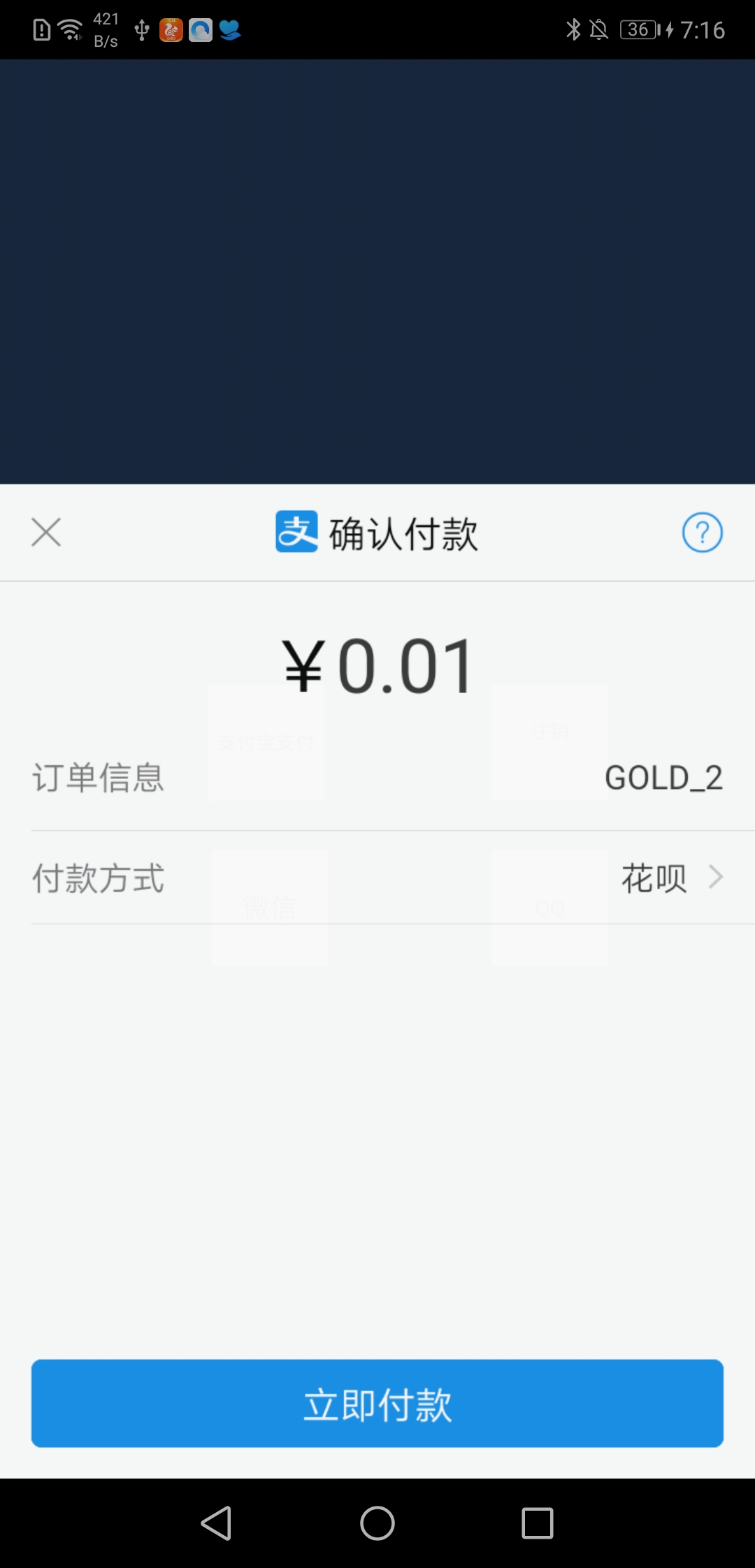
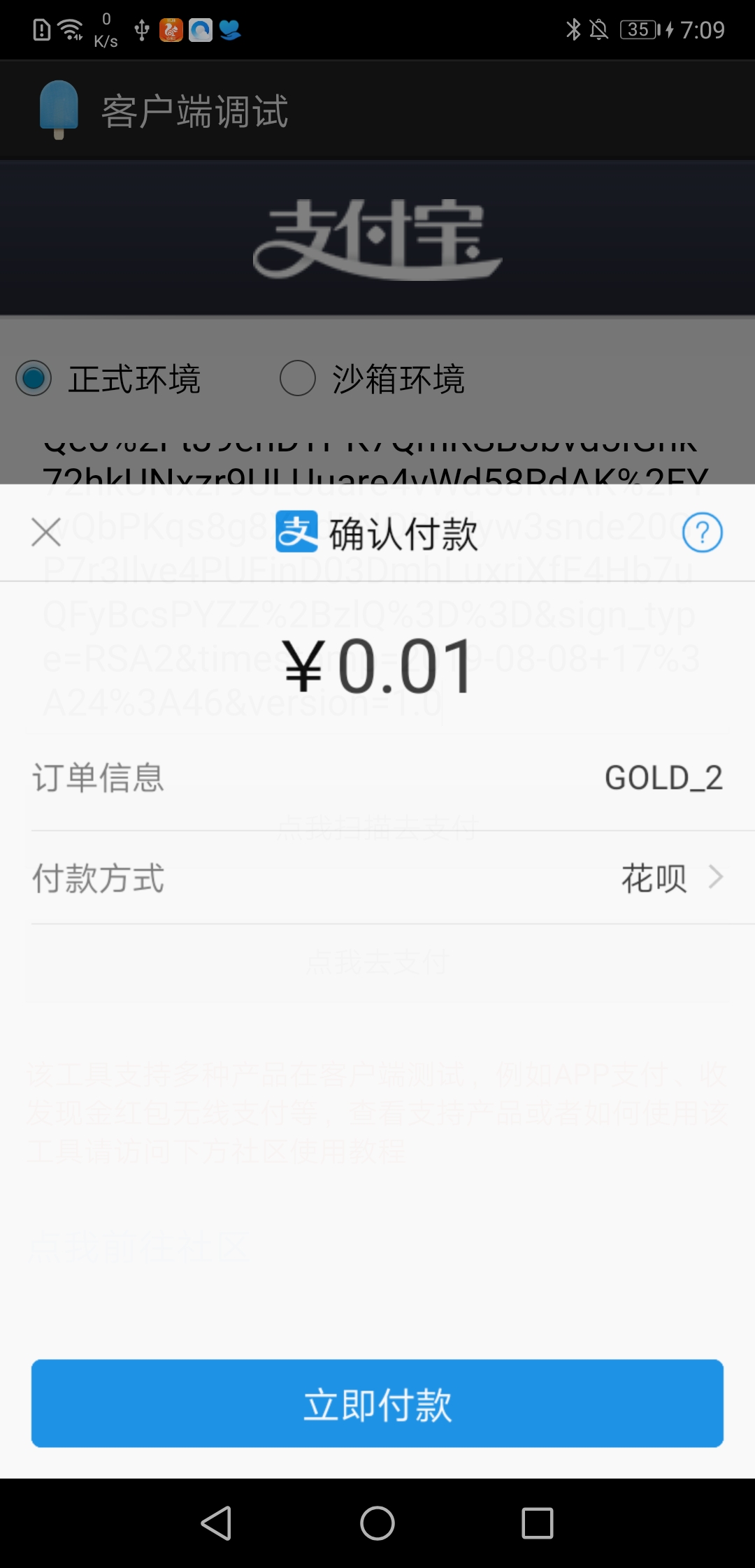
在支付宝所提供的客户端调试工具中,我把订单信息复制上去之后:显示可以支付

但是再自己的工程中,唤起支付宝,就会报ALI38173的错误..于是,我跟web大佬对了一遍又一遍,两边都没有问题..

我就去找支付宝客服,客服很耐心的回答,然后说这边没有什么问题..

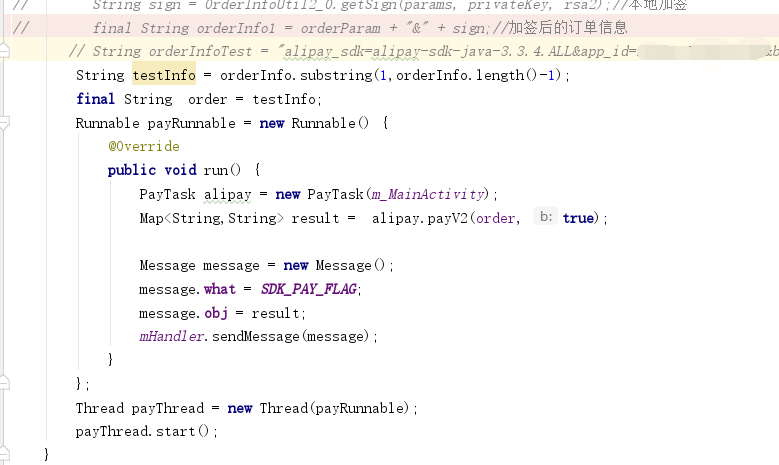
他提出了一个解决方案是 : 让我把订单信息直接复制到Android Studio中: ,orderInfoTest里面的内容就是web端所传递的内容

这个时候重新编译,发现: ….这不就是我想要的结果吗…

这个让人崩溃的原因来了..

先提供一下 打印信息:,乍一看..没什么问题对吧,这就是一句正常打印..

然而 就是因为 打印的时候 我们习惯写 ” “,才忽略掉这个..

没错..就是打印里面的 ” “,首位各一个..找出来后,做一个截取:

Linux下安装jdk1.8

在这里插入图片描述

一、安装准备
linux操作系统(CentOS 7.4 64位)
jdk1.8
xshell、xftp
二、安装步骤
1.下载jdk安装包
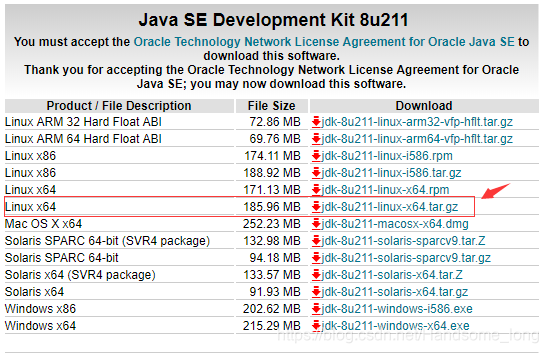
下载地址:https://www.oracle.com/technetwork/java/javase/downloads/jdk8-downloads-2133151.html
操作系统多少位就下载多少位的jdk如图:

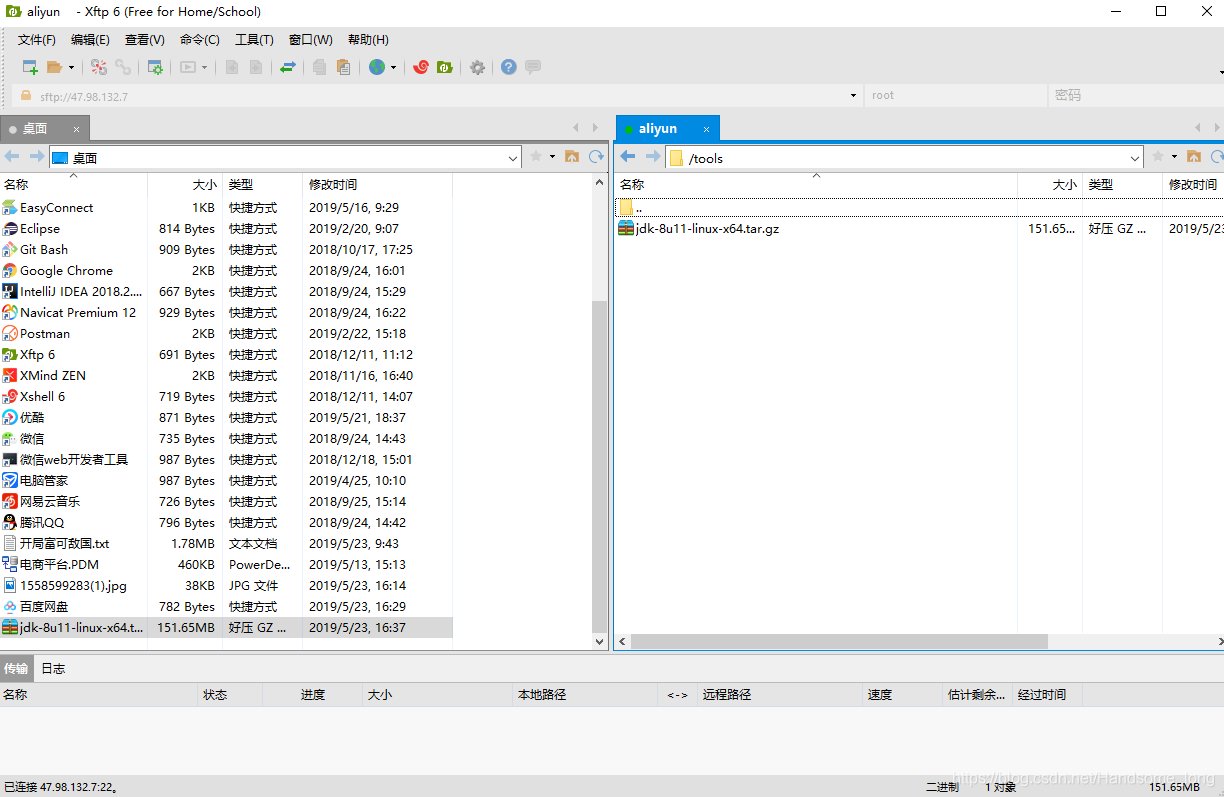
2.下载完成后把安装包上传到服务器,这里我用的是Xftp工具,对命令感兴趣的同学可以百度一下命令怎么上传到linux

在这里插入图片描述


3.命令行进行解压

tar -zxvf jdk-8u11-linux-x64.tar.gz
在这里插入图片描述


解压出来后可以看到jdk的文件夹了
4.进入/usr/目录下新建一个名为java的文件夹

命令:mkdir java
在这里插入图片描述


把刚刚解压出来的jdk移动到新创建的java文件夹下

mv /tools/jdk1.8.0_11/ /usr/java/
在这里插入图片描述


安装结束,接下来进行环境变量的配置

第三:环境变量配置
进入etc目录下通过vim命令进行编辑profile文件

vim profile

在末尾新增
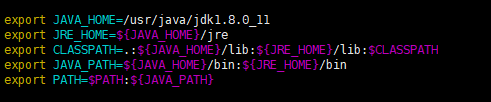
export JAVA_HOME=/usr/java/jdk1.8.0_11
export JRE_HOME=${JAVA_HOME}/jre
export CLASSPATH=.:${JAVA_HOME}/lib:${JRE_HOME}/lib:$CLASSPATH
export JAVA_PATH=${JAVA_HOME}/bin:${JRE_HOME}/bin
export PATH=$PATH:${JAVA_PATH}
在这里插入图片描述


修改完成后需要通过命令让配置文件立即生效

source /etc/profile
在这里插入图片描述


最后测试一下是否安装成功

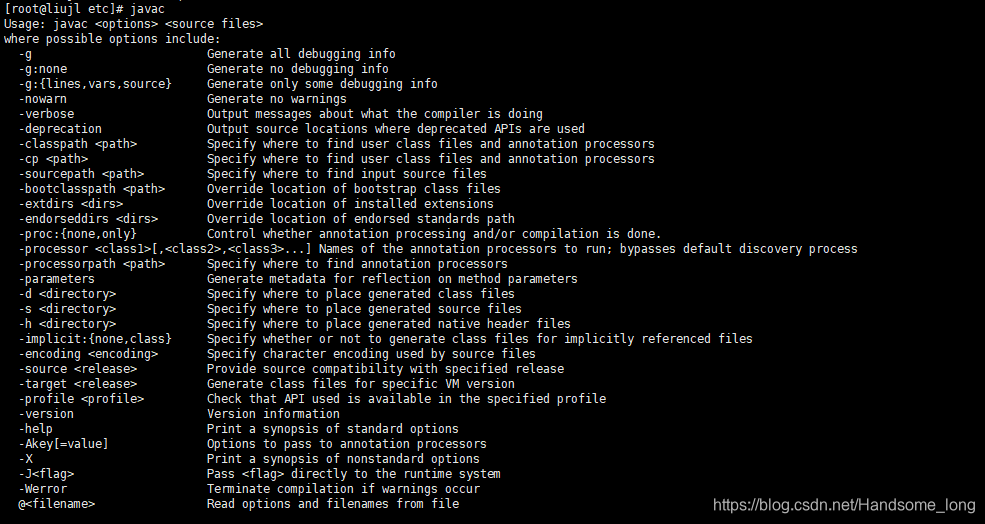
javac
在这里插入图片描述
java -version
在这里插入图片描述


Linux安装jdk1.8完成

基于java的nio聊天室demo

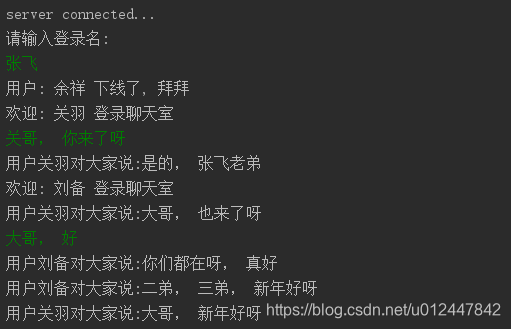
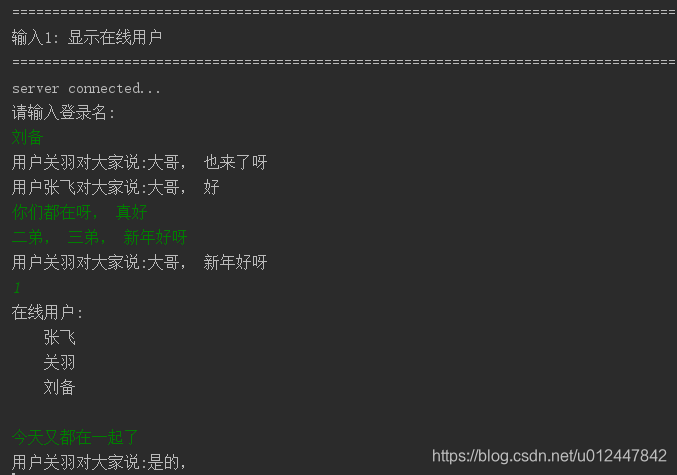
实现的界面

客户端

张飞用户

刘备用户

关羽用户:

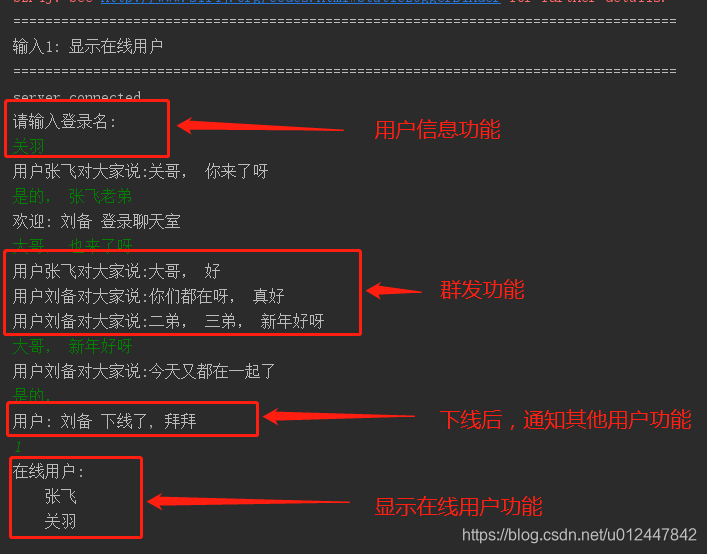
聊天室的具体功能如下: 

1: 群聊

2: 显示在线人数

3: 用户名信息

4: 用户离线, 通知其他在线的用户

聊天室代码:

链接:https://pan.baidu.com/s/1GNHRLAa3ij5Wb0tyT8jYMw
提取码:dd0x

参考: http://ifeve.com/selectors/

代码如下:

服务端代码

 
import java.io.IOException;
import java.net.InetSocketAddress;
import java.nio.ByteBuffer;
import java.nio.channels.*;
import java.util.HashMap;
import java.util.HashSet;
import java.util.Iterator;
 
public class chatServer {
    private int port;
    private Selector selector;
 
    private ByteBuffer readBuffer = ByteBuffer.allocate(1024);//调整缓冲区大小为1024字节
    private ByteBuffer sendBuffer = ByteBuffer.allocate(1024);
    private static final String USER_NAME_TAG = "$%%^&*()!@#$^%#@*()*";
    private HashSet<String> users = new HashSet<String>();
    private HashMap<String, String> Users = new HashMap<>();
    private String user_msg;
 
    public chatServer(int port){
        this.port = port;
    }
 
    public static void main(String[] args){
        new chatServer(8081).start();
    }
 
    public void start() {
        ServerSocketChannel ssc = null;
        try {
            ssc = ServerSocketChannel.open();
            ssc.configureBlocking(false);  //服务器配置为非阻塞 即异步IO
            ssc.socket().bind(new InetSocketAddress(port));   //绑定本地端口
            selector = Selector.open();
            ssc.register(selector, SelectionKey.OP_ACCEPT);   //ssc注册到selector准备连接
            System.out.println("ChatServer started ......");
        }catch (Exception e){
            e.printStackTrace();
        }
 
        while(true){
            try {
                int events = selector.select();
                if (events > 0) {
                    Iterator<SelectionKey> selectionKeys = selector.selectedKeys().iterator();
                    while (selectionKeys.hasNext()) {
                        SelectionKey key = selectionKeys.next();
                        selectionKeys.remove();  //移除当前的key
                        if (key.isValid()) {
                            if (key.isAcceptable()) {
                                accept(key);
                            }
                            if(key.isReadable()){
                                read(key);
                            }
                        }
                    }
                }
            } catch (Exception e) {
                e.printStackTrace();
            }
        }
    }
 
    private void accept(SelectionKey key) throws IOException {
        ServerSocketChannel ssc = (ServerSocketChannel) key.channel();
        SocketChannel clientChannel = ssc.accept();
        clientChannel.configureBlocking(false);
        clientChannel.register(selector, SelectionKey.OP_READ);
        System.out.println("a new client connected "+clientChannel.getLocalAddress());
    }
 
    private void read(SelectionKey key) throws IOException{
        SocketChannel socketChannel = (SocketChannel) key.channel();
        this.readBuffer.clear();//清除缓冲区,准备接受新数据
        System.out.println("===============read");
        int numRead;
        try{
            numRead = socketChannel.read(this.readBuffer);
        }catch (IOException e){    // 客户端断开连接,这里会报错提示远程主机强迫关闭了一个现有的连接。
            offlineUser(key);
            key.cancel();
            socketChannel.close();
            return;
        }
        user_msg = new String(readBuffer.array(),0, numRead);
        for (String s: users) System.out.println("在线用户: " + s);
 
        if (user_msg.contains(USER_NAME_TAG)){   // 用户第一次登陆, 输入登录名
            String user_name = user_msg.replace(USER_NAME_TAG, "");
            user_msg = "欢迎: " + user_name + " 登录聊天室";
            users.add(socketChannel.getRemoteAddress().toString() + "===" + user_name);   // 客户端地址和用户名拼接在一起作为唯一标识
            brodcast(socketChannel, user_msg);
        }
        else if (user_msg.equals("1")){       // 显示在线人数
            user_msg = onlineUser();
            write(socketChannel, user_msg);
        }
        else {                                // 群聊
            String user = "";
            for (String s: users) {
                if (s.contains(socketChannel.toString())){
                    String[] s1 = s.split("===");
                    if (s1.length == 2){
                        user = "用户" + s1[1] + "对大家说:";
                    }else{
                        continue;
                    }
                }
            }
            brodcast(socketChannel, user + user_msg);
        }
    }
 
    private void write(SocketChannel channel, String content) throws IOException, ClosedChannelException {
        sendBuffer.clear();
        sendBuffer.put(content.getBytes());
        sendBuffer.flip();
        channel.write(sendBuffer);
        //注册读操作 下一次进行读
        channel.register(selector, SelectionKey.OP_READ);
    }
 
    /**
     *  用户下线,同时通知线上用户哪些用户下线了。
     */
    public void offlineUser(SelectionKey key) throws IOException{
        SocketChannel socketChannel = (SocketChannel) key.channel();
        for (String user: users){
            String[] s1 = user.split("===");
            if (s1.length == 2){
                String user_name = s1[1];
                if (user.contains(socketChannel.getRemoteAddress().toString())){
                    users.remove(user);
                    String message = "用户: " + user_name + " 下线了, 拜拜";
                    brodcast(socketChannel, message);
                }
            }else{
                continue;
            }
        }
    }
 
    /**
     *   在线用户
     */
    private String onlineUser(){
        String online_users = "在线用户:\n";
        String user = "";
        for (String s: users) {
            String[] s1 = s.split("===");
            if (s1.length == 2){
                user = s1[1];
            }else{
                continue;
            }
            online_users += "\t" + user + "\n";
        }
        System.out.println(" " + online_users);
        return online_users;
    }
 
    /**
     *   群聊
     */
    public void brodcast(SocketChannel except, String content) throws IOException{
        for (SelectionKey key: selector.keys()) {
            Channel targetchannel = key.channel();
            System.out.println("broadcast write:" + content);
            if(targetchannel instanceof SocketChannel && targetchannel != except) {
                SocketChannel channel = (SocketChannel) key.channel();
                write(channel, content);
            }
        }
    }
}


客户端代码

  
import org.slf4j.Logger;
import org.slf4j.LoggerFactory;
import java.io.IOException;
import java.net.InetSocketAddress;
import java.nio.ByteBuffer;
import java.nio.channels.*;
import java.util.Iterator;
import java.util.Scanner;
import java.util.Set;
 
public class chatClient {
    private static final String host = "127.0.0.1";
    private static final int port = 8081;
    private  Selector selector;
    private  SocketChannel sc;
    private ByteBuffer writeBuffer = ByteBuffer.allocate(1024);
    private ByteBuffer readBuffer = ByteBuffer.allocate(1024);
 
    private static final String USER_NAME_TAG = "$%%^&*()!@#$^%#@*()*";
 
    volatile boolean running = true;
 
    private static final Logger LOG = LoggerFactory.getLogger(chatClient.class);
 
    public chatClient() throws IOException{
        connect(host, port);
//         // 读写分离
        listen();
        
        Reader reader = new Reader();
        reader.start();
    }
 
    public static void main(String[] args) throws IOException{
        System.out.println("===================================================================================");
        System.out.println("输入1: 显示在线用户");
        System.out.println("===================================================================================");
        new chatClient();
    }
 
    public void connect(String host, int port) {
        try {
            sc = SocketChannel.open();
            sc.configureBlocking(false);
            sc.connect(new InetSocketAddress(host, port));
            this.selector = Selector.open();
            sc.register( selector, SelectionKey.OP_CONNECT);   //将channel注册到selector中
        } catch (IOException e) {
            e.printStackTrace();
        }
    }
 
    public void listen() {
        Scanner scanner = new Scanner(System.in);
        while (true) {
            try {
                int events = selector.select();
                if (events > 0) {
                    Iterator<SelectionKey> selectionKeys = selector.selectedKeys().iterator();
                    while (selectionKeys.hasNext()) {
                        SelectionKey selectionKey = selectionKeys.next();
                        selectionKeys.remove();
 
                        //连接事件
                        if (selectionKey.isConnectable()) {
                            sc.finishConnect();
                            System.out.println("server connected...");
                            // 人员登录
                            login(scanner);
                            //注册写操作
                            sc.register(selector, SelectionKey.OP_WRITE);
                            break;
                        }
                        else if (selectionKey.isWritable()){
                            String message = scanner.nextLine();
                            writeBuffer.clear();
                            writeBuffer.put(message.getBytes());
                            //将缓冲区各标志复位,因为向里面put了数据标志被改变要想从中读取数据发向服务器,就要复位
                            writeBuffer.flip();
                            sc.write(writeBuffer);
 
                            sc.register(selector,  SelectionKey.OP_WRITE);
                        }
                    }
                }
            } catch (IOException e) {
                e.printStackTrace();
            }
        }
    }
 
    private void login(Scanner scanner) throws IOException{
        System.out.println("请输入登录名: ");
        String message = scanner.nextLine();
        writeBuffer.clear();
        writeBuffer.put((USER_NAME_TAG + message).getBytes());
        //将缓冲区各标志复位,因为向里面put了数据标志被改变要想从中读取数据发向服务器,就要复位
        writeBuffer.flip();
        sc.write(writeBuffer);
    }
 
    protected class Reader extends Thread {
        private final Selector writeSelector;
 
        Reader() throws IOException {
            this.setName("Reader");
            this.setDaemon(true);
            writeSelector = Selector.open(); // create a selector
            sc.register(writeSelector,  SelectionKey.OP_READ);
        }
 
        @Override
        public void run() {
            try {
                doRunLoop();
            } finally {
                LOG.info(getName() + ": stopping");
                try {
                    writeSelector.close();
                } catch (IOException ioe) {
                    LOG.error(getName() + ": couldn't close write selector", ioe);
                }
            }
        }
 
        private void doRunLoop() {
            while (running) {
                try {
                    int keyCt = writeSelector.select();
                    if (keyCt == 0) {
                        continue;
                    }
                    Set<SelectionKey> keys = writeSelector.selectedKeys();
                    Iterator<SelectionKey> iter = keys.iterator();
                    while (iter.hasNext()) {
                        SelectionKey key = iter.next();
                        iter.remove();
                        try {
                            if (key.isValid() && key.isReadable()) {
                                Thread.sleep(1);
                                SocketChannel client = (SocketChannel) key.channel();
                                //将缓冲区清空以备下次读取
                                readBuffer.clear();
                                int num = client.read(readBuffer);
                                System.out.println(new String(readBuffer.array(),0, num));
                                //注册读操作,下一次读
                                sc.register(selector, SelectionKey.OP_READ);
                            }
                        } catch (IOException e) {
                            LOG.debug(getName() + ": Reader", e);
                        }
                    }
                } catch (Exception e) {
                    LOG.warn(getName() + ": exception in Reader " + e);
                }
            }
        }
    }
}

Java的几种设计模式

java的设计模式大体上分为三大类:

  • 创建型模式(5种):工厂方法模式,抽象工厂模式,单例模式,建造者模式,原型模式。
  • 结构型模式(7种):适配器模式,装饰器模式,代理模式,外观模式,桥接模式,组合模式,享元模式。
  • 行为型模式(11种):策略模式、模板方法模式、观察者模式、迭代子模式、责任链模式、命令模式、备忘录模式、状态模式、访问者模式、中介者模式、解释器模式。

设计模式遵循的原则有6个:

1、开闭原则(Open Close Principle)

  对扩展开放,对修改关闭

2、里氏代换原则(Liskov Substitution Principle)

  只有当衍生类可以替换掉基类,软件单位的功能不受到影响时,基类才能真正被复用,而衍生类也能够在基类的基础上增加新的行为。

3、依赖倒转原则(Dependence Inversion Principle)

  这个是开闭原则的基础,对接口编程,依赖于抽象而不依赖于具体。

4、接口隔离原则(Interface Segregation Principle)

  使用多个隔离的借口来降低耦合度。

5、迪米特法则(最少知道原则)(Demeter Principle)

  一个实体应当尽量少的与其他实体之间发生相互作用,使得系统功能模块相对独立。

6、合成复用原则(Composite Reuse Principle)

  原则是尽量使用合成/聚合的方式,而不是使用继承。继承实际上破坏了类的封装性,超类的方法可能会被子类修改。

1. 工厂模式(Factory Method)

  常用的工厂模式是静态工厂,利用static方法,作为一种类似于常见的工具类Utils等辅助效果,一般情况下工厂类不需要实例化。

interface food{}

class A implements food{}

class B implements food{}

class C implements food{}

public class StaticFactory {

    private StaticFactory(){}

    public static food getA(){  return new A(); }

    public static food getB(){  return new B(); }

    public static food getC(){  return new C(); }

}

class Client{

    //客户端代码只需要将相应的参数传入即可得到对象

    //用户不需要了解工厂类内部的逻辑。

    public void get(String name){

        food x = null ;

        if ( name.equals(“A”)) {

            x = StaticFactory.getA();

        }else if ( name.equals(“B”)){

            x = StaticFactory.getB();

        }else {

            x = StaticFactory.getC();

        }

    }

}

2. 抽象工厂模式(Abstract Factory)

  一个基础接口定义了功能,每个实现接口的子类就是产品,然后定义一个工厂接口,实现了工厂接口的就是工厂,这时候,接口编程的优点就出现了,我们可以新增产品类(只需要实现产品接口),只需要同时新增一个工厂类,客户端就可以轻松调用新产品的代码。

  抽象工厂的灵活性就体现在这里,无需改动原有的代码,毕竟对于客户端来说,静态工厂模式在不改动StaticFactory类的代码时无法新增产品,如果采用了抽象工厂模式,就可以轻松的新增拓展类。

  实例代码:

interface food{}

class A implements food{}

class B implements food{}

interface produce{ food get();}

class FactoryForA implements produce{

    @Override

    public food get() {

        return new A();

    }

}

class FactoryForB implements produce{

    @Override

    public food get() {

        return new B();

    }

}

public class AbstractFactory {

    public void ClientCode(String name){

        food x= new FactoryForA().get();

        x = new FactoryForB().get();

    }

}

3. 单例模式(Singleton)

   在内部创建一个实例,构造器全部设置为private,所有方法均在该实例上改动,在创建上要注意类的实例化只能执行一次,可以采用许多种方法来实现,如Synchronized关键字,或者利用内部类等机制来实现。

public class Singleton {

    private Singleton(){}

    private static class SingletonBuild{

        private static Singleton value = new Singleton();

    }

    public Singleton getInstance(){  return  SingletonBuild.value ;}

}

4.建造者模式(Builder)

  在了解之前,先假设有一个问题,我们需要创建一个学生对象,属性有name,number,class,sex,age,school等属性,如果每一个属性都可以为空,也就是说我们可以只用一个name,也可以用一个school,name,或者一个class,number,或者其他任意的赋值来创建一个学生对象,这时该怎么构造?

  难道我们写6个1个输入的构造函数,15个2个输入的构造函数…….吗?这个时候就需要用到Builder模式了。给个例子,大家肯定一看就懂:

public class Builder {

    static class Student{

        String name = null ;

        int number = -1 ;

        String sex = null ;

        int age = -1 ;

        String school = null ;

     //构建器,利用构建器作为参数来构建Student对象

        static class StudentBuilder{

            String name = null ;

            int number = -1 ;

            String sex = null ;

            int age = -1 ;

            String school = null ;

            public StudentBuilder setName(String name) {

                this.name = name;

                return  this ;

            }

            public StudentBuilder setNumber(int number) {

                this.number = number;

                return  this ;

            }

            public StudentBuilder setSex(String sex) {

                this.sex = sex;

                return  this ;

            }

            public StudentBuilder setAge(int age) {

                this.age = age;

                return  this ;

            }

            public StudentBuilder setSchool(String school) {

                this.school = school;

                return  this ;

            }

            public Student build() {

                return new Student(this);

            }

        }

        public Student(StudentBuilder builder){

            this.age = builder.age;

            this.name = builder.name;

            this.number = builder.number;

            this.school = builder.school ;

            this.sex = builder.sex ;

        }

    }

    public static void main( String[] args ){

        Student a = new Student.StudentBuilder().setAge(13).setName(“LiHua”).build();

        Student b = new Student.StudentBuilder().setSchool(“sc”).setSex(“Male”).setName(“ZhangSan”).build();

    }

}

5. 原型模式(Protype)

原型模式就是讲一个对象作为原型,使用clone()方法来创建新的实例。

public class Prototype implements Cloneable{

    private String name;

    public String getName() {

        return name;

    }

    public void setName(String name) {

        this.name = name;

    }

    @Override

    protected Object clone()   {

        try {

            return super.clone();

        } catch (CloneNotSupportedException e) {

            e.printStackTrace();

        }finally {

            return null;

        }

    }

    public static void main ( String[] args){

        Prototype pro = new Prototype();

        Prototype pro1 = (Prototype)pro.clone();

    }

}

此处使用的是浅拷贝,关于深浅拷贝,大家可以另行查找相关资料。

6.适配器模式(Adapter)

适配器模式的作用就是在原来的类上提供新功能。主要可分为3种:

  • 类适配:创建新类,继承源类,并实现新接口,例如 

class  adapter extends oldClass  implements newFunc{}

  • 对象适配:创建新类持源类的实例,并实现新接口,例如 

class adapter implements newFunc { private oldClass oldInstance ;}

  • 接口适配:创建新的抽象类实现旧接口方法。例如 

abstract class adapter implements oldClassFunc { void newFunc();}

7.装饰模式(Decorator)

 给一类对象增加新的功能,装饰方法与具体的内部逻辑无关。例如:

interface Source{ void method();}

public class Decorator implements Source{

    private Source source ;

    public void decotate1(){

        System.out.println(“decorate”);

    }

    @Override

    public void method() {

        decotate1();

        source.method();

    }

}

8.代理模式(Proxy)

客户端通过代理类访问,代理类实现具体的实现细节,客户只需要使用代理类即可实现操作。

这种模式可以对旧功能进行代理,用一个代理类调用原有的方法,且对产生的结果进行控制。

interface Source{ void method();}

class OldClass implements Source{

    @Override

    public void method() {

    }

}

class Proxy implements Source{

    private Source source = new OldClass();

    void doSomething(){}

    @Override

    public void method() {

        new Class1().Func1();

        source.method();

        new Class2().Func2();

        doSomething();

    }

}

9.外观模式(Facade)

为子系统中的一组接口提供一个一致的界面,定义一个高层接口,这个接口使得这一子系统更加容易使用。这句话是百度百科的解释,有点难懂,但是没事,看下面的例子,我们在启动停止所有子系统的时候,为它们设计一个外观类,这样就可以实现统一的接口,这样即使有新增的子系统subSystem4,也可以在不修改客户端代码的情况下轻松完成。

public class Facade {

    private subSystem1 subSystem1 = new subSystem1();

    private subSystem2 subSystem2 = new subSystem2();

    private subSystem3 subSystem3 = new subSystem3();

    public void startSystem(){

        subSystem1.start();

        subSystem2.start();

        subSystem3.start();

    }

    public void stopSystem(){

        subSystem1.stop();

        subSystem2.stop();

        subSystem3.stop();

    }

}

10.桥接模式(Bridge)

这里引用下http://www.runoob.com/design-pattern/bridge-pattern.html的例子。Circle类将DrwaApi与Shape类进行了桥接,代码:

interface DrawAPI {

    public void drawCircle(int radius, int x, int y);

}

class RedCircle implements DrawAPI {

    @Override

    public void drawCircle(int radius, int x, int y) {

        System.out.println(“Drawing Circle[ color: red, radius: “

                + radius +”, x: ” +x+”, “+ y +”]”);

    }

}

class GreenCircle implements DrawAPI {

    @Override

    public void drawCircle(int radius, int x, int y) {

        System.out.println(“Drawing Circle[ color: green, radius: “

                + radius +”, x: ” +x+”, “+ y +”]”);

    }

}

abstract class Shape {

    protected DrawAPI drawAPI;

    protected Shape(DrawAPI drawAPI){

        this.drawAPI = drawAPI;

    }

    public abstract void draw();

}

class Circle extends Shape {

    private int x, y, radius;

    public Circle(int x, int y, int radius, DrawAPI drawAPI) {

        super(drawAPI);

        this.x = x;

        this.y = y;

        this.radius = radius;

    }

    public void draw() {

        drawAPI.drawCircle(radius,x,y);

    }

}

//客户端使用代码

Shape redCircle = new Circle(100,100, 10, new RedCircle());

Shape greenCircle = new Circle(100,100, 10, new GreenCircle());

redCircle.draw();

greenCircle.draw();

11.组合模式(Composite)

 组合模式是为了表示那些层次结构,同时部分和整体也可能是一样的结构,常见的如文件夹或者树。举例:

abstract class component{}

class File extends  component{ String filename;}

class Folder extends  component{

    component[] files ;  //既可以放文件File类,也可以放文件夹Folder类。Folder类下又有子文件或子文件夹。

    String foldername ;

    public Folder(component[] source){ files = source ;}

    public void scan(){

        for ( component f:files){

            if ( f instanceof File){

                System.out.println(“File “+((File) f).filename);

            }else if(f instanceof Folder){

                Folder e = (Folder)f ;

                System.out.println(“Folder “+e.foldername);

                e.scan();

            }

        }

    }

}

12.享元模式(Flyweight)

使用共享对象的方法,用来尽可能减少内存使用量以及分享资讯。通常使用工厂类辅助,例子中使用一个HashMap类进行辅助判断,数据池中是否已经有了目标实例,如果有,则直接返回,不需要多次创建重复实例。

abstract class flywei{ }

public class Flyweight extends flywei{

    Object obj ;

    public Flyweight(Object obj){

        this.obj = obj;

    }

}

class  FlyweightFactory{

    private HashMap<Object,Flyweight> data;

    public FlyweightFactory(){ data = new HashMap<>();}

    public Flyweight getFlyweight(Object object){

        if ( data.containsKey(object)){

            return data.get(object);

        }else {

            Flyweight flyweight = new Flyweight(object);

            data.put(object,flyweight);

            return flyweight;

        }

    }

}