CocosCreator教程(入门篇)

目录
一、项目结构
二、资源分类
三、资源小知识点
四、场景小知识点
五、子系统重点
六、脚本开发
七、发布游戏

系列教程
CocosCreator教程(初识篇)
CocosCreator教程(编辑器篇)


一、项目结构

ProjectName(新建项目)
├──assets
├──library
├──local
├──packages
├──settings
├──temp
└──project.json
子结构功能
assets与资源管理器的内容同步,游戏的核心目录(每个文件都有相应.meta文件)
library这里文件的结构和资源的格式将被处理成最终游戏发布时需要的形式
local编辑器使用习惯记录(如:窗体布局)
settings项目设置
project.json版本控制,必须与assets共同存在
build打包导出目录,构建项目时,自动生成

PS:.meta文件——记录某资源在项目中的唯一标识,以及其配置信息,只有在编辑器中对资源做修改,.meta文件才会实时变化。因此,不要在编辑器外,对资源的内容进行操作。


二、资源分类

1、场景(scene)

自动释放资源:切换场景后,上一个场景中的资源,从内存中释放。
延迟加载资源:意味着不用等待所有资源加载完毕,才显示场景。(快速切换场景,资源陆续在画面显示)

2、贴图(texture)

普通图,子层为一张spriteFrame。

3、预制(prefab)

创建方式:拖拽场景节点,到资源管理器。

4、图集(atlas)

精灵图,子层为多张spriteFrame。(精灵图合成软件:TexturePacker、Zwoptex)

5、自动图集(auto-atlas)

打包时,将所在目录中的所有碎图,合成为图集。

6、艺术数字(label-atlas)

数字为内容的图集。

7、字体(font)

动态字体:.ttf
位图字体:.fnt + .png(存在于同一目录)

8、粒子(particle)

小型动画

9、声音(audio)

模式:web audio、dom audio

10、骨骼动画(spine / dragonBones)
文件格式功能
.json骨骼数据
.png图集纹理
.txt / .atlas图集数据
11、瓦片图(tiledMap)
文件格式功能
.tmx地图数据
.png图集纹理
.tsx tileset数据配置文件
12、文本(text)
13、脚本(script)
14、json

三、资源小知识点

1、跨项目导入导出资源

操作流程:
(1)导出:文件 => 资源导出,选择 .fire场景文件,输出assets目录的 .zip压缩包。
(2)导入:文件 => 资源导入,选择压缩包源路径、解压路径,输出assets目录内容。

2、图像资源自动剪裁

基于size mode,尽量去除spriteFrame无像素的部分,减小图片尺寸。


四、场景小知识点

1、场景中的元素,即是节点,可内嵌组件。
2、坐标系
类别坐标轴方向
cocos坐标系(世界、本地坐标系)x右、y上、z外
设备屏幕坐标系x右、y下
3、锚点

作用:用于变换、子节点定位基准。


五、子系统重点

1、渲染系统

对摄像机、渲染组件的了解。

2、UI系统

对widget、layout等UI组件的了解。

3、动画系统

(1)创建动画的基本流程
(2)时间曲线(双击动画线,进入编辑窗口)
(3)事件管理(双击游标、加减按钮控制参数个数)
(4)脚本控制

4、物理系统

碰撞组件(普通碰撞)
(1)editing——是否为编辑模式
(2)regenerate points——计算图形边界,自定生成控制点,数值为控制点的生成密度 / 准确度
(3)ctrl + 点击——删除控制点
(4)组件类型:矩形、圆形、多边形
(5)设置碰撞组(项目 => 项目设置 => 分组设置):
制定分组 => 匹配分组 => 碰撞组件所在节点上,设置所属分组
(6)脚本控制

Box2D物理引擎(高级碰撞)

5、音频系统

(1)audioSource组件
(2)脚本控制


六、脚本开发

1、使用 cc.Class 声明类型

(1)定义 CCClass

var Sprite = cc.Class({
    //...
});

(2)实例化

var obj = new Sprite();

(3)判断类型

cc.log(obj instanceof Sprite);       //使用原生JS的instanceof 

(4)构造函数(ctor)

var Sprite = cc.Class({
    //使用ctor声明构造函数
    ctor: function () {
        cc.log(this instanceof Sprite);
    }
});

(5)实例方法

var Sprite = cc.Class({
    // 声明一个名叫 "print" 的实例方法
    print: function () { }
});

(6)继承(extends)

// 父类
var Shape = cc.Class();

// 子类
var Rect = cc.Class({
    //使用 extends 实现继承
    extends: Shape
});

(7)父构造函数

var Shape = cc.Class({
    ctor: function () {
        cc.log("Shape");    // 实例化时,父构造函数会自动调用,
    }
});

var Rect = cc.Class({
    extends: Shape
});

var Square = cc.Class({
    extends: Rect,
    ctor: function () {
        cc.log("Square");   // 再调用子构造函数
    }
});

var square = new Square();

(8)完整声明属性

//简单类型声明
properties: {
    score: {
        //这几个参数分别指定了 score 的默认值为 0,在 属性检查器 里,其属性名将显示为:“Score (player)”,并且当鼠标移到参数上时,显示对应的 Tooltip。
        default: 0,
        displayName: "Score (player)",
        tooltip: "The score of player",
    }
}

//数组声明
properties: {
    names: {
        default: [],
        type: [cc.String]   // 用 type 指定数组的每个元素都是字符串类型
    },

    enemies: {
        default: [],
        type: [cc.Node]     // type 同样写成数组,提高代码可读性
    },
}

//get/set 声明
properties: {
    width: {
        get: function () {
            return this._width;
        },
        set: function (value) {
            this._width = value;
        }
    }
}

properties常用参数

参数作用
default默认值
type限定属性的数据类型
visible若为false,则不在属性检查器面板中显示该属性
serializable若为false,则不序列化(保存)该属性
displayName在属性检查器面板中,显示成指定名字
tooltip在属性检查器面板中,添加属性的Tooltip
2、访问节点和组件

(1)获得组件所在的节点

this.node

(2)获得其它组件

this.getComponent(组件名)

(3)获得其它节点及其组件

// Player.js
cc.Class({
    extends: cc.Component,
    properties: {
        player: {
            default: null,
            type: cc.Node
        }
    }
});

//如果你将属性的 type 声明为 Player 组件,当你拖动节点 "Player Node" 到 属性检查器,player 属性就会被设置为这个节点里面的 Player 组件
// Cannon.js
var Player = require("Player");
cc.Class({
    extends: cc.Component,
    properties: {
        // 声明 player 属性,这次直接是组件类型
        player: {
            default: null,
            type: Player
        }
    }
});

//查找子节点
//返回子节点数组
this.node.children
//返回对应的子节点
this.node.getChildByName(子节点名);
//查找后代节点
cc.find(子节点/.../后代节点, this.node);
//全局查找节点
cc.find(场景/节点/节点/...);

(4)访问已有变量里的值(通过模块访问)

//专门开设一个中介模块,导出接口;在其他模块进行节点、组件、属性的操作
// Global.js
module.exports = {
    backNode: null,
    backLabel: null,
};

// Back.js
var Global = require("Global");
cc.Class({
    extends: cc.Component,
    onLoad: function () {
        Global.backNode = this.node;
        Global.backLabel = this.getComponent(cc.Label);
    }
});

// AnyScript.js
var Global = require("Global");
cc.Class({
    extends: cc.Component,
    start: function () {
        var text = "Back";
        Global.backLabel.string = text;
    }
});
3、常用节点和组件接口

(1)节点状态和层级操作

//激活/关闭节点
this.node.active = true;
this.node.active = false;

//更改节点的父节点
this.node.parent = parentNode;

//索引节点的子节点
//返回子节点数组
this.node.children
//返回子节点数量
this.node.childrenCount

(2)更改节点的变换(位置、旋转、缩放、尺寸)

//更改节点位置
//分别对 x 轴和 y 轴坐标赋值
this.node.x = 100;
this.node.y = 50;
//使用setPosition方法
this.node.setPosition(100, 50);
this.node.setPosition(cc.v2(100, 50));
//设置position变量
this.node.position = cc.v2(100, 50);

//更改节点旋转
this.node.rotation = 90;
this.node.setRotation(90);

//更改节点缩放
this.node.scaleX = 2;
this.node.scaleY = 2;
this.node.setScale(2);
this.node.setScale(2, 2);

//更改节点尺寸
this.node.setContentSize(100, 100);
this.node.setContentSize(cc.size(100, 100));
this.node.width = 100;
this.node.height = 100;

//更改节点锚点位置
this.node.anchorX = 1;
this.node.anchorY = 0;
this.node.setAnchorPoint(1, 0);

(3)颜色和不透明度

//设置颜色
mySprite.node.color = cc.Color.RED;
//设置不透明度
mySprite.node.opacity = 128;

(4)常用组件接口
cc.Component 是所有组件的基类,任何组件都包括如下的常见接口:

接口作用
this.node该组件所属的节点实例
this.enabled是否每帧执行该组件的 update 方法,同时也用来控制渲染组件是否显示
update(dt)作为组件的成员方法,在组件的 enabled 属性为 true 时,其中的代码会每帧执行
onLoad()组件所在节点进行初始化时(节点添加到节点树时)执行
start()会在该组件第一次 update 之前执行,通常用于需要在所有组件的 onLoad 初始化完毕后执行的逻辑
4、生命周期
函数名描述
onLoad在节点首次激活时触发,或者所在节点被激活的情况下触发
start在组件首次激活前
update动画更新前
lateUpdate动画更新后
onEnable当组件的 enabled 属性从 false 变为 true 时,或者所在节点的 active 属性从 false 变为 true 时(倘若节点首次被创建且 enabled 为 true,则会在 onLoad 之后,start 之前被调用)
onDisable当组件的 enabled 属性从 true 变为 false 时,或者所在节点的 active 属性从 true 变为 false 时
onDestroy当组件或者所在节点调用了 destroy()时
5、创建和销毁节点

(1)创建新节点

cc.Class({
  extends: cc.Component,
  properties: {
    sprite: {
      default: null,
      type: cc.SpriteFrame,
    },
  },
  start: function () {
    //动态创建节点,并将它加入到场景中
    var node = new cc.Node('Sprite');
    var sp = node.addComponent(cc.Sprite);
    sp.spriteFrame = this.sprite;
    node.parent = this.node;
  }
});

(2)克隆已有节点

//
cc.Class({
  extends: cc.Component,
  properties: {
    target: {
      default: null,
      type: cc.Node,
    },
  },
  start: function () {
    //克隆场景中的已有节点
    var scene = cc.director.getScene();
    var node = cc.instantiate(this.target);
    node.parent = scene;
    node.setPosition(0, 0);
  }
});

(3)创建预制节点

//
cc.Class({
  extends: cc.Component,
  properties: {
    target: {
      default: null,
      type: cc.Prefab,    //预制
    },
  },
  start: function () {
    var scene = cc.director.getScene();
    var node = cc.instantiate(this.target);
    node.parent = scene;
    node.setPosition(0, 0);
  }
});

(4)销毁节点

//
cc.Class({
  extends: cc.Component,
  properties: {
    target: cc.Node,
  },
  start: function () {
    // 5 秒后销毁目标节点
    //销毁节点并不会立刻被移除,而是在当前帧逻辑更新结束后,统一执行
    setTimeout(function () {
      this.target.destroy();
    }.bind(this), 5000);
  },
  update: function (dt) {
    //判断当前节点是否已经被销毁
    if (cc.isValid(this.target)) {
      this.target.rotation += dt * 10.0;
    }
  }
});

PS:不要使用removeFromParent去销毁节点。
原因:调用一个节点的 removeFromParent 后,它不一定就能完全从内存中释放,因为有可能由于一些逻辑上的问题,导致程序中仍然引用到了这个对象。

6、加载和切换场景

(1)加载和切换

//从当前场景,切换到MyScene场景
cc.director.loadScene("MyScene");

(2)通过常驻节点,进行场景资源管理和参数传递

//常驻节点:不随场景切换,而自动销毁,为所有场景提供持久性信息
//设置常驻节点
cc.game.addPersistRootNode(myNode);
//取消常驻节点,还原为一般场景节点
cc.game.removePersistRootNode(myNode);

(3)场景加载回调

//fn:加载MyScene场景时触发
cc.director.loadScene("MyScene", fn);

(4)预加载场景

//后台预加载场景
cc.director.preloadScene("MyScene", fn);
//有需要时,手动加载该场景
cc.director.loadScene("MyScene", fn);
7、获取和加载资源

(1)资源属性的声明

// NewScript.js
cc.Class({
    extends: cc.Component,
    properties: {
        //所有继承自 cc.Asset 的类型都统称资源,如 cc.Texture2D, cc.SpriteFrame, cc.AnimationClip, cc.Prefab 等
        texture: {
            default: null,
            type: cc.Texture2D
        },
        spriteFrame: {
            default: null,
            type: cc.SpriteFrame
        }
    }
});

(2)静态加载(在属性检查器里设置资源)

// NewScript.js
onLoad: function () {
    //拖拽资源管理器的资源,到属性检查器的脚本组件中,即可在脚本里拿到设置好的资源
    var spriteFrame = this.spriteFrame;
    var texture = this.texture;
    spriteFrame.setTexture(texture);
}

(3)动态加载

//动态加载的资源,需要存放于assets的子目录resources中

//加载单个资源
//cc.loader.loadRes(resources的相对路径, 类型(可选), 回调函数)
//加载Prefab资源
cc.loader.loadRes("test assets/prefab", function (err, prefab) {
    var newNode = cc.instantiate(prefab);
    cc.director.getScene().addChild(newNode);
});
//加载SpriteFrame
var self = this;
cc.loader.loadRes("test assets/image", cc.SpriteFrame, function (err, spriteFrame) {
    self.node.getComponent(cc.Sprite).spriteFrame = spriteFrame;
});

//批量加载资源
//cc.loader.loadResDir(resources的相对路径, 类型(可选), 回调函数)
//加载test assets目录下所有资源
cc.loader.loadResDir("test assets", function (err, assets) {
    // ...
});
//加载test assets目录下所有SpriteFrame,并且获取它们的路径
cc.loader.loadResDir("test assets", cc.SpriteFrame, function (err, assets, urls) {
    // ...
});

//资源浅释放
//cc.loader.releaseRes(resources的相对路径, 类型(可选))
cc.loader.releaseRes("test assets/image", cc.SpriteFrame);
cc.loader.releaseRes("test assets/anim");
//cc.loader.releaseAsset(组件名)
cc.loader.releaseAsset(spriteFrame);

// 资源深释放,释放一个资源以及所有它依赖的资源
var deps = cc.loader.getDependsRecursively('prefabs/sample');

(4)加载远程资源和设备资源

//加载远程资源
//远程 url 带图片后缀名
var remoteUrl = "http://unknown.org/someres.png";
cc.loader.load(remoteUrl, function (err, texture) {
    //...
});
//远程 url 不带图片后缀名,此时必须指定远程图片文件的类型
remoteUrl = "http://unknown.org/emoji?id=124982374";
cc.loader.load({url: remoteUrl, type: 'png'}, function () {
    //...
});

//加载设备资源
//用绝对路径加载设备存储内的资源,比如相册
var absolutePath = "/dara/data/some/path/to/image.png"
cc.loader.load(absolutePath, function () {
    //...
});

加载限制:
1、原生平台远程加载不支持图片文件以外类型的资源。
2、这种加载方式只支持图片、声音、文本等原生资源类型,不支持SpriteFrame、SpriteAtlas、Tilemap等资源的直接加载和解析。(需要后续版本中的AssetBundle支持)
3、Web端的远程加载受到浏览器的CORS跨域策略限制,如果对方服务器禁止跨域访问,那么会加载失败,而且由于WebGL安全策略的限制,即便对方服务器允许http请求成功之后也无法渲染。

(5)资源的依赖和释放

// 直接释放某个贴图
cc.loader.release(texture);
// 释放一个 prefab 以及所有它依赖的资源
var deps = cc.loader.getDependsRecursively('prefabs/sample');
cc.loader.release(deps);
// 如果在这个 prefab 中有一些和场景其他部分共享的资源,你不希望它们被释放,可以将这个资源从依赖列表中删除
var deps = cc.loader.getDependsRecursively('prefabs/sample');
var index = deps.indexOf(texture2d._uuid);
if (index !== -1)
    deps.splice(index, 1);
cc.loader.release(deps);
8、监听和发射事件

(1)监听事件

//target是可选参数,用于绑定响应函数的调用者
//boolean是可选参数,默认为false,表示冒泡流
this.node.on(event, fn, target, boolean);

(2)关闭监听

this.node.off(event, fn, target, boolean);

(3)发射事件

//为事件函数,提供参数,最多5个
this.node.emit(event, arg1, arg2, arg3);

(4)派送事件

//grandson.js
//升级版的on,冒泡到的节点,全部注册事件
this.node.dispatchEvent( new cc.Event.EventCustom('foobar', true) );

//father.js
//在指定的上级节点中,注册相同的事件,阻止事件冒泡,手动停止派送
this.node.on('foobar', function (event) {
  event.stopPropagation();
});

(5)事件对象(回调参数的event对象)

API 名类型意义
typeString事件的类型(事件名)
targetcc.Node接收到事件的原始对象
currentTargetcc.Node接收到事件的当前对象,事件在冒泡阶段当前对象可能与原始对象不同
getTypeFunction获取事件的类型
stopPropagationFunction停止冒泡阶段,事件将不会继续向父节点传递,当前节点的剩余监听器仍然会接收到事件
stopPropagationImmediateFunction立即停止事件的传递,事件将不会传给父节点以及当前节点的剩余监听器
getCurrentTargetFunction获取当前接收到事件的目标节点
detailFunction自定义事件的信息(属于 cc.Event.EventCustom)
setUserDataFunction设置自定义事件的信息(属于 cc.Event.EventCustom)
getUserDataFunction获取自定义事件的信息(属于 cc.Event.EventCustom)
9、节点系统事件

(1)鼠标事件类型和事件对象

枚举对象定义对应的事件名事件触发的时机
cc.Node.EventType.MOUSE_DOWNmousedown当鼠标在目标节点区域按下时触发一次
cc.Node.EventType.MOUSE_ENTERmouseenter当鼠标移入目标节点区域时,不论是否按下
cc.Node.EventType.MOUSE_MOVEmousemove当鼠标在目标节点在目标节点区域中移动时,不论是否按下
cc.Node.EventType.MOUSE_LEAVEmouseleave当鼠标移出目标节点区域时,不论是否按下
cc.Node.EventType.MOUSE_UPmouseup当鼠标从按下状态松开时触发一次
cc.Node.EventType.MOUSE_WHEELmousewheel当鼠标滚轮滚动时
函数名返回值类型意义
getScrollYNumber获取滚轮滚动的 Y 轴距离,只有滚动时才有效
getLocationObject获取鼠标位置对象,对象包含 x 和 y 属性
getLocationXNumber获取鼠标的 X 轴位置
getLocationYNumber获取鼠标的 Y 轴位置
getPreviousLocationObject获取鼠标事件上次触发时的位置对象,对象包含 x 和 y 属性
getDeltaObject获取鼠标距离上一次事件移动的距离对象,对象包含 x 和 y 属性
getButtonNumbercc.Event.EventMouse.BUTTON_LEFT或cc.Event.EventMouse.BUTTON_RIGHT或cc.Event.EventMouse.BUTTON_MIDDLE

(2)触摸事件类型和事件对象

枚举对象定义对应的事件名事件触发的时机
cc.Node.EventType.TOUCH_STARTtouchstart当手指触点落在目标节点区域内时
cc.Node.EventType.TOUCH_MOVEtouchmove当手指在屏幕上目标节点区域内移动时
cc.Node.EventType.TOUCH_ENDtouchend当手指在目标节点区域内离开屏幕时
cc.Node.EventType.TOUCH_CANCELtouchcancel当手指在目标节点区域外离开屏幕时
API 名类型意义
touchcc.Touch与当前事件关联的触点对象
getIDNumber获取触点的 ID,用于多点触摸的逻辑判断
getLocationObject获取触点位置对象,对象包含 x 和 y 属性
getLocationXNumber获取触点的 X 轴位置
getLocationYNumber获取触点的 Y 轴位置
getPreviousLocationObject获取触点上一次触发事件时的位置对象,对象包含 x 和 y 属性
getStartLocationObject获取触点初始时的位置对象,对象包含 x 和 y 属性
getDeltaObject获取触点距离上一次事件移动的距离对象,对象包含 x 和 y 属性

(3)其它事件

枚举对象定义对应的事件名事件触发的时机
position-changed当位置属性修改时
rotation-changed当旋转属性修改时
scale-changed当缩放属性修改时
size-changed当宽高属性修改时
anchor-changed当锚点属性修改时

PS:枚举对象定义、事件名等价,在回调参数中,作用相同。

10、全局系统事件

//全局系统事件的类型
cc.SystemEvent.EventType.KEY_DOWN    //键盘按下
cc.SystemEvent.EventType.KEY_UP    //键盘释放
cc.SystemEvent.EventType.DEVICEMOTION    //设备重力传感

//绑定、解除全局系统事件
cc.systemEvent.on(event, fn, target, boolean);
cc.systemEvent.off(event, fn, target, boolean);
11、动作系统(变换系统)

(1)动作控制

// 执行动作
node.runAction(action);
// 停止一个动作
node.stopAction(action);
// 停止所有动作
node.stopAllActions();

// 给 action 设置 tag
var ACTION_TAG = 1;
action.setTag(ACTION_TAG);
// 通过 tag 获取 action
node.getActionByTag(ACTION_TAG);
// 通过 tag 停止一个动作
node.stopActionByTag(ACTION_TAG);

(2)容器动作

//顺序执行
cc.sequence(action1, action2, ...);
//并发执行
cc.spawn(action1, action2, ...);
//指定次数,重复执行
cc.repeat(action, times)
//无限次数,重复执行
cc.repeatForever(action)
//改变动作速度倍率,再执行
cc.speed(action, rate)

(3)即时动作

cc.show()    //立即显示
cc.hide()    //立即隐藏
...

(4)时间间隔动作

cc.moveTo()    //移动到目标位置
cc.rotateTo()    //旋转到目标角度
cc.scaleTo()    //将节点大小缩放到指定的倍数
...

(5)动作回调

var finished = cc.callFunc(fn, target, arg);

(6)缓动动作

var action = cc.scaleTo(0.5, 2, 2);
//使用easeIn曲线,丰富动作表现
action.easing(cc.easeIn(3.0));
...

PS:可以使用缓动系统,代替动作系统。(缓动系统的API更简约)

12、计时器

//interval:以秒为单位的时间间隔
//repeat:重复次数
//delay:开始延时
this.schedule(fn, interval, repeat, delay)
this.unschedule(fn)
13、脚本执行顺序

editor: {
        //executionOrder越小,该组件相对其它组件就会越先执行(默认为0)
        //executionOrder只对 onLoad, onEnable, start, update 和 lateUpdate 有效,对 onDisable 和 onDestroy 无效
        executionOrder: 1
    }
14、标准网络接口

(1)XMLHttpRequest——短连接
(2)WebSocket——长连接

15、对象池

对象池的概念
在同一场景中,需要多次进行节点的生成、消失时,假如直接进行创建、销毁的操作,就会很浪费性能。因此,使用对象池,存储需要消失的节点,释放需要生成的节点,达到节点回收利用的目的。

工作流程
(1)初始化对象池

properties: {
    enemyPrefab: cc.Prefab    //准备预制资源
},
onLoad: function () {
    this.enemyPool = new cc.NodePool();
    let initCount = 5;
    for (let i = 0; i < initCount; ++i) {
        let enemy = cc.instantiate(this.enemyPrefab); // 创建节点
        this.enemyPool.put(enemy); // 通过 put 接口放入对象池
    }
}

(2)从对象池请求对象

createEnemy: function (parentNode) {
    let enemy = null;
    if (this.enemyPool.size() > 0) { // 通过 size 接口判断对象池中是否有空闲的对象
        enemy = this.enemyPool.get();
    } else { // 如果没有空闲对象,也就是对象池中备用对象不够时,我们就用 cc.instantiate 重新创建
        enemy = cc.instantiate(this.enemyPrefab);
    }
    enemy.parent = parentNode; // 将生成的敌人加入节点树
    enemy.getComponent('Enemy').init(); //接下来就可以调用 enemy 身上的脚本进行初始化
}

(3)将对象返回对象池

onEnemyKilled: function (enemy) {
    // enemy 应该是一个 cc.Node
    this.enemyPool.put(enemy); // 和初始化时的方法一样,将节点放进对象池,这个方法会同时调用节点的 removeFromParent
}

清除对象池

//手动清空对象池,销毁其中缓存的所有节点
myPool.clear();

七、发布游戏

作者:简栋梁
链接:https://www.jianshu.com/p/9d433f967822
来源:简书
著作权归作者所有。商业转载请联系作者获得授权,非商业转载请注明出处。

cocos creator游戏开发

1.初来乍到

打开 Cocos Creator 点击新建空白项目,在默认布局的左下区域,一个黄黄assets文件夹映入眼帘。作为前端的你对这个文件是不是再熟悉不过了。是的,和你想象的一样,开发游戏中所有资源,脚本都会放置到该文件。

2. 初步探索

项目建立好以后,对各区域的功能大致了解下,作为前端的你,主要还是要迅速的掌握cc提供的各种NB的功能。所以,还得赶紧打开 官网 快速浏览一遍。官网也写得很好,提供中文和英文,对于英文能力不好的伙伴来说,简直是不能太好了。是不是找到了当初学习Vue的感觉。作为前端的你,整天写了一堆业务控制,处理各种布局,各种兼容,对奇怪的css优先级搞得云里雾里的。所以是时候换一个更有意思开发场景,给自己做个游戏解闷多好

cc是一个跨平台框架,一端编译多端发布。想想前端的 mpvue taro uni-app,无不是解决此类问题,再加上gulp,webpack,再来一堆node_modules,啥less sass stylus.各种环境配置那是相当的复杂。所以业界流传,前端已经进入深水区,真的一点不假。 然而cc依然可以让你舒适的写JS或者TS ,并且没有繁杂的配置,一键搞定打包发布。

3. 小试牛刀

<p>上边说了一大堆,其实并没有什么鸟用。在官网首页中,给开发者提供了个完整坑爹的游戏《摘星星》,如果打包到微信小游戏,需要横屏,不太友好。本着举一反三的求学态度,我利用此场景,换了一个游戏玩法。开发了自己第一款小游戏《坦克侠》,当然也很坑爹</p>
<p>游戏开发主要是确定游戏规则,我新改编的玩法就是在星空中随机生成不同数量的星星,并一直往下掉落,我的主角坦克必须在星星掉落前接住。丢失一颗星星生命减一,生命为0游戏结束。当然我们主角每收集一颗星星,根据当前的难度会添加一定的分数。累计到一定的分数,又可以给主角添加一点生命值</p>
<p>在官网 下载初始项目 下载一个基础项目,该项目中只有一些项目基本图片和声音。接下来,我们需要建立场景,制作预制资源,添加控制脚本,编译发布微信小游戏,快速开始 </p>

制作一个游戏场景,与官网不同的是,我将Canvas的Size属性,在属性检查器中设置为 288 x 512 ,并且勾选了 Fit Height以及 Fit Width 用以适应同的手机屏幕。然后拖动背景图片到层级管理器中,并在场景编辑器中设置背景Size属性,使其等于Canvas的Size属性。然后依次在层级管理器中新建三个Label控件,依次拖动到背景图片左上角和右上角,用以记录生命值,当前分数,以及最高分数。接着在场景中间添加一个Label控件和一个Button按钮用于显示游戏结束和开始游戏。在场景底部拖动放置我们的主角坦克。所以最新场景的效果应该是如下显示的那样

场景预览
小程序码
微信群

4. 一顿操作猛如虎

游戏场景设计,看似酷炫,无非就是拖拖拖。依稀找到了当年C#开发winform的感觉,随便搞整一下,一个界面就出来了。所以导致很多人开发winform,webform很简单,很傻瓜,其实不是的。重要的还是后边的业务逻辑,解决方案,这些都是超越语言之上的东西。所以cc的场景编辑,就不多说了,直接分析我们游戏实现逻辑。开始之前我们先初始一下typescript开发环境,操作如下图

typescript


依次点击安装vs code 扩展插件,添加 Typescript项目配置。接下来就要编写脚本了,所有还是有必要了解下cc脚本的生命周期

  1. onLoad 首次激活时触发,一般做一些初始化操作。对比Vue我觉得最合适的应该是beforeMount回调
  2. start 首次激活时触发,一般初始化一些中间状态的数据,改方法在onLoad之后,在第一次update之前,对比Vue自然应该是mounted回调
  3. update 该回调会频繁调用,每一帧调用一次。对比Vue应该是beforeUpdate回调,虽然他们性质不一样
  4. lateUpdate 该回调会频繁调用,也是每帧调用一次,对比Vue应该updated回调
  5. onDestroy 根据条件调用,当组件调用了自身的 destroy()方法,会触发此回调
  6. onEnable 根据条件调用, enabled 属性从 false 变为 true 或 active 属性从 false 变为 true 触发此回调
  7. onDisable 根据条件调用, enabled 属性从 true 变为 false 或active 属性从 true 变为 false触发此回调

4.1 让主角动起来

做过前端的你一定知道,要想拖动一个DIV,一定是在Body中监听鼠标的移动事件。在移动端一定是监听触摸移动事件。是的,在cc里边做游戏,希望一个组件动起来依然是这么操作的,那么cc里边是如何注册事件的呢?两个方式,一个在场景编辑器下角的属性中添加脚本里边的方法,另外一种就是直接在脚本里边添加。当然我推荐第二种。虽然IDE会帮我们生成很多代码,如果不自己写一遍,就永远不晓得数据流向。就像当年开发winform时,很多人拖动一个按钮控件,然后双击控件,IDE就自动帮你注册好了一个用户点击事件。殊不知,IDE是在xx.design.cs中通过代码替你注册好的。所以既然刚开始学,一定要了解清楚它的原理。

  • cc.systemEvent.on(cc.SystemEvent.EventType.KEY_UP, this.onKeyUp, this) 注册一个系统事件 ,支持按键事件和重力感应事件
  • this.node.parent.on(cc.Node.EventType.TOUCH_MOVE, this.onTouchMove, this) 在某个节点注册一个Node 支持的事件类型

<p>所以,主角移动无非实在TouchMove时改自己的X/Y</p>

 // author:herbert qq:464884492 
 onTouchMove(e: cc.Event.EventTouch) {
        let deltaX = e.getDeltaX(); //获取本次和上次移动的增量
        let deltaY = e.getDeltaY();
        //左移
        if (deltaX < 0 && this.node.x <= this.leftMinX) return;
        if (deltaX > 0 && this.node.x >= this.rightMaxX) return;
        if (deltaY > 0 && this.node.y >= this.topMaxY) return;
        if (deltaY < 0 && this.node.y <= this.bottomMinY) return;
        this.node.x += deltaX;
        this.node.y += deltaY;
    }

4.2 生成坑爹的星星

在cc里边需要重复生成的对象,我们一般会制作成一个预制资源。然后在基本中通过代码实例化。何为预制资源,就权当它是一个模板吧。现在生成我们第一颗小星星

// author:herbert qq:464884492
buildOneStar() {
        let star = cc.instantiate(this.starPrefab);
        this.node.addChild(star);
         return star;
    }

是的,就是这么简单,有没有class.newInstance()的感觉,当然这个只是在场景的默认位置生成了一个星星而已。我们需要更多的信息,位置肯定也不是默认位置,所以还得继续码代码

 // author:herbert qq:464884492
   buildRandomStar() {
        let tempX = 0;
        let tempY = 0;
        tempX = Math.floor(this.starMaxX - Math.random() * this.starMaxX);//生成一个不大于MaxX的坐标
        tempY = Math.floor(this.starMaxY - Math.random() * this.starMaxY);
        if (Math.random() < 0.5) tempX = tempX * -1;
        let star = this.buildOneStar();
        star.setPosition(tempX, tempY);
        star.zIndex = this.tank.zIndex - 1;
        star.name = "star";
        star.getComponent("Star").index = this;
    }

这样感觉好多了,可以生成很多星星了,不过,我们的星星也得往下掉才行,作为前端的你首先想到的是不是更新星星的Y值,是的,我就是这么做的。利用生命周期中start方法,定义一个从上往最小Y运动的动画。后来才了解到所有的游戏引擎都有物理特性,开启了自己就掉下来了。不过原理肯定还是改变y值。何况这么简单的游戏完全没必要使用

    start() {
        // 定义一个Action
        let downAction = cc.moveTo(this.index.starFallSpeed, this.node.x, this.minY - 60);
        downAction.easing(cc.easeSineOut());
        this.node.runAction(downAction);
    }

4.3 是时候接住星星了

只要是游戏少不了做碰撞检测,如果在CC中开启了物理引擎还好,直接跟星星和主角添加一个刚体就好了,不过我们没开启,那就自己来了。不过碰撞检测无非就是判断两个区域有没有重叠地方,简单判断就上下左右,左上右上左下右下八个点。不过我这里偷了个懒,直接判断星星和主角间向量的距离。

    //author:herbert qq:464884492
    ...
    let distance = this.node.position.sub(this.tank.getPosition()).mag();
    if (distance < (this.tank.width / 2 - 5)) {
      console.log("接住了");
    }
    ...

4.4 来点刺激的

游戏嘛,总不能一成不变那多没意思,所以随着时间的推移我们的调整点难度。我这个游戏难度无非就一下两个方面

  1. 生成星星的速度加快
  2. 星星掉落的速度加快
//author:herbert qq:464884492
...
    this.index.scoreNum += this.index.starScoreSpeed;
            this.index.score.string = "得分:" + this.index.scoreNum;
            // 降落速度加
            if (Math.floor(this.index.scoreNum / 100) == this.index.starScoreSpeed - 4 && this.index.starFallSpeed > 1) {
                this.index.starFallSpeed -= 0.2; //下降速度加快
                if (this.index.starBuildTimeOut > 200) {
                    this.index.starBuildTimeOut -= 100; //生成速度加快
                }
                this.index.lifeNum += 1;
                if (this.index.starScoreSpeed < 10) {
                    this.index.starScoreSpeed += 1;
                }
            }
            cc.audioEngine.play(this.index.scoreClip, false, 0.2);
            this.index.allStars.splice(this.index.allStars.indexOf(this.node), 1)
            this.node.destroy();
...

4.5 是时候结束了

游戏嘛,也不能一直玩下去。不然多没挑战。自从调整游戏难度后我的最高分重来就没有超过4000.

//author:herbert qq:464884492
...
 if (this.node.y <= this.minY) {
            this.index.lifeNum -= 1;
            this.index.life.string = "生命:" + this.index.lifeNum;
            this.node.destroy();
            this.index.allStars.splice(this.index.allStars.indexOf(this.node), 1)
            if (this.index.lifeNum <= 0) {
                this.index.gameOver.node.active = true;
                this.index.btnPlay.node.active = true;
                this.index.starIsRunning = false;
                let storageValue = cc.sys.localStorage.getItem(this.index.HIGHSTORAGEKEY);
                if (storageValue && parseInt(storageValue) > this.index.scoreNum) {
                    return;
                }
                cc.sys.localStorage.setItem(this.index.HIGHSTORAGEKEY, this.index.scoreNum);
                this.index.highScore.string = "最高分:" + this.index.scoreNum;
            }
        }
...

5. 来点实际的

做技术嘛,大多都是 Talk is cheap,Show me your code.做点总结吧

  • 开源地址
  • 在基本中定义的属性,切记在编辑器中拖动绑定
  • 多看官网api,多开实例代码
  • 发布微信小游戏一定不要有英文,会导致审核不通过

使用Cocos Creator开发微信小游戏(四)小游戏实战

小游戏介绍


一个左右跳一跳小游戏,点屏幕左边向左跳,点右边向右跳,落水为失败。

PC chrome浏览器下游戏截图:

微信开发者工具截图:

 小游戏场景图结构


 场景结构同上一篇中的挤柠檬汁小游戏结构大体相同

DataManager:记录游戏中的配置数据,游戏逻辑数据(分数 )

SoundManager:管理游戏中的音效

ItemsManager:处理游戏过程中随机出现的道具(金币,玉米等)

Net:处理Http请求

UIManager:管理游戏中的所有UI

代码文件


主要文件代码

玩家控制(驴) Player.js

//驴

cc.Class({

    extends: cc.Component,

    properties: {

        // foo: {

        //    // ATTRIBUTES:

        //    default: null,        // The default value will be used only when the component attaching

        //                          // to a node for the first time

        //    type: cc.SpriteFrame, // optional, default is typeof default

        //    serializable: true,  // optional, default is true

        // },

        // bar: {

        //    get () {

        //        return this._bar;

        //    },

        //    set (value) {

        //        this._bar = value;

        //    }

        // },

        _UIGameNode: cc.Node,

    },

    // LIFE-CYCLE CALLBACKS:

    // onLoad () {},

    start ()

    {

        this._UIGameNode = cc.find(‘Canvas/UIManager/UIGame’);

    },

    //跳跃,相对位置

    jump(duration, destPos)

    {

        var rotAct = cc.jumpBy(duration, destPos, 80, 1);

        var callFunc = cc.callFunc(this.onJumpEnd, this);

        var seq = cc.sequence(rotAct, callFunc);

        if(destPos.x > 0)

        {

            this.node.setScaleX(1);     

        }

        else

        {

            this.node.setScaleX(-1); 

        }

        this.node.runAction(seq);

    },

    //跳跃到目标点, 绝对位置

    jumpTo(duration, destPos)

    {

        var rotAct = cc.jumpTo(duration, destPos, 80, 1);

        var callFunc = cc.callFunc(this.onJumpEnd, this);

        var seq = cc.sequence(rotAct, callFunc);

        if(destPos.x > 0)

        {

            this.node.setScaleX(1);     

        }

        else

        {

            this.node.setScaleX(-1); 

        }

        this.node.runAction(seq); 

    },

    //跳跃结束

    onJumpEnd()

    {

        this._UIGameNode.getComponent(‘UIGame’).onPlayerJumpEnd(); 

    },

    // update (dt) {},

});

ItemManager.js

//游戏中物品池,管理复用的物品

//物品类型

var ItemType =

{

    //没有东西

    IT_None: -1,

    //草

    IT_Grass: 0,

    //玉米

    IT_Corn: 1,

    //萝卜

    IT_Radish: 2,

    //金币

    IT_Coin:3,

};

var ItemManager = cc.Class({

    extends: cc.Component,

    properties: {

        // foo: {

        //    // ATTRIBUTES:

        //    default: null,        // The default value will be used only when the component attaching

        //                          // to a node for the first time

        //    type: cc.SpriteFrame, // optional, default is typeof default

        //    serializable: true,  // optional, default is true

        // },

        // bar: {

        //    get () {

        //        return this._bar;

        //    },

        //    set (value) {

        //        this._bar = value;

        //    }

        // },

        //物品Prefab列表

        ItemPrefabList:

        {

            default: [], 

            type: [cc.Prefab],

        },

        //概率列表

        ItemRateList:

        {

            default:[],

            type: [cc.Integer],                   

        },

        //随机的基数

        _RandBaseNum : 100,

        _RandRateList: [],

        //物品池

        _ItemPoolList: [],

    },

    // LIFE-CYCLE CALLBACKS:

    onLoad ()

    {

        this._RandBaseNum = 0;

        //概率统计:

        for(var i = 0; i < this.ItemRateList.length; ++i)

        {

            this._RandBaseNum += this.ItemRateList[i];

            if(i == 0)

            {

                this._RandRateList[i] = this.ItemRateList[i];

            }

            else

            {

                this._RandRateList[i] =  this._RandRateList[i – 1] + this.ItemRateList[i];

            }

        }

        //物品池,各个物品先预创建3个

        for(let i = 0; i < 4; ++i)

        {

            this._ItemPoolList[i] = new cc.NodePool();

            for(var j = 0; j < 3; ++j)

            {

                var curItem = cc.instantiate(this.ItemPrefabList[i]);

                this._ItemPoolList[i].put(curItem);

                //设置为物品 

                curItem.group = “item”;

                curItem.setTag(i);

            }

        }

    },

    start ()

    {

    },

    //获取当前Block挂载的物品

    getRandomItemType()

    {

        //[0, 1)

        var randNum = parseInt(cc.random0To1() * this._RandBaseNum);

        for(var i = 0; i < this._RandRateList.length; ++i)

        {

            if(randNum < this._RandRateList[i] )

            {

                break;

            }

        }

        //cc.log(“getRandomItemType “,  randNum, );

        return i – 1;

    },

    //获取某类型的Item

    getItemByType( itemType )

    {

        if(itemType == ItemType.IT_None)

        {

            return null;

        } 

        if(itemType > 3 || itemType < 0)

        {

            return null;

        }

        var curItem = this._ItemPoolList[itemType].get();

        if(curItem == null)

        {

            curItem =  cc.instantiate(this.ItemPrefabList[itemType]);

            this._ItemPoolList[itemType].put(curItem);

            //设置为物品 

            curItem.group = “item”;

            curItem.setTag(itemType);

            curItem = this._ItemPoolList[itemType].get();

            cc.log(“new item “, itemType);

        }

        curItem.scale = 0.7;

        return curItem;

    },

    //将Item重新返回到Pool

    putItemToPool(curItem)

    {

        if(curItem.group != ‘item’)

        {

            //cc.log(“putItemToPool invalid  group”);

            return;

        }

        curItem.parent = null;

        var itemType = curItem.getTag();

        if(itemType > 3 || itemType < 0)

        {

            //cc.log(“putItemToPool invalid  itemType”);

            return;

        }

        this._ItemPoolList[itemType].put(curItem);

    },

    // update (dt) {},

});

module.exports =

{

    ItemType: ItemType,

    ItemManager: ItemManager,

}

UIGame.js部分代码

    //游戏状态的处理

    setGameState(state)

    {

        //处理暂停逻辑

        if(this._CurGameState == GameState.GS_Pause && state !=  this._CurGameState)

        {

            cc.director.resume();   

        }

        //新状态的处理

        this._CurGameState = state; 

        //准备状态

        if(this._CurGameState == GameState.GS_Ready)

        {

            this.StartBtn.node.active = true;

            this.PauseBtn.node.active = false;

        }

        //暂停

        else if(this._CurGameState == GameState.GS_Pause)

        {

            cc.director.pause();

            //按钮显示与隐藏

            this.StartBtn.node.active = true;

            this.PauseBtn.node.active = false;

        }

        //等待游戏中的操作

        else if(this._CurGameState == GameState.GS_WaitOP)

        {

            this.StartBtn.node.active = false;

            this.PauseBtn.node.active = true;

            //对当前Block进行下移操作

            if(this._CurBlockIndex < 0 || this._CurBlockIndex >= this._BlockListUse.length)

            {

                cc.log(“GS_WaitOP invalid _CurBlockIndex “, this._CurBlockIndex);

                return;

            }

            var curBlock = this._BlockListUse[this._CurBlockIndex];

            if(curBlock == null)

            {

                cc.log(“GS_WaitOP invalid curBlock null”, this._CurBlockIndex);

                return;   

            }

            //block下移

            var downAct = curBlock.getActionByTag(0);

            if(downAct == null)

            {

                var downActScale = cc.scaleTo(1.5, 1, 0);

                var callFunc = cc.callFunc(this.onBlockDownFinish, this, curBlock);

                downAct = cc.sequence(downActScale, callFunc);

                curBlock.runAction(downAct);

            }

        }

        //游戏结束

        else if(this._CurGameState == GameState.GS_Over)

        {

            //按钮显示与隐藏

            this.StartBtn.node.active = false;

            this.PauseBtn.node.active = false;

            var UIManager = this.node.parent.getComponent(‘UIManager’);

            UIManager.openUI(UIType.UIType_GameOver);

            //向子域发送,上传数据

            var DataManager = this.DataManager.getComponent(‘DataManager’);

            if(window.wx != undefined)

            {

                window.wx.postMessage(

                    {

                        msgType: 1,

                        bestScore: DataManager.getCurScore(),

                    }

                );

            }

            //播放背景音乐

            if(this.SoundManager)

            {

                var soundMgr = this.SoundManager.getComponent(‘SoundManager’);

                soundMgr.stopSound(SoundType.SoundType_Bg);

                soundMgr.playSound(SoundType.SoundType_Fall);

            }

        }

    },

动态场景生成:

    //————————Block操作 begin————————–

    //获取Block

    getBlock()

    {

        if(this._BlockList.length > 0)

        {

            var block = this._BlockList.pop();

            this._BlockListUse.push(block);

          return block; 

        }

        else

        {

            var block = cc.instantiate(this.BlockPrefab);

            this.pushBlock(block);

            return this.getBlock(); 

        }

    },

    //添加Block

    pushBlock(block)

    {

      // this._BlockPool.put(block);

        this._BlockList.push(block);

    },

    //移除Block(移除一个最下面的,屏幕外的Block) 还原到池里

    delelteUseBlock()

    {

      var firstBlock = this._BlockListUse.shift();

      firstBlock.parent = null;

      firstBlock.scaleY = 1;

      //将Block下物品还原到物品池

      this.restoreItemToPool(firstBlock);

      this._BlockList.push(firstBlock);

      this._CurBlockIndex -= 1;       

    },

作者:游戏中的乐趣
链接:https://www.jianshu.com/p/6399f15042fe
来源:简书
著作权归作者所有。商业转载请联系作者获得授权,非商业转载请注明出处。

Cocos Creator 开发实战——射线测试

 近期写了一款基于射线测试的小游戏,本篇会介绍射线测试知识和一些坑,保证大家会用并且避免引擎bug。
       国际惯例先上效果

射线测试基础知识
       先看一遍官网,在页面的最下面部分。射线测试需要用到物理引擎,接下来开始教学。

开启物理引擎
       物理系统默认是关闭的,如果需要使用物理系统,那么首先需要做的事情就是开启物理系统,否则你在编辑器里做的所有物理编辑都不会产生任何效果。

onLoad () {
cc.director.getPhysicsManager().enabled = true;
},

添加物理碰撞物体
添加组件

用到的是物理引擎 添加的碰撞体必须是物理组件里的碰撞体
添加组件-》物理组件-》Collider组件-》Box
       type设置撑Static
       否则会有重力自己下落

通过触摸点触发射线测试
代码挂载在Canvas节点下

onLoad () {
cc.director.getPhysicsManager().enabled = true;
//添加触摸监听 通过触摸点讲解射线测试
this.node.on(‘touchstart’, this.TouchStart, this)
},

TouchStart (event) {
//获得触摸点本地坐标位置
let p1 = event.getLocation()
//射线测试结束点位置 从开始点向右发射:x坐标增加1000 射线测试
let p2 = cc.v2(p1.x+1000, p1.y)
this.rayTest(p1, p2)
},

rayTest (p1, p2) {
var results = cc.director.getPhysicsManager().rayCast(p1, p2, cc.RayCastType.Closest);

for (var i = 0; i < results.length; i++) {
    //两点之间检测出来的点的数组
    var result = results[i];
    //射线穿过的是哪一个碰撞体。
    var collider = result.collider;
    //射线穿过的碰撞体的世界坐标
    var point = result.point;
    //碰撞体在相交点的表面的法线向量。
    var normal = result.normal;
    //相交点在射线上的分数。
    var fraction = result.fraction;
    //打印出碰撞点的坐标
    cc.log('point:', point)
}

},

检测类型介绍

cc.RayCastType.Any
检测射线路径上任意的碰撞体,一旦检测到任何碰撞体,将立刻结束检测其他的碰撞体,最快。

cc.RayCastType.Closest
检测射线路径上最近的碰撞体,这是射线检测的默认值,稍慢。

cc.RayCastType.All
检测射线路径上的所有碰撞体,检测到的结果顺序不是固定的。在这种检测类型下一个碰撞体可能会返回多个结果,这是因为 box2d 是通过检测夹具(fixture)来进行物体检测的,而一个碰撞体中可能由多个夹具(fixture)组成的,慢。更多细节可到 物理碰撞组件 查看。

cc.RayCastType.AllClosest
检测射线路径上所有碰撞体,但是会对返回值进行删选,只返回每一个碰撞体距离射线起始点最近的那个点的相关信息,最慢

result返回值介绍

实际开发过程中的坑

cc.director.getPhysicsManager().rayCast(p1, p2, cc.RayCastType.Closest);
1
       这句话会出现bug,原因是因为运行加载的时候物理引擎这部分没有加载完成,所以底层封装的变量没有new出来。
       解决方法: 加一个计时器。

this.schedule(function() {
this.rayTest()
}, 0.01);
1
2
3
结果

在这基础上增加表现形式
创建一个星星 检测到射线测试的点 自动移动到检测点的位置

拖拽进入场景

移动
properties: {
m_star: cc.Node,
},

       拖入星星

rayTest (p1, p2) {
    var results = cc.director.getPhysicsManager().rayCast(p1, p2, cc.RayCastType.Closest);

    for (var i = 0; i < results.length; i++) {
        //两点之间检测出来的点的数组
        var result = results[i];
        //射线穿过的是哪一个碰撞体。
        var collider = result.collider;
        //射线穿过的碰撞体的世界坐标
        var point = result.point;
        //碰撞体在相交点的表面的法线向量。
        var normal = result.normal;
        //相交点在射线上的分数。
        var fraction = result.fraction;

        // cc.log('point:', point)

        //世界坐标转成当前节点坐标
        let localPos = this.node.convertToNodeSpaceAR(point)
        //移动
        this.m_star.runAction(cc.moveTo(1,localPos))

    }
},


结果

————————————————
版权声明:本文为CSDN博主「游戏创造者黄昱」的原创文章,遵循CC 4.0 BY-SA版权协议,转载请附上原文出处链接及本声明。
原文链接:https://blog.csdn.net/creator_HY/article/details/104074282

CocosCreator中加入webSocket的使用

前言

使用WebSocket作为网络连接的方式,简单的使用文本传输,使用onfire做事件的分发,可以替换NetControl里面的websocket实现为socket和其他网络方案,只要修复onfire的激发,基本不用该游戏代码。

新建一个配置类

  • NetConfig.js
  • 用于配置网络的相关内容
  • 当前只有host port
  • 还可以配置其他的内容
/**
 * 当前的网络配置
 */
module.exports={
    host:"ws://localhost",
    port:9000

};

新建一个网络控制类

//定义全局的变量
window.onfire=require("onfire");           //处理事件的类库
var netConfig=require('NetConfig');
var NetControl={
    _sock:{},  //当前的webSocket的对象
    connect: function () {
        if(this._sock.readyState!==1){
            //当前接口没有打开
            //重新连接
            this._sock = new WebSocket(netConfig.host+":"netConfig.port); 
            this._sock.onopen = this._onOpen.bind(this);
            this._sock.onclose = this._onClose.bind(this);
            this._sock.onmessage = this._onMessage.bind(this);
        }
        return this;
    },

    _onOpen:function(){
        onfire.fire("onopen");
    },
    _onClose:function(err){
        onfire.fire("onclose",err);
    },
    _onMessage:function(obj){

        onfire.fire("onmessage",obj);
    },

    send:function(msg){
        this._sock.send(msg);
    },

};

module.exports=NetControl;

引入一个onfire类库

项目地址:
https://github.com/hustcc/onfire.js535

  • 主要用于注册和分发webSocket的事件
  • 自己用listener写也是可以的
  • 不过 有类库干嘛不用呢

下面是onfire的例子

import onfire from 'onfire.js';

function test_callback(data1, data2) {
    console.log('this is a event 1');
}

// bind event and callback
var eventObj = onfire.on('test_event', test_callback);
var eventObj2 = onfire.on('test_event', function(data1, data2) {
    console.log('this is a event 2');
});

// fire event
onfire.fire('test_event', 'test_data1', 'test_data2');

// cancel bind event
onfire.un(eventObj); // only cancel the eventObj.
onfire.un('test_event'); // cancel all events named `test_event`.
onfire.un(test_callback); // cancel all the `test_callback` functions.

使用方法

  1. 拖入onfire.js到assert文件夹内导入类库
    不用导入为插件…
  2. 引入类库
var netControl=require('NetControl');
  1. 连接网络加入监听(可以多次注册同一方法)
netControl.connect();
this.msssageFire=onfire.on("onmessage",this.onMessage.bind(this));
  1. 本地监听方法
onMessage:function(obj){
    console.log("It's HelloWorld onMessage----->"+obj);
}
  1. 发送数据
var jsonTmp = "{ \"Mobile\": \"" + 121212 + "\", \"Password\": \"" + 121313454545 + "\" }"; 
netControl.send("1010" + jsonTmp);
console.log("sendToWS");
  1. 销毁事件的注册
onDestroy:function(){
    onfire.un(this.msssageFire);

}

原文地址:http://allknowboy.com/posts/e8f856f4/767

Centos卸载gcc

(1)查看安装的gcc版本

[y@localhost Desktop]

$ rpm -q gcc
gcc-4.4.7-23.el6.x86_64
1
2
3
(2)执行卸载命令 rpm -e

[y@localhost Desktop]

$ rpm -e gcc-4.4.7-23.el6.x86_64
error: Failed dependencies:
gcc = 4.4.7-23.el6 is needed by (installed) gcc-c++-4.4.7-23.el6.x86_64
gcc = 4.4.4 is needed by (installed) libtool-2.2.6-15.5.el6.x86_64
1
2
3
4
5
提示gcc-4.4.7-23.el6.x86_64被2个软件依赖,卸载失败,则先卸载被依赖的软件包

sudo rpm -e gcc-c++-4.4.7-23.el6.x86_64
sudo rpm -e libtool-2.2.6-15.5.el6.x86_64
1
2
(4)再执行sudo rpm -e gcc-4.4.7-23.el6.x86_64进行卸载

sudo rpm -e gcc-4.4.7-23.el6.x86_64
1
卸载成功
(5) 验证,输入gcc -v

[y@localhost Desktop]

$ gcc -v
bash: gcc: command not found
1
2
3
提示command not found,说明的确卸载成功了。
————————————————
版权声明:本文为CSDN博主「yzpyzp」的原创文章,遵循CC 4.0 BY-SA版权协议,转载请附上原文出处链接及本声明。
原文链接:https://blog.csdn.net/yzpbright/java/article/details/81568830

cenos 升级 g++ gcc(cc1plus: error: unrecognized command line option “-std=c++11”)

Building with ‘g++’.
Error using mex
cc1plus: error: unrecognized command line option “-std=c++11”
1、下载源码

在这里,稳妥起见,选择了4.8.5,如果需要别的版本,改掉版本号就好了,可以去GCC官网查看

$ wget ftp://ftp.gnu.org/gnu/gcc/gcc-4.8.5/gcc-4.8.5.tar.gz
2、下载依赖包 & 预安装

编译安装 GCC 需要依赖 mpc,mpfr,gmp包。好在 GCC 源码里自带脚本可以轻松下载依赖包。

$ tar zxf gcc-4.8.5.tar.gz
$ cd gcc-4.8.5
$ ./contrib/download_prerequisites

在此脚本里可以看到依赖包的版本号依次是 mpc-0.8.1,mpfr-2.4.2,gmp-4.3.2。

3、$ yum -y install glibc-devel.i686 –setopt=protected_multilib=false

4、编译安装

$ cd ..     //这样做的原因主要是要在源代码外建立build文件夹
$ mkdir gcc-build-4.8.5
$ mkdir /usr/local/gcc-4.8.5   //放置的是 include 文件。
$ mkdir /usr/local/gcc         //放置的是 bin + lib 文件
$ cd gcc-build-4.8.5
$ ../gcc-4.8.5/configure   –prefix=/usr/local/gcc-4.8.5 –exec-prefix=/usr/local/gcc –enable-languages=c,c++   //为了节省时间,这里只编译c和c++的
$ make && make install
为了避免安装后系统里出现多个版本的 GCC,这里直接将编译安装的目录指定为 /usr/local/gcc-4.8.5和/usr/local/gcc下,如果不指定 –prefix,则会默认安装到/usr/local下。

等待

make以后,漫长的等待,搞定

5、环境变量配置

将 gcc/g++改名,留存旧版本

$ mv /usr/bin/gcc /usr/bin/gcc-4.4.7
$ mv /usr/bin/g++ /usr/bin/g++-4.4.7
$ export PATH=/usr/local/gcc/bin:$PATH # 使用最新的 gcc/g++;
确认版本号

$ g++ –version
$ gcc –version
$ which g++
$ which gcc
错误

1、Build文件夹建立到错误的位置 stubs-32.h 找不到,CentOS 是64位的

compilation terminated.
make[5]: *** [_muldi3.o] Error 1
make[5]: Leaving directory `/home/wei/gcc-4.8.5/gcc-build-4.8.5/x86_64-unknown-linux-gnu/32/libgcc’
…………
解决方法:安装 32 位的 glibc-devel,后面的参数是忽略某个软件的多版本问题。

$ yum -y install glibc-devel.i686 –setopt=protected_multilib=false

这个错主要原因是新建的build文件夹在源代码树里,需要在另外独立的文件夹使用。  解决方法是:在源代码外新建了文件夹,解决后的代码已经更新到上面了。

First, we highly recommend that GCC be built into a separate directory from the sources whichdoes not reside within the source tree. This is how we generally build GCC; building where srcdir == objdir should still work, but doesn’t get extensive testing; building where objdir is a subdirectory of srcdir is unsupported.

yum安装 lnmp (linux+nginx+php7.1+mysql5.7)

1、第一步先更新yum update

2、yum安装nginx
安装nginx最新源:
yum localinstall http://nginx.org/packages/centos/7/noarch/RPMS/nginx-release-centos-7-0.el7.ngx.noarch.rpm
yum repolist enabled | grep “nginx*”
安装nginx:
yum -y install nginx
启动nginx:
service nginx start
设置nginx服务器开机自启动:
systemctl enable nginx.service
检查开机自动是否设置成功:
systemctl list-dependencies | grep nginx

3、yum安装mysql5.7
安装mysql源:
yum -y localinstall http://dev.mysql.com/get/mysql57-community-release-el7-7.noarch.rpm
yum repolist enabled | grep “mysql.*-community.*”
安装mysql:
yum -y install mysql-community-server mysql-community-devel
启动mysql:
service mysqld start
检查mysql启动是否正常:
service mysqld status 或者 ps -ef | grep mysql
设置mysqld服务开机自启动:
systemctl enable mysqld.service
检查mysqld开机自启动是否设置成功:
systemctl list-dependencies | grep mysqld

#查看密码和修改密码

#查看mysql的root账号的密码 grep 'temporary password' /var/log/mysqld.log  #登录mysql mysql -uroot -p  #修改密码 ALTER USER 'root'@'localhost' IDENTIFIED BY 'password';  #修改root用户可远程登录 GRANT ALL PRIVILEGES ON *.* TO 'root'@'%' IDENTIFIED BY 'password' WITH GRANT OPTION;  #刷新 flush privileges;

4、yum安装php7.1
安装php源:
rpm -Uvh https://dl.fedoraproject.org/pub/epel/epel-release-latest-7.noarch.rpm
rpm -Uvh https://mirror.webtatic.com/yum/el7/webtatic-release.rpm
检查源是否安装成功;
yum repolist enabled | grep “webtatic*”
安装php扩展源:
yum -y install php71w php71w-fpm
yum -y install php71w-mbstring php71w-common php71w-gd php71w-mcrypt
yum -y install php71w-mysql php71w-xml php71w-cli php71w-devel
yum -y install php71w-pecl-memcached php71w-pecl-redis php71w-opcache
验证php7.1.x和扩展是否安装成功 :
验证php是否安装成功
php -v
验证对应的扩展是否安装成功
php -m
设置php-fpm并检测php-fpm的运行状态:
启动php-fpm
service php-fpm star
检查启动是否成功
service php-fpm status
设置开机自启动:
systemctl enable php-fpm.service
检查开机自启动是否设置成功:
systemctl list-dependencies | grep php-fpm
ps -ef | grep php-fpm

################################################
5.单独安装redis
yum install redis
#修改配置
vi /etc/redis.conf
#daemonize yes 后台运行
#appendonly yes 数据持久化
service redis start

6.安装php-redis扩展
#先装git
yum install git

#git下扩展
cd /usr/local/src
git clone https:#github.com/phpredis/phpredis.git

#安装扩展
cd phpredis
phpize

#修改php配置
vi /etc/php.ini 添加extension=redis.so

#重启php
service php-fpm restart

yum安装 lnmp (linux+nginx+php7.1+mysql5.7)

1、第一步先更新yum update

2、yum安装nginx
安装nginx最新源:
yum localinstall http://nginx.org/packages/centos/7/noarch/RPMS/nginx-release-centos-7-0.el7.ngx.noarch.rpm
yum repolist enabled | grep “nginx*”
安装nginx:
yum -y install nginx
启动nginx:
service nginx start
设置nginx服务器开机自启动:
systemctl enable nginx.service
检查开机自动是否设置成功:
systemctl list-dependencies | grep nginx

3、yum安装mysql5.7
安装mysql源:
yum -y localinstall http://dev.mysql.com/get/mysql57-community-release-el7-7.noarch.rpm
yum repolist enabled | grep “mysql.*-community.*”
安装mysql:
yum -y install mysql-community-server mysql-community-devel
启动mysql:
service mysqld start
检查mysql启动是否正常:
service mysqld status 或者 ps -ef | grep mysql
设置mysqld服务开机自启动:
systemctl enable mysqld.service
检查mysqld开机自启动是否设置成功:
systemctl list-dependencies | grep mysqld

#查看密码和修改密码

#查看mysql的root账号的密码 grep 'temporary password' /var/log/mysqld.log  #登录mysql mysql -uroot -p  #修改密码 ALTER USER 'root'@'localhost' IDENTIFIED BY 'password';  #修改root用户可远程登录 GRANT ALL PRIVILEGES ON *.* TO 'root'@'%' IDENTIFIED BY 'password' WITH GRANT OPTION;  #刷新 flush privileges;

4、yum安装php7.1
安装php源:
rpm -Uvh https://dl.fedoraproject.org/pub/epel/epel-release-latest-7.noarch.rpm
rpm -Uvh https://mirror.webtatic.com/yum/el7/webtatic-release.rpm
检查源是否安装成功;
yum repolist enabled | grep “webtatic*”
安装php扩展源:
yum -y install php71w php71w-fpm
yum -y install php71w-mbstring php71w-common php71w-gd php71w-mcrypt
yum -y install php71w-mysql php71w-xml php71w-cli php71w-devel
yum -y install php71w-pecl-memcached php71w-pecl-redis php71w-opcache
验证php7.1.x和扩展是否安装成功 :
验证php是否安装成功
php -v
验证对应的扩展是否安装成功
php -m
设置php-fpm并检测php-fpm的运行状态:
启动php-fpm
service php-fpm star
检查启动是否成功
service php-fpm status
设置开机自启动:
systemctl enable php-fpm.service
检查开机自启动是否设置成功:
systemctl list-dependencies | grep php-fpm
ps -ef | grep php-fpm

################################################
5.单独安装redis
yum install redis
#修改配置
vi /etc/redis.conf
#daemonize yes 后台运行
#appendonly yes 数据持久化
service redis start

6.安装php-redis扩展
#先装git
yum install git

#git下扩展
cd /usr/local/src
git clone https:#github.com/phpredis/phpredis.git

#安装扩展
cd phpredis
phpize

#修改php配置
vi /etc/php.ini 添加extension=redis.so

#重启php
service php-fpm restart

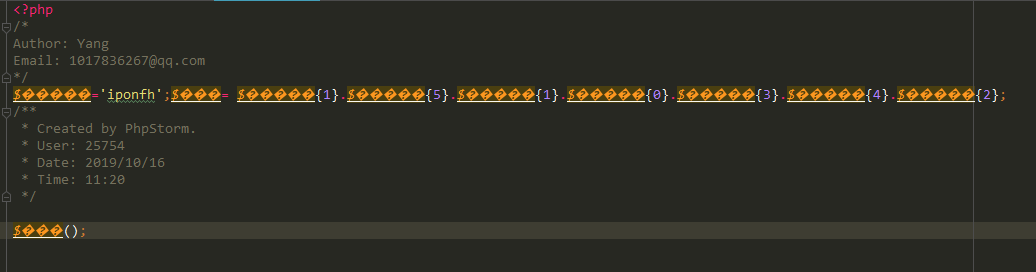
PHP 之源代码加密与解密,加密后可直接运行

方式一:

1234567891011121314151617181920212223242526272829303132333435363738394041424344454647484950515253545556575859606162636465666768697071727374757677<?php/*** Created by PhpStorm.* User: Yang* Date: 2019/10/16* Time: 10:25*/  class Encipher { private $_sourceFile '';private $_encodedFile '';private $_comments array('Author: Yang','Email: 1017836267@qq.com'); public function __construct($sourceFile$encodeFile$comments array()){!empty($sourceFile) && $this->_sourceFile = $sourceFile;!empty($encodeFile) && $this->_encodedFile = $encodeFile;!empty($comments) && $this->comments = (array)$comments; if (empty($this->_sourceFile) || !file_exists($this->_sourceFile)) {exit("Source file does not exist.");}if (empty($this->_encodedFile) || !file_exists($this->_encodedFile)) {//如果源文件不存在,则创建fopen($this->_encodedFile, "w");}} /*** 返回随机字符串* @return string*/private function createRandKey()// 返回随机字符串$str "ABCDEFGHIJKLMNOPQRSTUVWXYZabcdefghijklmnopqrstuvwxyz";return str_shuffle($str);} /*** 加密函数* @return bool*/public function encode() {//随机密匙1$k1 $this->createRandKey();//随机密匙2$k2 $this->createRandKey();// 获取源文件内容$sourceContent file_get_contents($this->_sourceFile);//base64加密$base64 $headers) . "\r\n" $prefixCode), $enkey$dekey);$evalEmbedCode $this->_getEvalEmbedCode($decodeCodeOfHostedCode$regVars$enkey$dekey);/*** eval(base64_decode(*     str_replace("\$hookKey", '', strtr($hookKey.$evalEmbedCode, $dekey, $enkey))* ));* $unset;*/$unset 'unset(' $funcStrVar;foreach ($regVars as $var) {$unset .= ',' $var;}$unset .= ');';$evalCode "@eval(" $regVars["base64_decode"] . "(" $regVars["str_replace"] . "(" $regVars["\$hookKey"] . ",''," $regVars["strtr"] . "('" $hookKey $evalEmbedCode "','" $dekey "','" $enkey "'))));" $unset;$originalEncodedCode $this->_getPHPEncode($file$enkey$dekey);$enCode = implode("\r\n"$headers) . "\r\n" $prefixCode $evalCode "return;?>\r\n" $originalEncodedCode;$this->_saveEncryptFile($file$enCode$enkey$dekey);} /*** The encoded code needs extra code*/private function _getBaseCodeOfHostedCode(){$code = <<<EOT\$farrs   = file(str_replace('\\\\''/'__FILE__));\$enCode  array_pop(\$farrs);\$phpCode array_pop(\$farrs);\$fstrs   = implode('', \$farrs) . substr(\$phpCode, 0, strrpos(\$phpCode'@ev'));\$hookKey = md5(\$fstrs);\$farrs   = \$phpCode = \$fstrs = NULL;EOT;return $code;} /*** The encoded code needs decode code* if the licence is generated, also need to process it.*/private function _getDecodeCodeOfHostedCode($file$enkey$dekey){$code = <<<EOTeval(base64_decode(strtr(\$enCode'{$dekey}''{$enkey}')));\$enCode = NULL;EOT;return $code;} private function _getFuncVarDefCode($usedFuncMaps$funcChars$funcStrVar){//all the chars of function name$funcStr = implode(""$funcChars); //set variable name's value for each variable of function name$funcVarValArr $this->_getFuncVarvalArr($usedFuncMaps$funcChars$funcStrVar); //encoded code define function name string.$code $funcStrVar "='{$funcStr}';";foreach ($usedFuncMaps as $func => $val) {$code .= $val "= " $funcVarValArr[$func] . ";\n";}return $code;} private function _getEvalEmbedCode($decodeCodeOfHostedCode$regVars$enkey$dekey){$code = preg_replace("/\r|\n/is"""strtr($decodeCodeOfHostedCode$regVars));//replace multi space to one, and encode it via base64$code base64_encode(preg_replace("/\s{2,}/is"" "$code));$code strtr($code$enkey$dekey);return $code;} /*** get function names and chars for all functions*/private function _getMatchedFunctions($code){//match all function namepreg_match_all("/([a-z_0-9]+)\(/is"$code$matches);$usedFuncs array_unique($matches[1]);if (false !== ($key array_search('eval'$usedFuncs))) {unset($usedFuncs[$key]);} $funcChars array_unique(preg_split("//is", implode(""$usedFuncs), -1, PREG_SPLIT_NO_EMPTY));shuffle($funcChars);return array(array_flip($usedFuncs), $funcChars);} /*** get variable names*/private function _getMatchedVariables($code){preg_match_all("/(\\\$[a-z0-9]+)\s*\=/is"$code$matches);return array_flip($matches[1]);} private function _getFuncVarvalArr($usedFuncMaps$funcChars$funcStrVar){$funcVarValArr array();foreach ($usedFuncMaps as $func => $_val) {$val "";for ($i = 0, $len strlen($func); $i $len$i++) {if ($val == "") {$val $funcStrVar "{" array_search($func{$i}, $funcChars) . "}";else {$val $val "." $funcStrVar "{" array_search($func{$i}, $funcChars) . "}";}}$funcVarValArr[$func] = $val;}return $funcVarValArr;} /*** get php pure code, trim php tag*/private function _getPHPCode($file){$from $this->source_file . '/' $file;$str file_get_contents($from);$str = preg_replace("/^[\s\xef\xbb\xbf]*<\?php/is"""$str);$str = trim(preg_replace("/\?>\s*$/is"""$str));return $str;} /*** get php encoded code*/private function _getPHPEncode($file$enkey$dekey){$code $this->_getPHPCode($file);$enCode strtr(base64_encode($code), $enkey$dekey);return $enCode;} private function _getKeyPairs(){$enkey $this->_getKeyStr();$dekey $this->_getKeyStr();while ($enkey === $dekey) {$dekey $this->_getKeyStr();}return array($enkey$dekey);} private function _getKeyStr(){$base64str 'ABCDEFGHIJKLMNOPQRSTUVWXYZabcdefghijklmnopqrstuvwxyz0123456789+/=';for ($i = 127; $i <= 160; $i++) {$base64str .= chr($i);}$baseChars array_filter(preg_split("//is"$base64str));$baseChars[] = 0;shuffle($baseChars);return implode(""$baseChars);} private function _setVarName($funcs$filter array()){$length $this->varnameLength;$basestr $this->_getInvisibleStr($length);$count count($funcs);if ($count == 0) {return array();}$varArr array();do {$randStr substr("\$" str_shuffle($basestr), 0, rand(2, $length));if (!in_array($randStr$varArr) && !in_array($randStr$filter)) {$varArr[] = $randStr;$count--;}while ($count > 0);return array_combine(array_keys($funcs), $varArr);} /*** legal variable names: '[a-zA-Z_\x7f-\xff][a-zA-Z0-9_\x7f-\xff]*'* Invisiable string's ascii is from 127 to 255:'[\x7f-\xff][\x7f-\xff]*'* param $length  the variable name's length.*/private function _getInvisibleStr($length = 10){$str '';for ($i = 0; $i $length$i++) {$num = rand(127, 255);$str .= chr($num);}return $str;} private function _saveEncryptFile($file$enCode$enkey = null, $dekey = null){$to $this->encoded_file . '/' $file;file_put_contents($to$enCode);echo $to "\n";}}