cc.Sprite使用
cc.Sprite
1: 游戏中显示一个图片,通常我们把这个叫做”精灵” sprite
2: cocos creator如果需要显示一个图片,那么需要在节点上挂一个精灵组件,为这个组件指定要显示的图片(SpriteFrame)
3: 显示一个图片的步骤:
(1) 创建一个节点;
(2) 添加一个组件;
(3) 要显示的图片(SpriteFrame)拖动到SpriteFrame;
(4) 配置图片的SIZE_MODE:
a: CUSTOM 大小和CCNode的大小一致;
b: RAW 原始的图片大小;
c: TRIMMED 大小为原始图片大小, 显示的内容是裁剪掉透明像素后的图片;
(5) trim: 是否裁剪掉 图片的透明区域, 如果勾选,就会把完全透明的行和列裁掉, 做帧动画的时候,我们一般是用原始大小不去透明度,动画,不至于抖动;
4: 精灵更换spriteFame;
5: 快捷创建带精灵组件的节点;
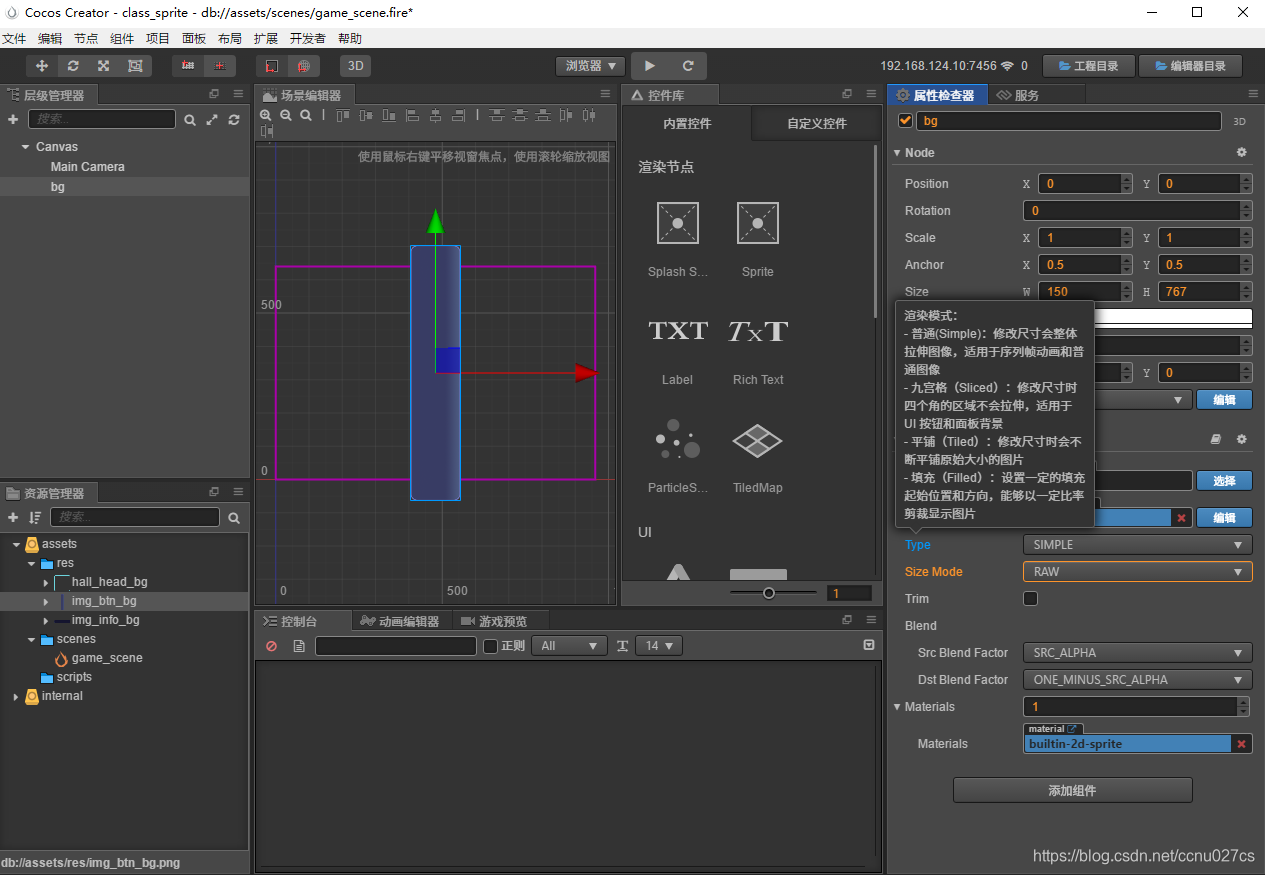
图片模式
1: simple: 精灵最普通的模式, 选择该模式后,图片将缩放到指定的大小;
2: Tiled: 平铺模式, 图片以平铺的模式,铺地板砖的模式,铺到目标大小上;
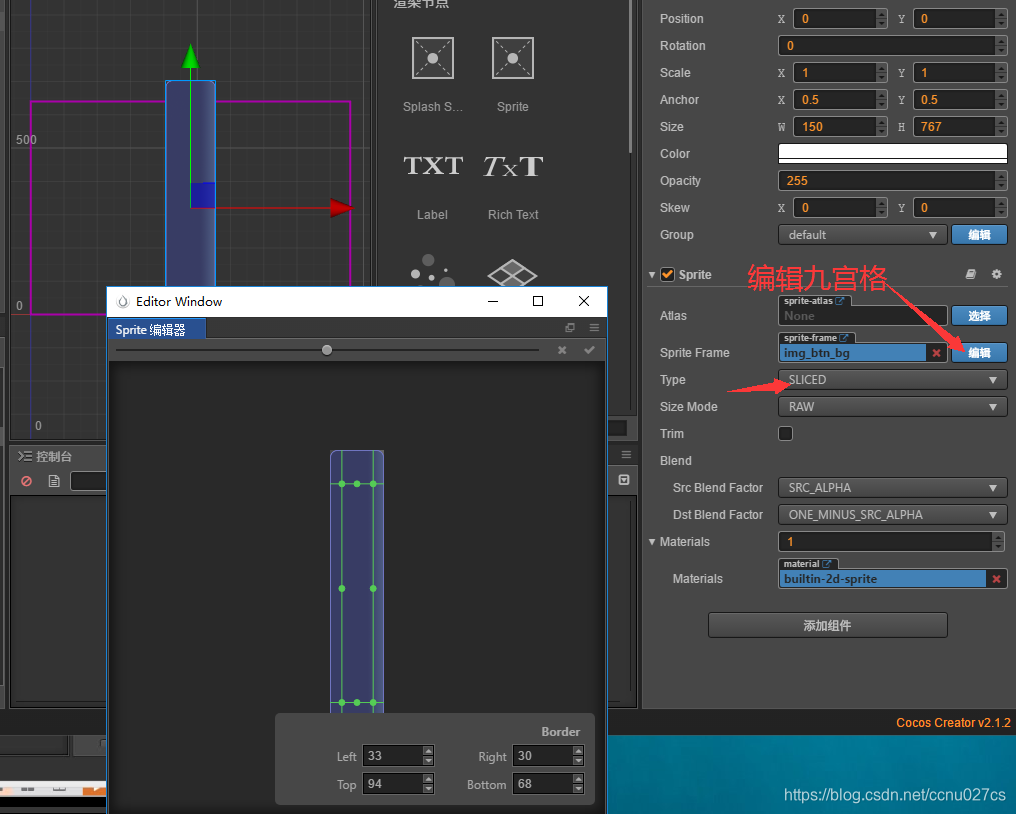
3: Slice: 九宫格模式,指定拉伸区域;
4: Filled: 设置填充的方式(圆,矩形),可以使用比例来裁剪显示图片(只显示的比例);
九宫格的使用
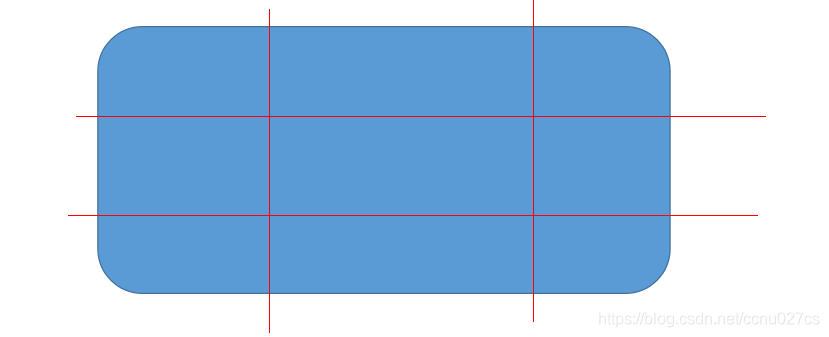
1: 指定拉伸区域, 让图片在拉伸的时候某些区域不会改变; 比如圆角,聊天气泡等
2: 九宫格能省图片资源, (对话框);
3: 编辑九宫格,来制定缩放区域;
4: 体会对话框背景的九宫拉伸;
Filled模式
1: 配置Filled模式
2: 配置Filled模式, 设置为Radius参数;
3: 配置Radius的参数模式,
中心: 位置坐标(0, 1小数), (0, 0)左下脚, (1, 1) 右上角 (0.5, 0.5) 中心点
Fill Start 开始的位置: 0 ~1, 右边中心点开始,逆时针走
Fill Range: 填充总量(0, 1];
FillRange为正,那么就是逆时针,如果为负,那么就是顺时针;
4: 个性化时间进度条案例;
5: 游戏中道具的时间进度显示都可以;
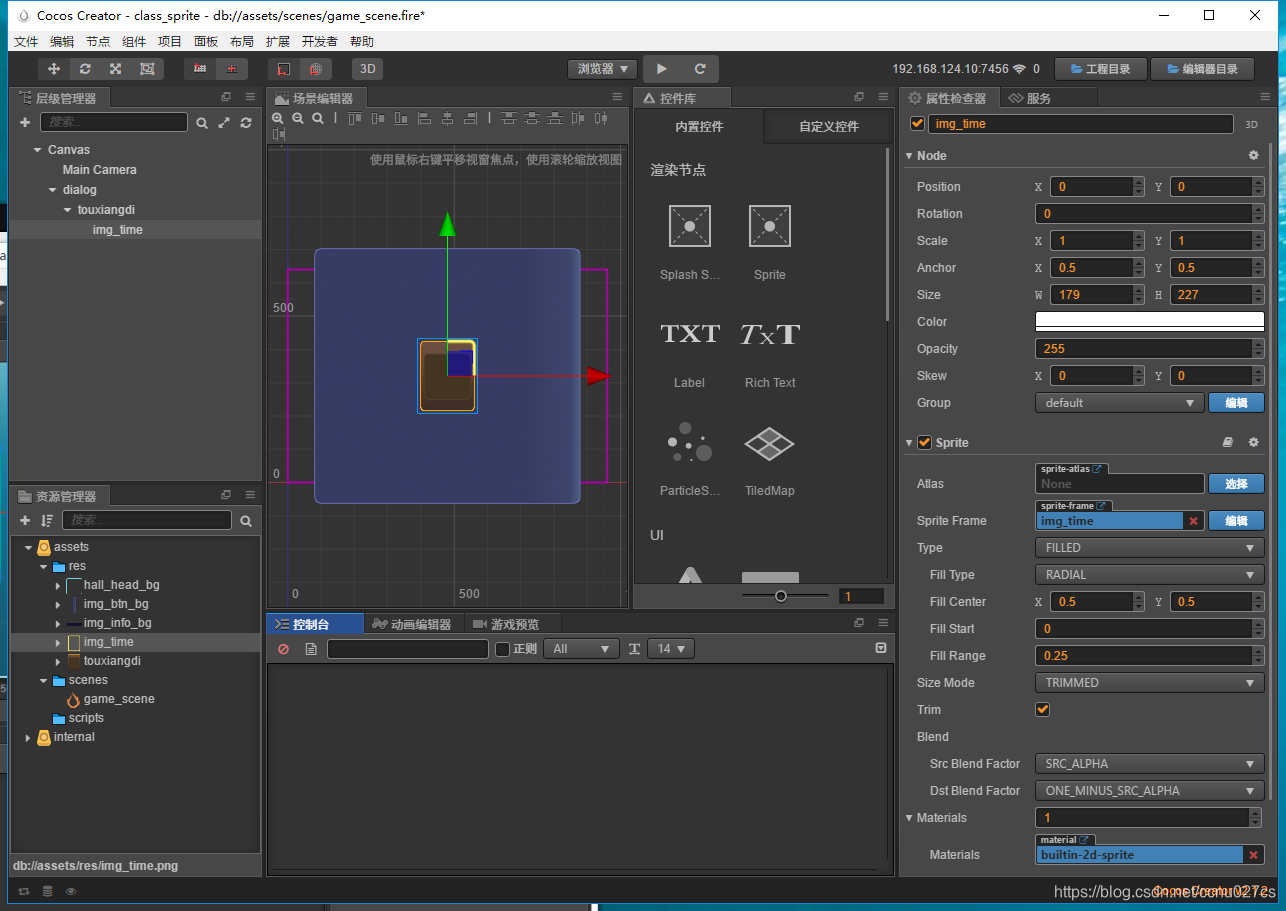
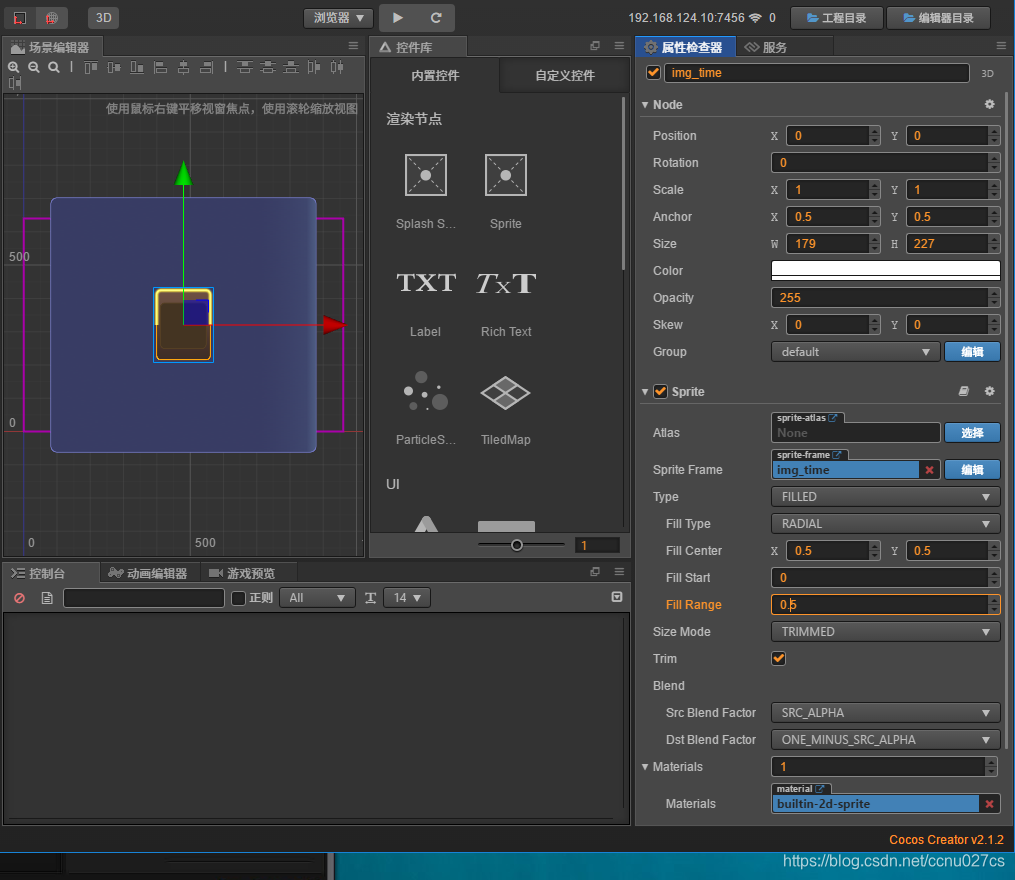
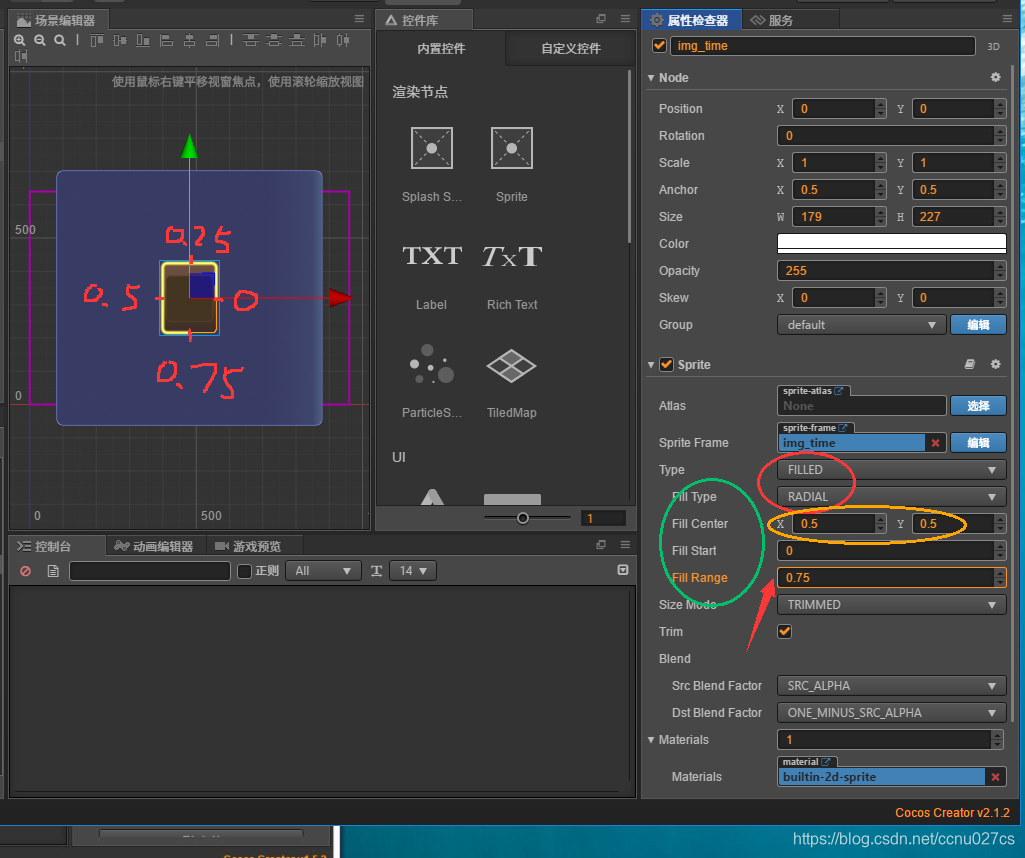
这里Fill Range为负数的时候,会改变旋转方向。正数是逆时针,负数是顺时针。
head.js周围边框倒计时效果
// Learn cc.Class:// - [Chinese] https://docs.cocos.com/creator/manual/zh/scripting/class.html// - [English] http://docs.cocos2d-x.org/creator/manual/en/scripting/class.html// Learn Attribute:// - [Chinese] https://docs.cocos.com/creator/manual/zh/scripting/reference/attributes.html// - [English] http://docs.cocos2d-x.org/creator/manual/en/scripting/reference/attributes.html// Learn life-cycle callbacks:// - [Chinese] https://docs.cocos.com/creator/manual/zh/scripting/life-cycle-callbacks.html// - [English] https://www.cocos2d-x.org/docs/creator/manual/en/scripting/life-cycle-callbacks.html cc.Class({ extends: cc.Component, properties: { // foo: { // // ATTRIBUTES: // default: null, // The default value will be used only when the component attaching // // to a node for the first time // type: cc.SpriteFrame, // optional, default is typeof default // serializable: true, // optional, default is true // }, // bar: { // get () { // return this._bar; // }, // set (value) { // this._bar = value; // } // }, sprite: { default: null, type: cc.Sprite, }, act_time: 15, }, // LIFE-CYCLE CALLBACKS: onLoad () { //获取组件实例:1代码获取、2编辑器绑定 var _node = this.node.getChildByName("time_bar"); this.sp = _node.getComponent(cc.Sprite); //1.增加 //this.now_time = 0; //2.减少 this.now_time = this.act_time; }, start () { }, update (dt) { // //1.增加 // this.now_time += dt; // var percent = this.now_time / this.act_time; //百分比 // if(percent >= 1){ // percent = 1; // this.now_time = 0;//重新开始 // } // this.sp.fillRange = percent; //2.减少 this.now_time -= dt; var percent = this.now_time / this.act_time; //百分比 if(percent <= 0){ this.now_time = this.act_time;//重新开始 } this.sp.fillRange = percent; },});change_frame.js
// Learn cc.Class://  - [Chinese] https://docs.cocos.com/creator/manual/zh/scripting/class.html//  - [English] http://docs.cocos2d-x.org/creator/manual/en/scripting/class.html// Learn Attribute://  - [Chinese] https://docs.cocos.com/creator/manual/zh/scripting/reference/attributes.html//  - [English] http://docs.cocos2d-x.org/creator/manual/en/scripting/reference/attributes.html// Learn life-cycle callbacks://  - [Chinese] https://docs.cocos.com/creator/manual/zh/scripting/life-cycle-callbacks.html//  - [English] https://www.cocos2d-x.org/docs/creator/manual/en/scripting/life-cycle-callbacks.htmlcc.Class({    extends: cc.Component,    properties: {        // foo: {        //     // ATTRIBUTES:        //     default: null,        // The default value will be used only when the component attaching        //                           // to a node for the first time        //     type: cc.SpriteFrame, // optional, default is typeof default        //     serializable: true,   // optional, default is true        // },        // bar: {        //     get () {        //         return this._bar;        //     },        //     set (value) {        //         this._bar = value;        //     }        // },        //1编辑器方式,2代码资源的动态加载        sprite_frame: {            default: null,            type: cc.SpriteFrame,        },    },    // LIFE-CYCLE CALLBACKS:    onLoad () {        //获取组件实例:1代码获取、2编辑器绑定        //var node = this.node.getChildByName("img_time");        this.sp = this.getComponent(cc.Sprite);        this.sp.spriteFrame = this.sprite_frame;//注意是小写spriteFrame    },    start () {    },    // update (dt) {},});

https://blog.csdn.net/ccnu027cs/article/details/102472127
