thinkphp 数据库连接报错 SQLSTATE[HY000] [2002] No such file or directory

https://blog.csdn.net/tornge/article/details/51388233

找到mysql sokcet的路径

vim /etc/mysql/mysql.conf.d/mysqld.cnf 
socket          = /var/run/mysqld/mysqld.sock

在php.ini中关于mysql的socket路径的地方,修改如如下

复制代码
[Pdo_mysql]
; If mysqlnd is used: Number of cache slots for the internal result set cache
; http://php.net/pdo_mysql.cache_size
pdo_mysql.cache_size = 2000

; Default socket name for local MySQL connects.  If empty, uses the built-in
; MySQL defaults.
; http://php.net/pdo_mysql.default-socket
pdo_mysql.default_socket=/var/run/mysqld/mysqld.sock

SQLSTATE[HY000] [2002] Connection refused错误 (磁盘满了导致MySQL启动不了)

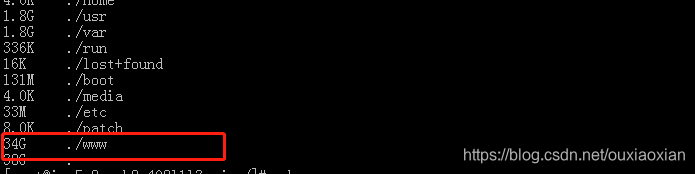
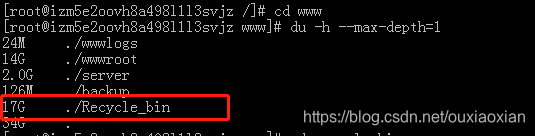
问题:自己公司的测试服务器,运行的好好的,突然不能用了,数据库打不开,项目也打不开,报SQLSTATE[HY000] [2002] Connection refused,去百度了一下,发现是磁盘满了MySQL启动不了导致的,后来查看了一下,发现是因为mysql_bin日志自动生成

查看占用磁盘空间的文件

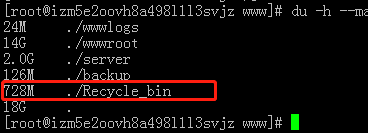
清除日志后,查看文件大小

然后自己根据百度的删除日志方法,将不要的日志删除(下面是别人的方法,可行的)

https://blog.csdn.net/ck3207/article/details/76691904
https://blog.csdn.net/caokun_8341/article/details/78868844

然后关闭了my.cnf里面的日志生成(根据情况而定,可以设置成每几天清除一下日志)

清除日志,释放磁盘后,重启MySQL,项目就正常运行了

PHP 苹果支付校验

最近跟iOS这边对接苹果支付,商品等信息由前端访问谷歌服务器获取,支付等都由前端完成,后端则需要校验前端传过来的参数,通过后入库处理
苹果支付后返回给iOS的数据,有一串很长的base64的数据,后端只需要获取这串数据来校验

   /**IOS内购验证票据
     * @param string $receipt_data 付款后凭证
     * @param bool $sandbox 是否为沙盒
     * @param bool $transactions 仅对包含自动续订的应用收据使用此字段
     * @return mixed
     */
    public function validate_applepay($receipt_data,$sandbox=true,$transactions=false)
    {
        $jsonData = array('receipt-data' => $receipt_data, 'password' => config('apple_pay')['password'],'exclude-old-transactions'=>$transactions);
        $post_json = json_encode($jsonData);
        $url=$sandbox===true?"https://sandbox.itunes.apple.com/verifyReceipt":"https://buy.itunes.apple.com/verifyReceipt";
        $client=new Client(['verify' => false]);
        $response=   $client->post($url,[
            'body'=>$post_json,
            'headers'  => [
                'Content-Type' => 'application/json'
            ]
        ]);
        $result= $response->getBody()->getContents();;
        $res= json_decode($result, true);
     if (intval($res['status']) == 0) {  //验证成功
            $apple_pay = config('apple_pay');
            $products = array_keys($apple_pay['products']);
            $product_id = $res['receipt']['in_app'][0]['product_id'];
            if (!in_array($product_id, $products)) {
                $this->error='不是系统内部的商品ID';
                return false;
            }
            if ($res['receipt']['bundle_id']!= $apple_pay['bundle_id']) {
                $this->error='bundle_id 不一致';
                return false;
            }
            $info = $this->getOne($res['receipt']['in_app'][0]['transaction_id']);
            if ($info){
                $this->error='交易号重复';
                return false;
            }
            return true;
        } elseif (intval($res['status']) == 21007) {
            return  $this->validate_applepay($receipt_data,true);
        } else {
            $this->error=self::code[$res['status']];
            return false;
        }
    }

校验通过后,苹果返回的状态码

 Const code=[
        21000=>'App Store无法读取你提供的JSON数据',
        21002=>'收据数据不符合格式',
        21003=> '收据无法被验证',
        21004=> '你提供的共享密钥和账户的共享密钥不一致',
        21005=> '收据服务器当前不可用',
        21006=> '收据是有效的,但订阅服务已经过期。当收到这个信息时,解码后的收据信息也包含在返回内容中',
        21007=>'收据信息是测试用(sandbox),但却被发送到产品环境中验证',
        21008=>'收据信息是产品环境中使用,但却被发送到测试环境中验证'
    ];

校验通过的返回的数据

    "receipt":{
        "receipt_type":"ProductionSandbox",
        "adam_id":0,
        "app_item_id":0,
        "bundle_id":"com.xxx.xxx",
        "application_version":"2",
        "download_id":0,
        "version_external_identifier":0,
        "receipt_creation_date":"2020-07-03 03:05:51 Etc/GMT",
        "receipt_creation_date_ms":"1593745551000",
        "receipt_creation_date_pst":"2020-07-02 20:05:51 America/Los_Angeles",
        "request_date":"2020-07-09 03:26:37 Etc/GMT",
        "request_date_ms":"1594265197186",
        "request_date_pst":"2020-07-08 20:26:37 America/Los_Angeles",
        "original_purchase_date":"2013-08-01 07:00:00 Etc/GMT",
        "original_purchase_date_ms":"1375340400000",
        "original_purchase_date_pst":"2013-08-01 00:00:00 America/Los_Angeles",
        "original_application_version":"1.0",
        "in_app":[
            {
                "quantity":"1",
                "product_id":"xxxx",
                "transaction_id":"1000000687969364",
                "original_transaction_id":"1000000687969364",
                "purchase_date":"2020-07-03 03:05:51 Etc/GMT",
                "purchase_date_ms":"1593745551000",
                "purchase_date_pst":"2020-07-02 20:05:51 America/Los_Angeles",
                "original_purchase_date":"2020-07-03 03:05:51 Etc/GMT",
                "original_purchase_date_ms":"1593745551000",
                "original_purchase_date_pst":"2020-07-02 20:05:51 America/Los_Angeles",
                "is_trial_period":"false"
            }]
    },
    "status":0,
    "environment":"Sandbox"
}

作者:seahonest
链接:https://www.jianshu.com/p/02a4fa66b9cf
来源:简书
著作权归作者所有。商业转载请联系作者获得授权,非商业转载请注明出处。

vue项目实现缓存的最佳方案

需求

在开发vue的项目中有遇到了这样一个需求:一个视频列表页面,展示视频名称和是否收藏,点击进去某一项观看,可以收藏或者取消收藏,返回的时候需要记住列表页面的页码等状态,同时这条视频的收藏状态也需要更新, 但是从其他页面进来视频列表页面的时候不缓存这个页面,也就是进入的时候是视频列表页面的第一页

一句话总结一下: pageAList->pageADetail->pageAList, 缓存pageAList, 同时该视频的收藏状态如果发生变化需要更新, 其他页面->pageAList, pageAList不缓存

在网上找了很多别人的方法,都不满足我们的需求

然后我们团队几个人捣鼓了几天,还真的整出了一套方法,实现了这个需求

实现后的效果

无图无真相,用一张gif图来看一下实现后的效果吧!!!

操作流程:

  • 首页->pageAList, 跳转第二页 ->首页-> pageAList,页码显示第一页,说明从其他页面进入pageAList, pageAList页面没有被缓存
  • pageAList, 跳转到第三页,点击视频22 -> 进入视频详情页pageADetail,点击收藏,收藏成功,点击返回 -> pageAList显示的是第三页,并且视频22的收藏状态从未收藏变成已收藏,说明从pageADetail进入pageAList,pageAList页面缓存了,并且更新了状态

说明:

  • 二级缓存: 也就是从A->B->A,缓存A
  • 三级缓存:A->B->C->B->A, 缓存A,B
    因为项目里面绝大部分是二级缓存,这里我们就做二级缓存,但是这不代表我的这个缓存方法不适用三级缓存,三级缓存后面我也会讲如何实现

实现二级缓存

用vue-cli2的脚手架搭建了一个项目,用这个项目来说明如何实现
先来看看项目目录

删除了无用的components目录和assets目录,新增了src/pages目录和src/store目录, pages页面用来存放页面组件, store不多说,存放vuex相关的东西,新增了server/app.js目录,用来启动后台服务

1. 前提条件

  • 项目引入vue,vuex, vue-router,axios等vue全家桶
  • 引入element-ui,只是为了项目美观,毕竟本人懒癌晚期,不想自己写样式
  • 在config/index.js里面配置前端代理

+ 引入express,启动后台,后端开3003端口,给前端提供api支持 来看看服务端代码server/app.js,非常简单,就是造了30条数据,写了3个接口,几十行文件直接搭建了一个node服务器,简单粗暴解决数据模拟问题,会mock用mock也行

const express = require('express')
// const bodyParser = require('body-parser')
const app = express()
let allList = Array.from({length: 30}, (v, i) => ({
  id: i,
  name: '视频' + i,
  isCollect: false
}))
// 后台设置允许跨域访问
// 前后端都是本地localhost,所以不需要设置cors跨域,如果是部署在服务器上,则需要设置
// app.all('*', function (req, res, next) {
//   res.header('Access-Control-Allow-Origin', '*')
//   res.header('Access-Control-Allow-Headers', 'X-Requested-With')
//   res.header('Access-Control-Allow-Methods', 'PUT,POST,GET,DELETE,OPTIONS')
//   res.header('X-Powered-By', ' 3.2.1')
//   res.header('Content-Type', 'application/json;charset=utf-8')
//   next()
// })
app.use(express.json())
app.use(express.urlencoded({extended: false}))
// 1 获取所有的视频列表
app.get('/api/getVideoList', function (req, res) {
  let query = req.query
  let currentPage = query.currentPage
  let pageSize = query.pageSize
  let list = allList.slice((currentPage - 1) * pageSize, currentPage * pageSize)
  res.json({
    code: 0,
    data: {
      list,
      total: allList.length
    }
  })
})
// 2 获取某一条视频详情
app.get('/api/getVideoDetail/:id', function (req, res) {
  let id = Number(req.params.id)
  let info = allList.find(v => v.id === id)
  res.json({
    code: 0,
    data: info
  })
})
// 3 收藏或者取消收藏视频
app.post('/api/collectVideo', function (req, res) {
  let id = Number(req.body.id)
  let isCollect = req.body.isCollect
  allList = allList.map((v, i) => {
    return v.id === id ? {...v, isCollect} : v
  })
  res.json({code: 0})
})
const PORT = 3003
app.listen(PORT, function () {
  console.log('app is listening port' + PORT)
})

2. 路由配置

在路由配置里面把需要缓存的路由的meta添加keepAlive属性,值为true, 这个想必大家都知道,是缓存路由组件的
在我们项目里面,需要缓存的路由是pageAList,所以这个路由的meta的keepAlive设置成true,其他路由正常写,路由文件src/router/index.js如下:

import Vue from 'vue'
import Router from 'vue-router'
import home from '../pages/home'
import pageAList from '../pages/pageAList'
import pageADetail from '../pages/pageADetail'
import pageB from '../pages/pageB'
import main from '../pages/main'
Vue.use(Router)

export default new Router({
  routes: [
    {
      path: '/',
      name: 'main',
      component: main,
      redirect: '/home',
      children: [
        {
          path: 'home',
          name: 'home',
          component: home
        },
        {
          path: 'pageAList',
          name: 'pageAList',
          component: pageAList,
          meta: {
            keepAlive: true
          }
        },
        {
          path: 'pageB',
          component: pageB
        }
      ]
    },
    {
      path: '/pageADetail',
      name: 'pageADetail',
      component: pageADetail
    }
  ]
})

3. vuex配置

vuex的store.js里面存储一个名为excludeComponents的数组,这个数组用来操作需要做缓存的组件

state.js

const state = {
  excludeComponents: [] 
}
export default state

同时在mutations.js里面加入两个方法, addExcludeComponent是往excludeComponents里面添加元素的,removeExcludeComponent是往excludeComponents数组里面移除元素

注意: 这两个方法的第二个参数是数组或者组件name

mutations.js

const mutations = {
  addExcludeComponent (state, excludeComponent) {
    let excludeComponents = state.excludeComponents
    if (Array.isArray(excludeComponent)) {
      state.excludeComponents = [...new Set([...excludeComponents, ...excludeComponent])]
    } else {
      state.excludeComponents = [...new Set([...excludeComponents, excludeComponent])]
    }
  },
  // excludeComponent可能是组件name字符串或者数组
  removeExcludeComponent (state, excludeComponent) {
    let excludeComponents = state.excludeComponents
    if (Array.isArray(excludeComponent)) {
      for (let i = 0; i < excludeComponent.length; i++) {
        let index = excludeComponents.findIndex(v => v === excludeComponent[i])
        if (index > -1) {
          excludeComponents.splice(index, 1)
        }
      }
    } else {
      for (let i = 0, len = excludeComponents.length; i < len; i++) {
        if (excludeComponents[i] === excludeComponent) {
          excludeComponents.splice(i, 1)
          break
        }
      }
    }
    state.excludeComponents = excludeComponents
  }
}
export default mutations

4. keep-alive包裹router-view

将App.vue的router-view用keep-alive组件包裹, main.vue的路由也需要这么包裹,这点非常重要,因为pageAList组件是从它们的router-view中匹配的

<keep-alive :exclude="excludeComponents"><som-component></some-component></keep-alive>这个写法大家应该不会陌生,这也是尤大神官方推荐的缓存方法, exclude属性值可以是组件名称字符串(组件选项的name属性)或者数组,代表不缓存这些组件,所以vuex里面的addExcludeComponent是代表要缓存组件,addExcludeComponent代表不缓存组件,这里稍微有点绕,请牢记这个规则,这样接下来你就不会被绕进去了。

App.vue

<template>
  <div id="app">
    <keep-alive :exclude="excludeComponents">
      <router-view v-if="$route.meta.keepAlive"></router-view>
    </keep-alive>
    <router-view v-if="!$route.meta.keepAlive"></router-view>
  </div>
</template>

<script>
export default {
  name: 'App',
  computed: {
    excludeComponents () {
      return this.$store.state.excludeComponents
    }
  }
}
</script

main.vue

<template>
  <div>
    <ul>
      <li v-for="nav in navs" :key="nav.name">
        <router-link :to="nav.name">{{nav.title}}</router-link>
      </li>
    </ul>
    <keep-alive :exclude="excludeComponents">
      <router-view v-if="$route.meta.keepAlive"></router-view>
    </keep-alive>
    <router-view v-if="!$route.meta.keepAlive"></router-view>
  </div>
</template>
<script>
export default {
  name: 'main.vue',
  data () {
    return {
      navs: [{
        name: 'home',
        title: '首页'
      }, {
        name: 'pageAList',
        title: 'pageAList'
      }, {
        name: 'pageB',
        title: 'pageB'
      }]
    }
  },
  methods: {
  },
  computed: {
    excludeComponents () {
      return this.$store.state.excludeComponents
    }
  },
  created () {
  }
}
</script>

接下来的两点设置非常重要

5. 一级组件

对于需要缓存的一级路由pageAList,添加两个路由生命周期钩子beforeRouteEnterbeforeRouteLeave

import {getVideoList} from '../api'
export default {
  name: 'pageAList', // 组件名称,和组件对应的路由名称不需要相同
  data () {
    return {
      currentPage: 1,
      pageSize: 10,
      total: 0,
      allList: [],
      list: []
    }
  },
  methods: {
    getVideoList () {
      let params = {currentPage: this.currentPage, pageSize: this.pageSize}
      getVideoList(params).then(r => {
        if (r.code === 0) {
          this.list = r.data.list
          this.total = r.data.total
        }
      })
    },
    goIntoVideo (item) {
      this.$router.push({name: 'pageADetail', query: {id: item.id}})
    },
    handleCurrentPage (val) {
      this.currentPage = val
      this.getVideoList()
    }
  },
  beforeRouteEnter (to, from, next) {
    next(vm => {
      vm.$store.commit('removeExcludeComponent', 'pageAList')
      next()
    })
    },
  beforeRouteLeave (to, from, next) {
    let reg = /pageADetail/
    if (reg.test(to.name)) {
      this.$store.commit('removeExcludeComponent', 'pageAList')
    } else {
      this.$store.commit('addExcludeComponent', 'pageAList')
    }
    next()
  },
  activated () {
    this.getVideoList()
  },
  mounted () {
    this.getVideoList()
  }
}
  • beforeRouteEnter,进入这个组件pageAList之前,在excludeComponents移除当前组件,也就是缓存当前组件,所以任何路由跳转到这个组件,这个组件其实都是被缓存的,都会触发activated钩子
  • beforeRouteLeave: 离开当前页面,如果跳转到pageADetail,那么就需要在excludeComponents移除当前组件pageAList,也就是缓存当前组件,如果是跳转到其他页面,就需要把pageAList添加进去excludeComponents,也就是不缓存当前组件
  • 获取数据的方法getVideoList在mounted或者created钩子里面调取,如果二级路由更改数据,一级路由需要更新,那么就需要在activated钩子里再获取一次数据,我们这个详情可以收藏,改变列表的状态,所以这两个钩子都使用了

6. 二级组件

对于需要缓存的一级路由的二级路由组件pageADetail,添加beforeRouteLeave路由生命周期钩子

在这个beforeRouteLeave钩子里面,需要先清除一级组件的缓存状态,如果跳转路由匹配到一级组件,再缓存一级组件

beforeRouteLeave (to, from, next) {
    let componentName = ''
    // 离开详情页时,将pageAList添加到exludeComponents里,也就是将需要缓存的页面pageAList置为不缓存状态
    let list = ['pageAList']
    this.$store.commit('addExcludeComponent', list)
    // 缓存组件路由名称到组件name的映射
    let map = new Map([['pageAList', 'pageAList']])
    componentName = map.get(to.name) || ''
    // 如果离开的时候跳转的路由是pageAList,将pageAList从exludeComponents里面移除,也就是要缓存pageAList
    this.$store.commit('removeExcludeComponent', componentName)
    next()
  }

7.实现方法总结

  • 进入了pageAList,就在beforeRouteEnter里缓存了它,离开当前组件的时候有两种情况:
    • 1 跳转进去pageADetail,在pageAList的beforeRouteLeave钩子里面缓存pageAList,从pageADetail离开的时候,也有两种情况
      • (1) 回到pageAList,那么在pageADetail的beforeRouteLeave钩子里面缓存了pageAList,所以这就是从pageAList-pageADetail-pageAList的时候,pageAList可以被缓存,还是之前的页码状态
      • (2) 进入其他路由,在pageADetail的beforeRouteLeave钩子里面清除了pageAList的缓存
    • 2 跳转到非pageADetail的页面,在pageAList的beforeRouteLeave钩子里面清除pageAList的缓存

方案评估

自认为用这个方案来实现缓存,最终的效果非常完美了
缺点:

  1. 代码有点多,缓存代码不好复用
  2. 性能问题:如果在要缓存的一级组件里面写了activated钩子,那么从非一级组件对应的二级组件进入到要缓存的一级组件的时候,会发送两次接口请求数据,mounted里面一次, activated里面一次, 所以如果想追求几行代码完美解决缓存问题的,这里就有点无能为力了

项目源码

项目源码的github地址,欢迎大家克隆下载

项目启动与效果演示

  1. npm install安装项目依赖
  2. npm run server启动后台服务器监听本地3003端口
  3. npm run dev启动前端项目

三级缓存

上面的方法二级缓存就够了
上面我们说的是两个页面,二级缓存的问题,现在假设有三个页面,A1-A2-A3,一步步点进去,要求从A3返回到A2的时候,缓存A2,再从A2返回A1的时候,缓存A1,大家可以自己动手研究下,这里就不写了,其实就是上面的思路,留给大家研究,大家可以关注我的微信公众号,里面有三级缓存的代码答案。

PHP如何在页面中原样输出HTML代码

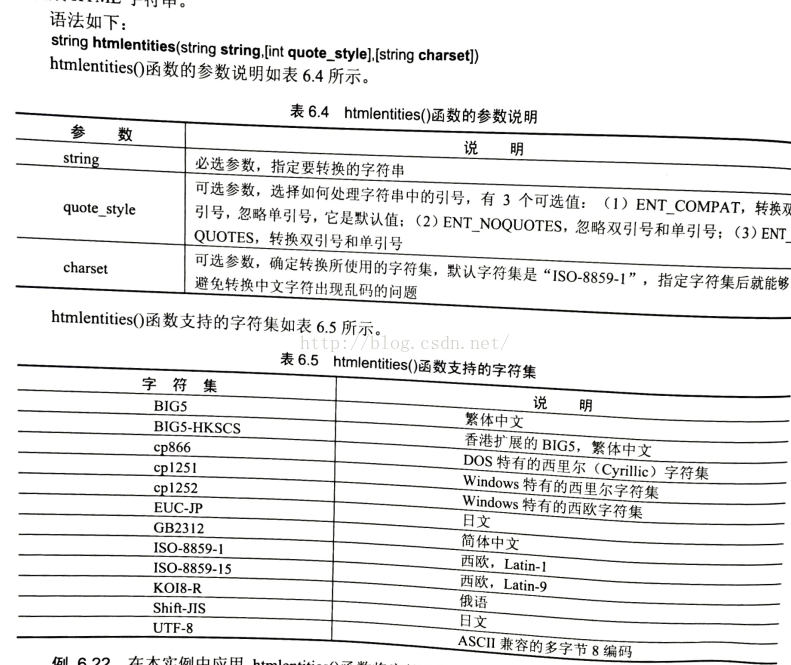
字符串与HTML之间的相互转换主要应用htmlentities()函数来完成。

header("Content-Type: text/html; charset=utf-8");$str="<a href=\"www.107lab.com\">107网站工作室</a>";echo $str;echo "<br>";echo htmlentities($str,ENT_QUOTES,"UTF-8");

运行结果为:

107网站工作室
<a href=”www.107lab.com”>107网站工作室</a>

技巧:在应用此函数对字符串转换成HTML字符串的过程中,设置参数charset的字符集为utf-8,即可以避免在输出中文字符时出现乱码。

htmlentities() 函数把字符转换为 HTML 实体。

提示:要把 HTML 实体转换回字符,请使用 html_entity_decode() 函数。

提示:请使用 get_html_translation_table() 函数来返回 htmlentities() 使用的翻译表。

总结PHP删除字符串最后一个字符的三种方法

总结PHP删除字符串最后一个字符的三种方法_php技巧_脚本之家

一、前言

从数据库中select()读取一对多的信息时,经常需要将取出的数组用某个特定的字符分割,然后拼接成字符串。

常见的语法格式:?

123foreach ($arr as $key => $value) {$arr_str = $arr['x_id'] . ',' . $arr_str;}

foreach ($arr as $key => $value) { $arr_str = $arr[‘x_id’] . ‘,’ . $arr_str; }

假设字符数组 $arr 中的字符分别为?

123arr[0] = 'a';arr[1] = 'b';arr[2] = 'c';

arr[0] = ‘a’; arr[1] = ‘b’; arr[2] = ‘c’;

则,拼接后的 $arr_str 字符串为 a,b,c, 这个时候,就需要我们对最后一位字符’,’进行删除处理。

二、PHP中删除最后一位字符的方法总结:

方法一:?

1substr($arr_str,0,strlen($arr_str)-1);

substr($arr_str,0,strlen($arr_str)-1);

详解:substr()函数语法:string substr ( string $string , int $start [, int $length ] )

           strlen()函数语法:int strlen ( string $string )

本例原理:

        首先使用strlen()函数判断字符串$arr_str的长度,然后使用substr()函数对$arr_str进行截取,截取至$arr_str的倒数第二位。这样就把最后的”,”去掉了。

使用感受:

         不推荐,php中还有更简洁更好用的方式!

方法二:     ?

1substr($arr_str, 0, -1)

substr($arr_str, 0, -1)

详解:直接使用substr()函数倒序裁掉最后一位字符;

使用感受:还是很合适的~~不过,首先你要确定字符串中一定有内容,且最后一位一定不要!

方法三:       
?

1rtrim($arr_str, ",")

rtrim($arr_str, “,”)

详解:rtrim()函数语法:string rtrim ( string $str [, string $character_mask ] )

rtrim — 删除字符串末端的空白字符(或者其他字符)

使用感受:

简直就是为了这个需求准备的!

注意:以上方法对字符串进行操作后,返回操作结果,并不对字符串本身进行改变!记得使用一个变量进行接收结果!

三、总结

以上就是PHP删除字符串最后一个字符的几种方法总结,大家都学会了吗?希望这篇文章对大家的学习或者工作能带来一定的帮助。

layui的select实现省市区级联

本来是一个很简单的思路,就是change事件触发查询,但是我这个页面(之前已经存在的)是融合了vue+layui导致原来的vue的语法在这里边不受用,例如简单的@change因为用了layui是监听不到的,只能用layui的方式去实现,并且我也不知道怎么回事,在layui的change事件里边竟然不能用axios,我真的是特别无语了……总是提示这个undefined那个undefined

百度N圈,各种方法试遍,总算找到了可以实现的方式,不把它整理出来,感觉都对不起自己,以后我自己写的页面是坚决不会把vue和layui融合在一起了,感觉还是vue+element更适合!

1、页面的html

                       <div class="project-location">
                <div class="title">
                    <span>项目所在地:</span>
                </div>
                <div class="layui-form">
                    <div class="layui-input-inline">
                        <select ref="modules"
                                class="layui-form-select"
                                name="projectProvice"
                                lay-verify="required"
                                lay-filter="province"
                                lay-search>
                            <option value="">请选择省</option>
                            <option v-for="(type,index) in provinces" :value="type.dcode">{{type.distname}}</option>
                        </select>
                    </div>
                </div>
                <div class="cut-line">—</div>
                <div class="layui-form">
                    <div class="layui-input-inline">
                        <select ref="modules"
                                class="layui-form-select"
                                name="projectCity"
                                id="city"
                                lay-verify="required"
                                lay-filter="mycity"
                                lay-search>
                            <option value="0">请选择市</option>
                            <!--option v-for="(type,index) in cities" :value="type.dcode">{{type.distname}}</option> -->
                       </select>
                   </div>
                </div>
                <div class="cut-line">—</div>
                <div class="layui-form">
                   <div class="layui-input-inline">
                       <select ref="modules"
                               class="layui-form-select"
                               name="projectZone"
                               id="zone"
                               lay-filter="zone"
                               lay-verify="required"
                               lay-search>
                           <option value="0">请选择区</option>
                          <!--<option v-for="(type,index) in zones" :value="type.dcode">{{type.distname}}</option>-->
                       </select>
                   </div>
                </div>
            </div>

注意:这里省的option的赋值用的还是v-for,在页面mouted时查询出省级的数据,再layui render,市区的则是ajax查出数据之后再apend

2、在mouted()里边获取省级数据

this.axios.get("/qsmonitor/common/dist?pcode=")
               .then(res => {
                   this.provinces = res.data.data;
                   setTimeout(function() {
                       layui.form.render();
                   }, 10);
               });

3、选中省ajax获取市级数据

layui.form.on("select(province)", function (opt) {
               let pcode=opt.value;
               let $ = layui.jquery;
               layui.jquery.get("/qsmonitor/common/dist?pcode=" + pcode)
                   .then(res => {
                       //每次加载都要把之前选中的初始化
                       $("#city").empty();
                       $("#city").append(new Option("请选择市","0"));
                       $("#zone").empty();
                       $("#zone").append(new Option("请选择区","0"));
                       let tt = eval('(' + res + ')');
                       $.each(tt.data, function(key, val) {
                           $("#city").append(new Option(val.distname,val.dcode));
                       });
                       layui.form.render("select");
                   });
           });

4、选中市ajax获取区县数据

layui.form.on("select(mycity)", function (op) {
               let pd=op.value;
               let $ = layui.jquery;
               layui.jquery.get("/qsmonitor/common/dist?pcode=" + pd)
                   .then(res => {
                      $("#zone").empty();
                       $("#zone").append(new Option("请选择区","0"));
                      
                       let zz = eval('(' + res + ')');
                       $.each(zz.data, function(key, val) {
                           $("#zone").append(new Option(val.distname,val.pcode));
                       });
 
                       layui.form.render("select");
                   });
           });

基于java的网络抓包技术研究与实现

本实验是用java实现的网络抓包程序,在windows环境下安装winpcap4.0和jpcap6.0后,下载eclipse和jigloo插件(一种在eclipse底下作图形化开发的工具),将其安装好,然后就可以进行java的网络抓包图形化开发了。

二、原理与关键技术
2.1 网络抓包技术原理
网络层上有各种各样的数据包,它们以不同的帧格式在网络层上进行传输,但是在传输时它们都遵循相同的格式,即有相同的长度,如果一种协议的帧格式达不到这种长度,就让其补齐,以达到我们的要求。

2.2 网络抓包关键技术
无论是在windows操作系统下还是在linux操作系统下,要想捕获网络上的数据包,必须要对网卡进行控制,因为本机的数据报从网络上来到本机是通过网卡然后再保存到本地缓冲区上的,所以要抓获网包就必须调用网卡驱动中的对外函数,在linux系统中有net.h文件,可以调用net.h文件中的函数来操作网卡,可以直接编程实现,但为了更方便的使用,可以安装一个叫libpcap的软件,这样调用函数更好用,而在windows系统中,因为源代码不对外公开,所以要安装一个叫winpcap的软件,这样用C或VC++就可以实现了,但因为我用的是java语言来实现的,所以无论是在哪个系统都要安装一个叫jpcap的软件,它本身就把底层的函数又封装了一下,这样就可以让java来使用了。

三、设计与实现
3.1 基于java的设计方案
我的这个网络抓包程序是图形化操作界面,在菜单栏点击抓包按钮后选择网卡和过滤字还有最长字长,点击开始,然后就可以开始抓包了,在主界面中就会显示出一行又一行的数据,这些数据就是抓获到的数据包。

3.2 具体实现
1、安装winpcap4.0和jpcap6.0

2、下载eclipse3.3和jigloo,jigloo是eclipse底下的插件,是用来支持eclipse底下的java 图形化开发的。

3、编写java抓包程序:

建立三个文件,一个主程序,一个抓包程序,一个抓包选项程序对话框程序

第一个程序:主程序如下Java代码  

收藏代码
  1. package netcap;  
  2.   
  3. import java.awt.event.ActionEvent;  
  4.   
  5. import java.awt.event.ActionListener;  
  6.   
  7.    
  8.   
  9. import javax.swing.JSeparator;  
  10.   
  11. import javax.swing.JMenuItem;  
  12.   
  13. import javax.swing.JMenu;  
  14.   
  15. import javax.swing.JMenuBar;  
  16.   
  17.    
  18.   
  19. import java.awt.*;  
  20.   
  21. import java.awt.event.*;  
  22.   
  23. import javax.swing.*;  
  24.   
  25. import javax.swing.table.*;  
  26.   
  27. import netcap.*;  
  28.   
  29. import jpcap.*;  
  30.   
  31. import jpcap.packet.*;  
  32.   
  33. import java.util.*;  
  34.   
  35. import java.sql.Timestamp;  
  36.   
  37.    
  38.   
  39. /** 
  40.  
  41. * This code was edited or generated using CloudGarden’s Jigloo 
  42.  
  43. * SWT/Swing GUI Builder, which is free for non-commercial 
  44.  
  45. * use. If Jigloo is being used commercially (ie, by a corporation, 
  46.  
  47. * company or business for any purpose whatever) then you 
  48.  
  49. * should purchase a license for each developer using Jigloo. 
  50.  
  51. * Please visit www.cloudgarden.com for details. 
  52.  
  53. * Use of Jigloo implies acceptance of these licensing terms. 
  54.  
  55. * A COMMERCIAL LICENSE HAS NOT BEEN PURCHASED FOR 
  56.  
  57. * THIS MACHINE, SO JIGLOO OR THIS CODE CANNOT BE USED 
  58.  
  59. * LEGALLY FOR ANY CORPORATE OR COMMERCIAL PURPOSE. 
  60.  
  61. */  
  62.   
  63. public class JFrameMain extends javax.swing.JFrame implements ActionListener{  
  64.   
  65.    
  66.   
  67.        private JMenuItem exitMenuItem;  
  68.   
  69.        private JSeparator jSeparator2;  
  70.   
  71.        private JMenuItem saveAsMenuItem;  
  72.   
  73.        private JMenuItem saveMenuItem;  
  74.   
  75.        private JMenuItem stopMenuItem;  
  76.   
  77.        private JMenuItem startMenuItem;  
  78.   
  79.        private JMenu Menu;  
  80.   
  81.        private JMenuBar jMenuBar1;  
  82.   
  83.          
  84.   
  85.        JTable tabledisplay = null;  
  86.   
  87.        Vector rows,columns;  
  88.   
  89.        DefaultTableModel tabModel;  
  90.   
  91.        JScrollPane scrollPane;  
  92.   
  93.        JLabel statusLabel;  
  94.   
  95.          
  96.   
  97.        Netcaptor captor = new Netcaptor();  
  98.   
  99.    
  100.   
  101.        /** 
  102.  
  103.        * Auto-generated main method to display this JFrame 
  104.  
  105.        */  
  106.   
  107.        public static void main(String[] args) {  
  108.   
  109.               JFrameMain inst = new JFrameMain();  
  110.   
  111.               inst.setVisible(true);  
  112.   
  113.        }  
  114.   
  115.          
  116.   
  117.        public JFrameMain() {  
  118.   
  119.               super();  
  120.   
  121.               initGUI();  
  122.   
  123.        }  
  124.   
  125.          
  126.   
  127.        private void initGUI() {  
  128.   
  129.               try {  
  130.   
  131.                      setSize(400, 300);  
  132.   
  133.                      {  
  134.   
  135.                             jMenuBar1 = new JMenuBar();  
  136.   
  137.                             setJMenuBar(jMenuBar1);  
  138.   
  139.                             {  
  140.   
  141.                                    Menu = new JMenu();  
  142.   
  143.                                    jMenuBar1.add(Menu);  
  144.   
  145.                                    Menu.setText(“\u6293\u5305”);  
  146.   
  147.                                    Menu.setPreferredSize(new java.awt.Dimension(35, 21));  
  148.   
  149.                                    {  
  150.   
  151.                                           startMenuItem = new JMenuItem();  
  152.   
  153.                                           Menu.add(startMenuItem);  
  154.   
  155.                                           startMenuItem.setText(“开始”);  
  156.   
  157.                                           startMenuItem.setActionCommand(“start”);  
  158.   
  159.                                           startMenuItem.addActionListener(this);  
  160.   
  161.                                    }  
  162.   
  163.                                    {  
  164.   
  165.                                           stopMenuItem = new JMenuItem();  
  166.   
  167.                                           Menu.add(stopMenuItem);  
  168.   
  169.                                           stopMenuItem.setText(“停止”);  
  170.   
  171.                                           stopMenuItem.setActionCommand(“stop”);  
  172.   
  173.                                           stopMenuItem.addActionListener(this);  
  174.   
  175.                                    }  
  176.   
  177.                                    {  
  178.   
  179.                                           saveMenuItem = new JMenuItem();  
  180.   
  181.                                           Menu.add(saveMenuItem);  
  182.   
  183.                                           saveMenuItem.setText(“保存”);  
  184.   
  185.                                    }  
  186.   
  187.                                    {  
  188.   
  189.                                           saveAsMenuItem = new JMenuItem();  
  190.   
  191.                                           Menu.add(saveAsMenuItem);  
  192.   
  193.                                           saveAsMenuItem.setText(“保存为 …”);  
  194.   
  195.                                    }  
  196.   
  197.                                    {  
  198.   
  199.                                           jSeparator2 = new JSeparator();  
  200.   
  201.                                           Menu.add(jSeparator2);  
  202.   
  203.                                    }  
  204.   
  205.                                    {  
  206.   
  207.                                           exitMenuItem = new JMenuItem();  
  208.   
  209.                                           Menu.add(exitMenuItem);  
  210.   
  211.                                           exitMenuItem.setText(“Exit”);  
  212.   
  213.                                           exitMenuItem.setActionCommand(“exit”);  
  214.   
  215.                                           exitMenuItem.addActionListener(this);  
  216.   
  217.                                    }  
  218.   
  219.                             }  
  220.   
  221.                      }  
  222.   
  223.                        
  224.   
  225.                      rows=new Vector();  
  226.   
  227.                      columns= new Vector();  
  228.   
  229.                        
  230.   
  231.                      columns.addElement(“数据报时间”);  
  232.   
  233.                      columns.addElement(“源IP地址”);  
  234.   
  235.                      columns.addElement(“目的IP地址”);  
  236.   
  237.                      columns.addElement(“首部长度”);  
  238.   
  239.                      columns.addElement(“数据长度”);  
  240.   
  241.                      columns.addElement(“是否分段”);  
  242.   
  243.                      columns.addElement(“分段偏移量”);  
  244.   
  245.                      columns.addElement(“首部内容”);  
  246.   
  247.                      columns.addElement(“数据内容”);  
  248.   
  249.    
  250.   
  251.                        
  252.   
  253.                      tabModel=new DefaultTableModel();  
  254.   
  255.                      tabModel.setDataVector(rows,columns);  
  256.   
  257.                      tabledisplay = new JTable( tabModel );  
  258.   
  259.                      scrollPane= new JScrollPane(tabledisplay);  
  260.   
  261.                      this.getContentPane().add( new JScrollPane(tabledisplay),BorderLayout.CENTER);  
  262.   
  263.                        
  264.   
  265.                      statusLabel=new JLabel(“06610班 张琛雨 066100583”);  
  266.   
  267.                      this.getContentPane().add(statusLabel,BorderLayout.SOUTH);  
  268.   
  269.               } catch (Exception e) {  
  270.   
  271.                      e.printStackTrace();  
  272.   
  273.               }  
  274.   
  275.        }  
  276.   
  277.          
  278.   
  279.        public void actionPerformed(ActionEvent event){  
  280.   
  281.               String cmd=event.getActionCommand();  
  282.   
  283.                 
  284.   
  285.               if(cmd.equals(“start”)){  
  286.   
  287.                      captor.capturePacketsFromDevice();  
  288.   
  289.                      captor.setJFrame(this);  
  290.   
  291.               }  
  292.   
  293.               else if(cmd.equals(“stop”)){  
  294.   
  295.                      captor.stopCapture();  
  296.   
  297.               }  
  298.   
  299.               else if(cmd.equals(“exit”)){  
  300.   
  301.                      System.exit(0);  
  302.   
  303.               }  
  304.   
  305.        }  
  306.   
  307.    
  308.   
  309.        public void dealPacket( Packet packet )  
  310.   
  311.        {  
  312.   
  313.               try  
  314.   
  315.               {  
  316.   
  317.                      Vector r=new Vector();  
  318.   
  319.                      String strtmp;  
  320.   
  321.                      Timestamp timestamp = new Timestamp((packet.sec * 1000) + (packet.usec / 1000));   
  322.   
  323.                        
  324.   
  325.                      r.addElement( timestamp.toString() );  //数据报时间  
  326.   
  327.                      r.addElement(((IPPacket)packet).src_ip.toString());    //源IP地址  
  328.   
  329.                      r.addElement(((IPPacket)packet).dst_ip.toString());    //目的IP地址  
  330.   
  331.                      r.addElement( packet.header.length );   //首部长度  
  332.   
  333.                      r.addElement( packet.data.length );             //数据长度  
  334.   
  335.                      r.addElement( ((IPPacket)packet).dont_frag == true ? “分段” : “不分段” );                          //是否不分段  
  336.   
  337.                      r.addElement( ((IPPacket)packet).offset );          //数据长度  
  338.   
  339.          
  340.   
  341.                      strtmp = “”;  
  342.   
  343.                      for(int i=0;i<packet.header.length;i++){               
  344.   
  345.                             strtmp += Byte.toString(packet.header[i]);  
  346.   
  347.                      }  
  348.   
  349.                      r.addElement(strtmp);    //首部内容  
  350.   
  351.          
  352.   
  353.                      strtmp = “”;  
  354.   
  355.                      for(int i=0;i<packet.data.length;i++){            
  356.   
  357.                             strtmp += Byte.toString(packet.data[i]);  
  358.   
  359.                      }  
  360.   
  361.                      r.addElement(strtmp);    //数据内容  
  362.   
  363.                                                           
  364.   
  365.                      rows.addElement(r);  
  366.   
  367.                      tabledisplay.addNotify();  
  368.   
  369.               }  
  370.   
  371.               catch( Exception e)  
  372.   
  373.               {  
  374.   
  375.                        
  376.   
  377.               }  
  378.   
  379.        }  
  380.   
  381. }  
  382.   
  383. 在这里定义了一个向量r,当有数据包产生时,便将数据包赋值给r,rows.AddElement(r)语句便将r添加到向量rows中,然后tabledisplay.addNotify();语句就会刷新界面将新的数据包显示出来。  
  384.   
  385.    
  386.   
  387. 第二个程序:抓包  
  388.   
  389. package netcap;  
  390.   
  391.    
  392.   
  393. import java.io.File;  
  394.   
  395. import java.util.Vector;  
  396.   
  397.    
  398.   
  399. import javax.swing.JFileChooser;  
  400.   
  401. import javax.swing.JOptionPane;  
  402.   
  403.    
  404.   
  405. import jpcap.JpcapCaptor;  
  406.   
  407. import jpcap.PacketReceiver;  
  408.   
  409. import jpcap.JpcapWriter;  
  410.   
  411. import jpcap.packet.Packet;  
  412.   
  413.    
  414.   
  415. public class Netcaptor {  
  416.   
  417.    
  418.   
  419.        JpcapCaptor jpcap = null;  
  420.   
  421.        JFrameMain frame;  
  422.   
  423.          
  424.   
  425.        public void setJFrame(JFrameMain frame){  
  426.   
  427.               this.frame=frame;  
  428.   
  429.        }  
  430.   
  431.          
  432.   
  433.        public void capturePacketsFromDevice() {  
  434.   
  435.    
  436.   
  437.               if(jpcap!=null)  
  438.   
  439.                      jpcap.close();  
  440.   
  441.                        
  442.   
  443.               jpcap = Jcapturedialog.getJpcap(frame);  
  444.   
  445.                 
  446.   
  447.               if (jpcap != null) {  
  448.   
  449.                      startCaptureThread();  
  450.   
  451.               }  
  452.   
  453.    
  454.   
  455.        }  
  456.   
  457.          
  458.   
  459.        private Thread captureThread;  
  460.   
  461.          
  462.   
  463.        private void startCaptureThread(){  
  464.   
  465.                 
  466.   
  467.               if(captureThread != null)  
  468.   
  469.                      return;  
  470.   
  471.               captureThread = new Thread(new Runnable(){  
  472.   
  473.                      public void run(){  
  474.   
  475.                             while(captureThread != null){  
  476.   
  477.                                    jpcap.processPacket(1, handler);  
  478.   
  479.                             }  
  480.   
  481.                      }  
  482.   
  483.               });  
  484.   
  485.               captureThread.setPriority(Thread.MIN_PRIORITY);  
  486.   
  487.               captureThread.start();  
  488.   
  489.        }  
  490.   
  491.          
  492.   
  493.        void stopcaptureThread(){  
  494.   
  495.               captureThread = null;  
  496.   
  497.        }  
  498.   
  499.          
  500.   
  501.        public void stopCapture(){  
  502.   
  503.               System.out.println(2);  
  504.   
  505.               stopcaptureThread();  
  506.   
  507.        }  
  508.   
  509.          
  510.   
  511.        private PacketReceiver handler=new PacketReceiver(){  
  512.   
  513.               public void receivePacket(Packet packet) {  
  514.   
  515.                      //System.out.println(packet);  
  516.   
  517.                      frame.dealPacket(packet);  
  518.   
  519.               }  
  520.   
  521.                 
  522.   
  523.        };  
  524.   
  525. }  

定义一个抓包对象JpcapCaptor jpcap = null;但点击开始时调用private void startCaptureThread()方法开始抓包,jpcap.processPacket(1, handler);语句能够反复调用handler所指向的方法,这个方法中定义的packet就是网络上抓到的数据包,经过frame.dealPacket(packet);就可以显示在主界面上。

程序三:抓包选项Java代码  

收藏代码
  1. package netcap;  
  2.   
  3.    
  4.   
  5. import javax.swing.JFrame;  
  6.   
  7. import jpcap.*;  
  8.   
  9. import java.awt.*;  
  10.   
  11. import java.awt.event.*;  
  12.   
  13. import javax.swing.*;  
  14.   
  15.    
  16.   
  17.    
  18.   
  19. /** 
  20.  
  21. * This code was edited or generated using CloudGarden’s Jigloo 
  22.  
  23. * SWT/Swing GUI Builder, which is free for non-commercial 
  24.  
  25. * use. If Jigloo is being used commercially (ie, by a corporation, 
  26.  
  27. * company or business for any purpose whatever) then you 
  28.  
  29. * should purchase a license for each developer using Jigloo. 
  30.  
  31. * Please visit www.cloudgarden.com for details. 
  32.  
  33. * Use of Jigloo implies acceptance of these licensing terms. 
  34.  
  35. * A COMMERCIAL LICENSE HAS NOT BEEN PURCHASED FOR 
  36.  
  37. * THIS MACHINE, SO JIGLOO OR THIS CODE CANNOT BE USED 
  38.  
  39. * LEGALLY FOR ANY CORPORATE OR COMMERCIAL PURPOSE. 
  40.  
  41. */  
  42.   
  43. public class Jcapturedialog extends javax.swing.JDialog implements ActionListener {  
  44.   
  45.    
  46.   
  47.        /** 
  48.  
  49.        * Auto-generated main method to display this JDialog 
  50.  
  51.        */  
  52.   
  53.        static JpcapCaptor jpcap=null;  
  54.   
  55.        private JRadioButton wholeRadioButton;  
  56.   
  57.        private JPanel buttonPanel;  
  58.   
  59.        private JButton cancelButton;  
  60.   
  61.        private JButton okButton;  
  62.   
  63.        private JRadioButton userRadioButton;  
  64.   
  65.        private JRadioButton headRadioButton;  
  66.   
  67.        private JPanel netPanel;  
  68.   
  69.        private JTextField caplenTextField;  
  70.   
  71.        private JPanel caplenPanel;  
  72.   
  73.        private JTextField TextField;  
  74.   
  75.        private JPanel filterPanel;  
  76.   
  77.        private JCheckBox CheckBox;  
  78.   
  79.        private JComboBox netJComboBox;  
  80.   
  81.        private JPanel jPanel_east;  
  82.   
  83.        private JPanel jPanel_west;  
  84.   
  85.    
  86.   
  87.        NetworkInterface[] devices;  
  88.   
  89.          
  90.   
  91.        public static void main(String[] args) {  
  92.   
  93.               JFrame frame = new JFrame();  
  94.   
  95.               Jcapturedialog inst = new Jcapturedialog(frame);  
  96.   
  97.               inst.setVisible(true);  
  98.   
  99.        }  
  100.   
  101.          
  102.   
  103.        public Jcapturedialog(JFrame frame) {  
  104.   
  105.               super(frame,”选择要检测的网卡并设置参数”,true);  
  106.   
  107.    
  108.   
  109.               try {  
  110.   
  111.                      BoxLayout thisLayout = new BoxLayout(  
  112.   
  113.                             getContentPane(),  
  114.   
  115.                             javax.swing.BoxLayout.X_AXIS);  
  116.   
  117.                      getContentPane().setLayout(thisLayout);  
  118.   
  119.                      {  
  120.   
  121.                             jPanel_west = new JPanel();  
  122.   
  123.                             jPanel_west.setLayout(new BoxLayout(jPanel_west,BoxLayout.Y_AXIS));  
  124.   
  125.                             getContentPane().add(jPanel_west);  
  126.   
  127.                             {  
  128.   
  129.                                    netPanel = new JPanel();  
  130.   
  131.                                    FlowLayout netPanelLayout = new FlowLayout();  
  132.   
  133.                                    netPanelLayout.setAlignOnBaseline(true);  
  134.   
  135.                                    netPanel.setBorder(BorderFactory.createTitledBorder(“选择网卡”));  
  136.   
  137.                                    netPanel.setAlignmentX(Component.LEFT_ALIGNMENT);  
  138.   
  139.                                    jPanel_west.add(netPanel);  
  140.   
  141.                                    netPanel.setLayout(netPanelLayout);  
  142.   
  143. //                                 netPanel.setPreferredSize(new java.awt.Dimension(239, 56));  
  144.   
  145.                                    {  
  146.   
  147.                                           devices = JpcapCaptor.getDeviceList();  
  148.   
  149.                                           if(devices == null){  
  150.   
  151.                                                  JOptionPane.showMessageDialog(frame, “没有找到网卡”);  
  152.   
  153.                                                  dispose();  
  154.   
  155.                                                  return;  
  156.   
  157.                                           }  
  158.   
  159.                                           else{  
  160.   
  161.                                                  String[] names = new String[devices.length];  
  162.   
  163.                                                  for(int i=0;i < names.length;i++){  
  164.   
  165.                                                         names[i] = (devices[i].description == null?devices[i].name:devices[i].description);  
  166.   
  167.                                                  }  
  168.   
  169.                                                  netJComboBox = new JComboBox(names);  
  170.   
  171.                                           }  
  172.   
  173.                                                  netPanel.add(netJComboBox);        
  174.   
  175.                                    }  
  176.   
  177.                             }  
  178.   
  179.                             {  
  180.   
  181.                                    CheckBox = new JCheckBox();  
  182.   
  183.                                    jPanel_west.add(CheckBox);  
  184.   
  185.                                    FlowLayout CheckBoxLayout = new FlowLayout();  
  186.   
  187.                                    CheckBoxLayout.setAlignOnBaseline(true);  
  188.   
  189.                                    CheckBox.setText(“\u662f\u5426\u8bbe\u7f6e\u4e3a\u6df7\u6742\u6a21\u5f0f”);  
  190.   
  191.                                    CheckBox.setLayout(null);  
  192.   
  193.                             }  
  194.   
  195.                             {  
  196.   
  197.                                    filterPanel = new JPanel();  
  198.   
  199.                                    filterPanel.setBorder(BorderFactory.createTitledBorder(“捕获过滤器”));  
  200.   
  201.                                    filterPanel.setAlignmentX(Component.LEFT_ALIGNMENT);  
  202.   
  203.                                    FlowLayout filterPanelLayout = new FlowLayout();  
  204.   
  205.                                    filterPanelLayout.setAlignment(FlowLayout.LEFT);  
  206.   
  207.                                    filterPanelLayout.setAlignOnBaseline(true);  
  208.   
  209.                                    jPanel_west.add(filterPanel);  
  210.   
  211.                                    filterPanel.setLayout(filterPanelLayout);  
  212.   
  213.                                    {  
  214.   
  215.                                           TextField = new JTextField(20);  
  216.   
  217.                                           filterPanel.add(TextField);  
  218.   
  219.                                    }  
  220.   
  221.                             }  
  222.   
  223.                      }  
  224.   
  225.                      {  
  226.   
  227.                             jPanel_east = new JPanel();  
  228.   
  229.                             jPanel_east.setLayout(new BoxLayout(jPanel_east,BoxLayout.Y_AXIS));  
  230.   
  231.                             getContentPane().add(jPanel_east);  
  232.   
  233.    
  234.   
  235.                             {  
  236.   
  237.                                    caplenPanel = new JPanel();  
  238.   
  239.                                    caplenPanel.setBorder(BorderFactory.createTitledBorder(“最长字长”));  
  240.   
  241.                                    caplenPanel.setAlignmentX(Component.LEFT_ALIGNMENT);  
  242.   
  243.                                    jPanel_east.add(caplenPanel);  
  244.   
  245.                                    caplenPanel.setLayout(new BoxLayout(caplenPanel,BoxLayout.Y_AXIS));  
  246.   
  247.    
  248.   
  249.                                    {  
  250.   
  251.                                           caplenTextField = new JTextField(20);  
  252.   
  253.                                           caplenPanel.add(caplenTextField);  
  254.   
  255.                                           caplenTextField.setText(“1514”);  
  256.   
  257.                                           caplenTextField.setEnabled(false);  
  258.   
  259.                                    }  
  260.   
  261.                                    {  
  262.   
  263.                                           wholeRadioButton = new JRadioButton();  
  264.   
  265.                                           FlowLayout userRadioButtonLayout = new FlowLayout();  
  266.   
  267.                                           userRadioButtonLayout.setAlignOnBaseline(true);  
  268.   
  269.                                           caplenPanel.add(wholeRadioButton);  
  270.   
  271.                                           wholeRadioButton.setText(“\u6574\u4e2a\u6570\u636e\u62a5”);  
  272.   
  273.                                           wholeRadioButton.setSelected(true);  
  274.   
  275.    
  276.   
  277.                                           wholeRadioButton.addActionListener(this);  
  278.   
  279.                                    }  
  280.   
  281.                                    {  
  282.   
  283.                                           headRadioButton = new JRadioButton();  
  284.   
  285.                                           caplenPanel.add(headRadioButton);  
  286.   
  287.                                           headRadioButton.setText(“\u4ec5\u9996\u90e8”);  
  288.   
  289.    
  290.   
  291.                                           headRadioButton.addActionListener(this);  
  292.   
  293.                                    }  
  294.   
  295.                                    {  
  296.   
  297.                                           userRadioButton = new JRadioButton();  
  298.   
  299.                                           caplenPanel.add(userRadioButton);  
  300.   
  301.                                           userRadioButton.setText(“\u5176\u4ed6\u90e8\u5206”);  
  302.   
  303.    
  304.   
  305.                                           userRadioButton.addActionListener(this);  
  306.   
  307.                                    }  
  308.   
  309.                                    ButtonGroup group=new ButtonGroup();  
  310.   
  311.                                    group.add(wholeRadioButton);  
  312.   
  313.                                    wholeRadioButton.setActionCommand(“Whole”);  
  314.   
  315.                                    group.add(headRadioButton);  
  316.   
  317.                                    headRadioButton.setActionCommand(“Head”);  
  318.   
  319.                                    group.add(userRadioButton);  
  320.   
  321.                                    userRadioButton.setActionCommand(“user”);  
  322.   
  323.                             }  
  324.   
  325.                             {  
  326.   
  327.                                    buttonPanel = new JPanel(new FlowLayout(FlowLayout.RIGHT));  
  328.   
  329. //                                 buttonPanel.setLayout(new BoxLayout(buttonPanel,BoxLayout.X_AXIS));  
  330.   
  331.                                    jPanel_east.add(buttonPanel);  
  332.   
  333.    
  334.   
  335.                                    {  
  336.   
  337.                                           okButton = new JButton();  
  338.   
  339.                                           buttonPanel.add(okButton);  
  340.   
  341.                                           FlowLayout cancelButtonLayout = new FlowLayout();  
  342.   
  343.                                           cancelButtonLayout.setAlignOnBaseline(true);  
  344.   
  345.                                           okButton.setText(“\u786e\u5b9a”);  
  346.   
  347.    
  348.   
  349.                                           okButton.setActionCommand(“ok”);  
  350.   
  351.                                           okButton.addActionListener(this);  
  352.   
  353.                                    }  
  354.   
  355.                                    {  
  356.   
  357.                                           cancelButton = new JButton();  
  358.   
  359.                                           buttonPanel.add(cancelButton);  
  360.   
  361.                                           cancelButton.setText(“\u53d6\u6d88”);  
  362.   
  363.    
  364.   
  365.                                           cancelButton.setActionCommand(“cancel”);  
  366.   
  367.                                           cancelButton.addActionListener(this);  
  368.   
  369.                                    }  
  370.   
  371. //                                 buttonPanel.setAlignmentX(Component.RIGHT_ALIGNMENT);  
  372.   
  373.                             }  
  374.   
  375.                      }  
  376.   
  377.                      getContentPane().setLayout(new BoxLayout(getContentPane(),BoxLayout.X_AXIS));  
  378.   
  379.    
  380.   
  381.                      getContentPane().add(jPanel_west);  
  382.   
  383.    
  384.   
  385.                      getContentPane().add(jPanel_east);  
  386.   
  387.    
  388.   
  389.                      pack();  
  390.   
  391.    
  392.   
  393.               } catch (Exception e) {  
  394.   
  395.                      e.printStackTrace();  
  396.   
  397.               }  
  398.   
  399.        }  
  400.   
  401.        public void actionPerformed(ActionEvent evt){  
  402.   
  403.               String cmd=evt.getActionCommand();  
  404.   
  405.                 
  406.   
  407.               if(cmd.equals(“Whole”)){  
  408.   
  409.                      caplenTextField.setText(“1514”);  
  410.   
  411.                      caplenTextField.setEnabled(false);  
  412.   
  413.               }else if(cmd.equals(“Head”)){  
  414.   
  415.                      caplenTextField.setText(“68”);  
  416.   
  417.                      caplenTextField.setEnabled(false);  
  418.   
  419.               }else if(cmd.equals(“user”)){  
  420.   
  421.                      caplenTextField.setText(“”);  
  422.   
  423.                      caplenTextField.setEnabled(true);  
  424.   
  425.                      caplenTextField.requestFocus();  
  426.   
  427.               }else if(cmd.equals(“ok”)){  
  428.   
  429.                      try{  
  430.   
  431.                             int caplen=Integer.parseInt(caplenTextField.getText());  
  432.   
  433.                             if(caplen<68 || caplen>1514){  
  434.   
  435.                                    JOptionPane.showMessageDialog(null,”捕获长度必须介于 68 和 1514之间”);  
  436.   
  437.                                    return;  
  438.   
  439.                             }  
  440.   
  441.                               
  442.   
  443.                             jpcap=JpcapCaptor.openDevice(devices[netJComboBox.getSelectedIndex()],caplen,  
  444.   
  445.                                           CheckBox.isSelected(),50);  
  446.   
  447.                               
  448.   
  449.                             if(TextField.getText()!=null && TextField.getText().length()>0){  
  450.   
  451.                                    jpcap.setFilter(TextField.getText(),true);  
  452.   
  453.                             }  
  454.   
  455.                      }catch(NumberFormatException e){  
  456.   
  457.                             JOptionPane.showMessageDialog(null,”捕获长度必须是正整数”);  
  458.   
  459.                      }catch(java.io.IOException e){  
  460.   
  461.                             JOptionPane.showMessageDialog(null,e.toString());  
  462.   
  463.                             jpcap=null;  
  464.   
  465.                      }finally{  
  466.   
  467.                             dispose();  
  468.   
  469.                      }  
  470.   
  471.                 
  472.   
  473.               }else if(cmd.equals(“cancel”)){  
  474.   
  475.                      dispose();  
  476.   
  477.               }  
  478.   
  479.        }  
  480.   
  481.          
  482.   
  483.        public static JpcapCaptor getJpcap(JFrame parent){  
  484.   
  485.               new Jcapturedialog(parent).setVisible(true);  
  486.   
  487.               return jpcap;  
  488.   
  489.        }  
  490.   
  491. }  

这一部分主要是界面操作,根据jigloo插件对不同的按钮和文本框还有其他的组件设置监听操作,以激发不同的函数操作,主要是devices = JpcapCaptor.getDeviceList();语句和

jpcap=JpcapCaptor.openDevice(devices[netJComboBox.getSelectedIndex()],caplen,

CheckBox.isSelected(),50);语句要选择一下监听的网卡,比如说笔记本就有两个网卡,一个无线一个有线,选择一下就会监听相应的网卡。函数

public static JpcapCaptor getJpcap(JFrame parent){

       new Jcapturedialog(parent).setVisible(true);

       return jpcap;

    }

返回jpcap,这个jpcap就是对应的选择上的网卡对象,接下来就从对应的网卡对象jpcap上不断得到数据包。

基于java的网络抓包方法(转)

一、实验内容描述
本实验是用java实现的网络抓包程序,在windows环境下安装winpcap4.0和jpcap6.0后,下载eclipse和jigloo插件(一种在eclipse底下作图形化开发的工具),将其安装好,然后就可以进行java的网络抓包图形化开发了。
二、原理与关键技术
2.1 网络抓包技术原理
网络层上有各种各样的数据包,它们以不同的帧格式在网络层上进行传输,但是在传输时它们都遵循相同的格式,即有相同的长度,如果一种协议的帧格式达不到这种长度,就让其补齐,以达到我们的要求。
2.2 网络抓包关键技术
无论是在windows操作系统下还是在linux操作系统下,要想捕获网络上的数据包,必须要对网卡进行控制,因为本机的数据报从网络上来到本机是通过网卡然后再保存到本地缓冲区上的,所以要抓获网包就必须调用网卡驱动中的对外函数,在linux系统中有net.h文件,可以调用net.h文件中的函数来操作网卡,可以直接编程实现,但为了更方便的使用,可以安装一个叫libpcap的软件,这样调用函数更好用,而在windows系统中,因为源代码不对外公开,所以要安装一个叫winpcap的软件,这样用C或VC++就可以实现了,但因为我用的是java语言来实现的,所以无论是在哪个系统都要安装一个叫jpcap的软件,它本身就把底层的函数又封装了一下,这样就可以让java来使用了。
三、设计与实现
3.1 基于java的设计方案
我的这个网络抓包程序是图形化操作界面,在菜单栏点击抓包按钮后选择网卡和过滤字还有最长字长,点击开始,然后就可以开始抓包了,在主界面中就会显示出一行又一行的数据,这些数据就是抓获到的数据包。
3.2 具体实现
1、安装winpcap4.0和jpcap6.0
2、下载eclipse3.3和jigloo,jigloo是eclipse底下的插件,是用来支持eclipse底下的java 图形化开发的。
3、编写java抓包程序:
建立三个文件,一个主程序,一个抓包程序,一个抓包选项程序对话框程序
第一个程序:主程序如下
package netcap;
import java.awt.event.ActionEvent;
import java.awt.event.ActionListener;
 
import javax.swing.JSeparator;
import javax.swing.JMenuItem;
import javax.swing.JMenu;
import javax.swing.JMenuBar;
 
import java.awt.*;
import java.awt.event.*;
import javax.swing.*;
import javax.swing.table.*;
import netcap.*;
import jpcap.*;
import jpcap.packet.*;
import java.util.*;
import java.sql.Timestamp;
 
/**
* This code was edited or generated using CloudGarden’s Jigloo
* SWT/Swing GUI Builder, which is free for non-commercial
* use. If Jigloo is being used commercially (ie, by a corporation,
* company or business for any purpose whatever) then you
* should purchase a license for each developer using Jigloo.
* Please visit www.cloudgarden.com for details.
* Use of Jigloo implies acceptance of these licensing terms.
* A COMMERCIAL LICENSE HAS NOT BEEN PURCHASED FOR
* THIS MACHINE, SO JIGLOO OR THIS CODE CANNOT BE USED
* LEGALLY FOR ANY CORPORATE OR COMMERCIAL PURPOSE.
*/
public class JFrameMain extends javax.swing.JFrame implements ActionListener{
 
       private JMenuItem exitMenuItem;
       private JSeparator jSeparator2;
       private JMenuItem saveAsMenuItem;
       private JMenuItem saveMenuItem;
       private JMenuItem stopMenuItem;
       private JMenuItem startMenuItem;
       private JMenu Menu;
       private JMenuBar jMenuBar1;
      
       JTable tabledisplay = null;
       Vector rows,columns;
       DefaultTableModel tabModel;
       JScrollPane scrollPane;
       JLabel statusLabel;
      
       Netcaptor captor = new Netcaptor();
 
       /**
       * Auto-generated main method to display this JFrame
       */
       public static void main(String[] args) {
              JFrameMain inst = new JFrameMain();
              inst.setVisible(true);
       }
      
       public JFrameMain() {
              super();
              initGUI();
       }
      
       private void initGUI() {
              try {
                     setSize(400, 300);
                     {
                            jMenuBar1 = new JMenuBar();
                            setJMenuBar(jMenuBar1);
                            {
                                   Menu = new JMenu();
                                   jMenuBar1.add(Menu);
                                   Menu.setText(“\抓\包”);
                                   Menu.setPreferredSize(new java.awt.Dimension(35, 21));
                                   {
                                          startMenuItem = new JMenuItem();
                                          Menu.add(startMenuItem);
                                          startMenuItem.setText(“开始”);
                                          startMenuItem.setActionCommand(“start”);
                                          startMenuItem.addActionListener(this);
                                   }
                                   {
                                          stopMenuItem = new JMenuItem();
                                          Menu.add(stopMenuItem);
                                          stopMenuItem.setText(“停止”);
                                          stopMenuItem.setActionCommand(“stop”);
                                          stopMenuItem.addActionListener(this);
                                   }
                                   {
                                          saveMenuItem = new JMenuItem();
                                          Menu.add(saveMenuItem);
                                          saveMenuItem.setText(“保存”);
                                   }
                                   {
                                          saveAsMenuItem = new JMenuItem();
                                          Menu.add(saveAsMenuItem);
                                          saveAsMenuItem.setText(“保存为 …”);
                                   }
                                   {
                                          jSeparator2 = new JSeparator();
                                          Menu.add(jSeparator2);
                                   }
                                   {
                                          exitMenuItem = new JMenuItem();
                                          Menu.add(exitMenuItem);
                                          exitMenuItem.setText(“Exit”);
                                          exitMenuItem.setActionCommand(“exit”);
                                          exitMenuItem.addActionListener(this);
                                   }
                            }
                     }
                    
                     rows=new Vector();
                     columns= new Vector();
                    
                     columns.addElement(“数据报时间”);
                     columns.addElement(“源IP地址”);
                     columns.addElement(“目的IP地址”);
                     columns.addElement(“首部长度”);
                     columns.addElement(“数据长度”);
                     columns.addElement(“是否分段”);
                     columns.addElement(“分段偏移量”);
                     columns.addElement(“首部内容”);
                     columns.addElement(“数据内容”);
 
                    
                     tabModel=new DefaultTableModel();
                     tabModel.setDataVector(rows,columns);
                     tabledisplay = new JTable( tabModel );
                     scrollPane= new JScrollPane(tabledisplay);
                     this.getContentPane().add( new JScrollPane(tabledisplay),BorderLayout.CENTER);
                    
                     statusLabel=new JLabel(“06610班 张琛雨 066100583”);
                     this.getContentPane().add(statusLabel,BorderLayout.SOUTH);
              } catch (Exception e) {
                     e.printStackTrace();
              }
       }
      
       public void actionPerformed(ActionEvent event){
              String cmd=event.getActionCommand();
             
              if(cmd.equals(“start”)){
                     captor.capturePacketsFromDevice();
                     captor.setJFrame(this);
              }
              else if(cmd.equals(“stop”)){
                     captor.stopCapture();
              }
              else if(cmd.equals(“exit”)){
                     System.exit(0);
              }
       }
 
       public void dealPacket( Packet packet )
       {
              try
              {
                     Vector r=new Vector();
                     String strtmp;
                     Timestamp timestamp = new Timestamp((packet.sec * 1000) + (packet.usec / 1000));
                    
                     r.addElement( timestamp.toString() ); //数据报时间
                     r.addElement(((IPPacket)packet).src_ip.toString());    //源IP地址
                     r.addElement(((IPPacket)packet).dst_ip.toString());    //目的IP地址
                     r.addElement( packet.header.length );   //首部长度
                     r.addElement( packet.data.length );             //数据长度
                     r.addElement( ((IPPacket)packet).dont_frag == true ? “分段” : “不分段” );                          //是否不分段
                     r.addElement( ((IPPacket)packet).offset );          //数据长度
      
                     strtmp = “”;
                     for(int i=0;i<packet.header.length;i++){            
                            strtmp += Byte.toString(packet.header[i]);
                     }
                     r.addElement(strtmp);    //首部内容
      
                     strtmp = “”;
                     for(int i=0;i<packet.data.length;i++){         
                            strtmp += Byte.toString(packet.data[i]);
                     }
                     r.addElement(strtmp);    //数据内容
                                                       
                     rows.addElement(r);
                     tabledisplay.addNotify();
              }
              catch( Exception e)
              {
                    
              }
       }
}
在这里定义了一个向量r,当有数据包产生时,便将数据包赋值给r,rows.AddElement(r)语句便将r添加到向量rows中,然后tabledisplay.addNotify();语句就会刷新界面将新的数据包显示出来。
 
第二个程序:抓包
package netcap;
 
import java.io.File;
import java.util.Vector;
 
import javax.swing.JFileChooser;
import javax.swing.JOptionPane;
 
import jpcap.JpcapCaptor;
import jpcap.PacketReceiver;
import jpcap.JpcapWriter;
import jpcap.packet.Packet;
 
public class Netcaptor {
 
       JpcapCaptor jpcap = null;
       JFrameMain frame;
      
       public void setJFrame(JFrameMain frame){
              this.frame=frame;
       }
      
       public void capturePacketsFromDevice() {
 
              if(jpcap!=null)
                     jpcap.close();
                    
              jpcap = Jcapturedialog.getJpcap(frame);
             
              if (jpcap != null) {
                     startCaptureThread();
              }
 
       }
      
       private Thread captureThread;
      
       private void startCaptureThread(){
             
              if(captureThread != null)
                     return;
              captureThread = new Thread(new Runnable(){
                     public void run(){
                            while(captureThread != null){
                                   jpcap.processPacket(1, handler);
                            }
                     }
              });
              captureThread.setPriority(Thread.MIN_PRIORITY);
              captureThread.start();
       }
      
       void stopcaptureThread(){
              captureThread = null;
       }
      
       public void stopCapture(){
              System.out.println(2);
              stopcaptureThread();
       }
      
       private PacketReceiver handler=new PacketReceiver(){
              public void receivePacket(Packet packet) {
                     //System.out.println(packet);
                     frame.dealPacket(packet);
              }
             
       };
}
定义一个抓包对象JpcapCaptor jpcap = null;但点击开始时调用private void startCaptureThread()方法开始抓包,jpcap.processPacket(1, handler);语句能够反复调用handler所指向的方法,这个方法中定义的packet就是网络上抓到的数据包,经过frame.dealPacket(packet);就可以显示在主界面上。
程序三:抓包选项
package netcap;
 
import javax.swing.JFrame;
import jpcap.*;
import java.awt.*;
import java.awt.event.*;
import javax.swing.*;
 
 
/**
* This code was edited or generated using CloudGarden’s Jigloo
* SWT/Swing GUI Builder, which is free for non-commercial
* use. If Jigloo is being used commercially (ie, by a corporation,
* company or business for any purpose whatever) then you
* should purchase a license for each developer using Jigloo.
* Please visit www.cloudgarden.com for details.
* Use of Jigloo implies acceptance of these licensing terms.
* A COMMERCIAL LICENSE HAS NOT BEEN PURCHASED FOR
* THIS MACHINE, SO JIGLOO OR THIS CODE CANNOT BE USED
* LEGALLY FOR ANY CORPORATE OR COMMERCIAL PURPOSE.
*/
public class Jcapturedialog extends javax.swing.JDialog implements ActionListener {
 
       /**
       * Auto-generated main method to display this JDialog
       */
       static JpcapCaptor jpcap=null;
       private JRadioButton wholeRadioButton;
       private JPanel buttonPanel;
       private JButton cancelButton;
       private JButton okButton;
       private JRadioButton userRadioButton;
       private JRadioButton headRadioButton;
       private JPanel netPanel;
       private JTextField caplenTextField;
       private JPanel caplenPanel;
       private JTextField TextField;
       private JPanel filterPanel;
       private JCheckBox CheckBox;
       private JComboBox netJComboBox;
       private JPanel jPanel_east;
       private JPanel jPanel_west;
 
       NetworkInterface[] devices;
      
       public static void main(String[] args) {
              JFrame frame = new JFrame();
              Jcapturedialog inst = new Jcapturedialog(frame);
              inst.setVisible(true);
       }
      
       public Jcapturedialog(JFrame frame) {
              super(frame,”选择要检测的网卡并设置参数”,true);
 
              try {
                     BoxLayout thisLayout = new BoxLayout(
                            getContentPane(),
                            javax.swing.BoxLayout.X_AXIS);
                     getContentPane().setLayout(thisLayout);
                     {
                            jPanel_west = new JPanel();
                            jPanel_west.setLayout(new BoxLayout(jPanel_west,BoxLayout.Y_AXIS));
                            getContentPane().add(jPanel_west);
                            {
                                   netPanel = new JPanel();
                                   FlowLayout netPanelLayout = new FlowLayout();
                                   netPanelLayout.setAlignOnBaseline(true);
                                   netPanel.setBorder(BorderFactory.createTitledBorder(“选择网卡”));
                                   netPanel.setAlignmentX(Component.LEFT_ALIGNMENT);
                                   jPanel_west.add(netPanel);
                                   netPanel.setLayout(netPanelLayout);
//                                 netPanel.setPreferredSize(new java.awt.Dimension(239, 56));
                                   {
                                          devices = JpcapCaptor.getDeviceList();
                                          if(devices == null){
                                                 JOptionPane.showMessageDialog(frame, “没有找到网卡”);
                                                 dispose();
                                                 return;
                                          }
                                          else{
                                                 String[] names = new String[devices.length];
                                                 for(int i=0;i < names.length;i++){
                                                        names[i] = (devices[i].description == null?devices[i].name:devices[i].description);
                                                 }
                                                 netJComboBox = new JComboBox(names);
                                          }
                                                 netPanel.add(netJComboBox);     
                                   }
                            }
                            {
                                   CheckBox = new JCheckBox();
                                   jPanel_west.add(CheckBox);
                                   FlowLayout CheckBoxLayout = new FlowLayout();
                                   CheckBoxLayout.setAlignOnBaseline(true);
                                   CheckBox.setText(“\是\否\设\置\为\混\杂\模\式”);
                                   CheckBox.setLayout(null);
                            }
                            {
                                   filterPanel = new JPanel();
                                   filterPanel.setBorder(BorderFactory.createTitledBorder(“捕获过滤器”));
                                   filterPanel.setAlignmentX(Component.LEFT_ALIGNMENT);
                                   FlowLayout filterPanelLayout = new FlowLayout();
                                   filterPanelLayout.setAlignment(FlowLayout.LEFT);
                                   filterPanelLayout.setAlignOnBaseline(true);
                                   jPanel_west.add(filterPanel);
                                   filterPanel.setLayout(filterPanelLayout);
                                   {
                                          TextField = new JTextField(20

Java程序通过代理访问网络

问题背景

最近工作上有开发爬虫的任务,对目标网站数据进行抓取,由于大部分网站都在国外,无法直接访问,需要通过代理才能登录。爬虫部署的服务器在香港,所以爬虫部署到服务器后,是可以访问目标网站的,但本地开发调试程序时,需要通过代理才能访问。
这篇文章就带大家了解一下如何在Java程序中使用代理访问网络。

解决方案

  • 你需要一个代理服务器,和一个可以连接到此服务器的客户端。
    花点银子买一个稳定的账号,或者自己搭建一个。
    这里我使用自己搭建的 Shadowsocks 代理服务器,使用 Shadowsocks-Windows 作为本地代理的客户端,并开启默认的 1080 端口,以供本地其他程序通过代理访问网络。
  • 指定 Java 程序的代理服务器地址和端口
    有两种指定方式:
    1. 通过 命令行参数 指定
      如果只需要考虑代理 HTTP 协议请求,只需添加如下命令行参数:
    -Dhttp.proxyHost=127.0.0.1 -Dhttp.proxyPort=1080 想要 HTTP 和 HTTPS 协议的请求都通过代理访问网络,可以追加上:-Dhttps.proxyHost=127.0.0.1 -Dhttps.proxyPort=1080 最终填写的值为: -Dhttp.proxyHost=127.0.0.1 -Dhttp.proxyPort=1080 -Dhttps.proxyHost=127.0.0.1 -Dhttps.proxyPort=1080
    1. 在程序中使用System.setProperty(String, String)
      同样很简单,这里直接上代码:
    String proxyHost = "127.0.0.1"; String proxyPort = "1080"; System.setProperty("http.proxyHost", proxyHost); System.setProperty("http.proxyPort", proxyPort); // 对https也开启代理 System.setProperty("https.proxyHost", proxyHost); System.setProperty("https.proxyPort", proxyPort);

推荐使用第一种方案,通过VM Option 的方式,对代码没有任何侵入,绿色环保。

测试

这里我在Eclipse中使用第一种方法进行测试。

  • 测试代码

import java.io.IOException; import java.io.InputStream; import java.net.URL; import java.net.URLConnection; public class Test { public static void main(String[] args) throws IOException { URL url = new URL(“https://google.com”); URLConnection connection = url.openConnection(); connection.connect(); InputStream inputStream = connection.getInputStream(); byte[] bytes = new byte[1024]; while (inputStream.read(bytes) >= 0) { System.out.println(new String(bytes)); } } }

  • 测试结果,可以正常访问Google等网站。

总结

除了上述 http.proxyHost 和 http.proxyPort,以及 https.proxyHost 和 https.proxyPort 在代理时比较有用外,还有一个属性也比较有用,那就是 http.nonProxyHosts,它用来指定哪些主机不使用代理,如果有多个,用英文竖线(|)分隔,可以使用星号 (*)作为通配符。
下表是常用协议对应的代理属性:

协议属性(代理主机/代理端口/不使用代理的主机列表)默认值
HTTPhttp.proxyHost<none>
http.proxyPort80
http.nonProxyHosts<none>
HTTPShttps.proxyHost<none>
https.proxyPort443
https.nonProxyHosts<none>
FTPftp.proxyHost<none>
ftp.proxyPort80
ftp.nonProxyHosts<none>
SOCKSsocksProxyHost<none>
socksProxyPort1080

详细介绍请参考官方说明:Java Networking and Proxies

原文链接http://xueliang.org/article/detail/20170116145848852