h5仿微信聊天功能|仿微信界面|weUI仿微信界面、红包

使用h5开发的仿微信原生app聊天界面实战案例,用到了最新混合h5+css3+zepto+weui+wcPop+swiper等技术进行开发,实现了滑动查看大图、视频及发送消息、表情、动图,打赏、霸屏、发红包,模拟微信支付键盘等功能,长按消息可以弹出操作菜单。界面精美、效果棒棒哒~

5b6d93740001092a00200020.jpg

[代码]xml代码:

<!-- //微聊消息上墙面板 -->
<div class="wc__chatMsg-panel flex1">
	<div class="wc__slimscroll2">
		<div class="chatMsg-cnt">
			<ul class="clearfix" id="J__chatMsgList">
				<li class="time"><span>2017年12月28日 晚上21:10</span></li>
				<li class="notice"><span>"<a href="#">Aster</a>"通过扫描"<a href="#">张小龙</a>"分享的二维码加入群聊</span></li>
				<li class="time"><span>2017年12月28日 晚上23:15</span></li>
				<li class="notice"><span>"<a href="#">雷军</a>"通过扫描"<a href="#">李彦宏</a>"分享的二维码加入群聊</span></li>
				<li class="notice"><span>当前群聊人数较多,已显示群成员昵称,同时为了信息安全,请注意聊天隐私</span></li>

				<li class="time"><span>2017年12月31日 晚上22:30</span></li>
				<!-- 别人-->
				<li class="others">
					<a class="avatar" href="好友主页(详细资料).html"><img src="img/uimg/u__chat-img01.jpg" /></a>
					<div class="content">
						<p class="author">马云(老子天下第一)</p>
						<div class="msg">
							hello 各位女士、先生,欢迎大家来到达摩派,进群后记得修改备注哈~~ 名字+公司/职业/机构 <img class="face" src="img/emotion/face01/29.png"><img class="face" src="img/emotion/face01/71.png"><img class="face" src="img/emotion/face01/75.png">
						</div>
					</div>
				</li>
				<!--自己-->
				<li class="me">
					<div class="content">
						<p class="author">Nice奶思</p>
						<div class="msg">
							么么哒,马总发个红包呗!
						</div>
					</div>
					<a class="avatar" href="好友主页(详细资料).html"><img src="img/uimg/u__chat-img14.jpg" /></a>
				</li>
				<li class="others">
					<a class="avatar" href="好友主页(详细资料).html"><img src="img/uimg/u__chat-img02.jpg" /></a>
					<div class="content">
						<p class="author">MR(马蓉  ㈱)</p>
						<div class="msg">
							马总,晚上好哇,还木休息呢。我还在景区度假呢,棒棒! <img class="face" src="img/emotion/face01/69.png">
						</div>
					</div>
				</li>
				<li class="others">
					<a class="avatar" href="好友主页(详细资料).html"><img src="img/uimg/u__chat-img02.jpg" /></a>
					<div class="content">
						<p class="author">MR(马蓉  ㈱)</p>
						<div class="msg picture">
							<img class="img__pic" src="img/placeholder/wchat__img03.jpg" />
						</div>
					</div>
				</li>
				<li class="others">
					<a class="avatar" href="好友主页(详细资料).html"><img src="img/uimg/u__chat-img12.jpg" /></a>
					<div class="content">
						<p class="author">Flowers(杨迪)</p>
						<div class="msg">
							哼,要红包。 <img class="face" src="img/emotion/face01/63.png">
						</div>
					</div>
				</li>
				<li class="time"><span>1月1日 早上02:00</span></li>
				<li class="others">
					<a class="avatar" href="好友主页(详细资料).html"><img src="img/uimg/u__chat-img04.jpg" /></a>
					<div class="content">
						<p class="author">Xlong(张小龙)</p>
						<div class="msg">
							小程序后台新增推广功能,支持开发者添加与业务相关的自定义关键词!<br>
							<a >https://mp.weixin.qq.com/cgi-bin/wx</a>
						</div>
					</div>
				</li>
				<li class="me">
					<div class="content">
						<p class="author">Nice奶思</p>
						<div class="msg">
							小龙哥好敬业哇,牛牛牛!<img class="face" src="img/emotion/face01/79.png">
						</div>
					</div>
					<a class="avatar" href="好友主页(详细资料).html"><img src="img/uimg/u__chat-img14.jpg" /></a>
				</li>
				<li class="me">
					<div class="content">
						<p class="author">Nice奶思</p>
						<div class="msg video">
							<img class="img__video" src="img/placeholder/wchat__video02-poster.jpg" videoUrl="img/placeholder/wchat__video02-Y7qk5uVcNcFJIY8O4mKzDw.mp4" />
						</div>
					</div>
					<a class="avatar" href="好友主页(详细资料).html">
						<img src="img/uimg/u__chat-img14.jpg" />
					</a>
				</li>
				<li class="time"><span>2月25日 早上09:48</span></li>
				<li class="others">
					<a class="avatar" href="好友主页(详细资料).html"><img src="img/uimg/u__chat-img06.jpg" /></a>
					<div class="content">
						<p class="author">Robin(李彦宏)</p>
						<div class="msg">
							早上好,各位,这次人机交互线下活动的视频及PPT预计明天可以公开啦 <img class="face" src="img/emotion/face01/4.png">
						</div>
					</div>
				</li>
				<li class="others">
					<a class="avatar" href="好友主页(详细资料).html"><img src="img/uimg/u__chat-img15.jpg" /></a>
					<div class="content">
						<p class="author">King(李嘉诚)</p>
						<div class="msg">
							这个不错,支持下~ <img class="face" src="img/emotion/face01/42.png">
						</div>
					</div>
				</li>
				<li class="time"><span>3月12日 下午14:28</span></li>
				<li class="others">
					<a class="avatar" href="好友主页(详细资料).html"><img src="img/uimg/u__chat-img03.jpg" /></a>
					<div class="content">
						<p class="author">Jay(周杰伦)</p>
						<div class="msg">
							我的新专辑《告白气球》将于6.1上线,到时希望大家多多支持啦~ <img class="face" src="img/emotion/face01/66.png">
						</div>
					</div>
				</li>
				<li class="others">
					<a class="avatar" href="好友主页(详细资料).html"><img src="img/uimg/u__chat-img11.jpg" /></a>
					<div class="content">
						<p class="author">Luci(王巧巧)</p>
						<div class="msg picture">
							<img class="img__pic" src="img/placeholder/wchat__img01.jpg" />
						</div>
					</div>
				</li>
				<li class="time"><span>"马云(老子天下第一)" 撤回了一条消息</span></li>
				<li class="others">
					<a class="avatar" href="好友主页(详细资料).html"><img src="img/uimg/u__chat-img11.jpg" /></a>
					<div class="content">
						<p class="author">Luci(王巧巧)</p>
						<div class="msg video">
							<img class="img__video" src="img/placeholder/wchat__video01-poster.jpg" videoUrl="img/placeholder/wchat__video01-Y7qk5uVcNcFJIY8O4mKzDw.mp4" />
						</div>
					</div>
				</li>
				<li class="time"><span>"Luci(王巧巧)" 已被移出群聊</span></li>
				<li class="me">
					<div class="content">
						<p class="author">Nice奶思</p>
						<div class="msg picture">
							<img class="img__pic" src="img/placeholder/wchat__img02.jpg">
						</div>
					</div>
					<a class="avatar" href="好友主页(详细资料).html"><img src="img/uimg/u__chat-img14.jpg" /></a>
				</li>
				<li class="me">
					<div class="content">
						<p class="author">Nice奶思</p>
						<div class="msg">
							北京新世纪饭店发放福利啦,免费领取VIP会员,大家快去参与吧。
						</div>
					</div>
					<a class="avatar" href="好友主页(详细资料).html"><img src="img/uimg/u__chat-img14.jpg" /></a>
				</li>
			</ul>
		</div>
	</div>
</div>

[代码]js代码:

// ...表情、选择区切换
$(".wc__editor-panel").on("click", ".btn", function(){
	var that = $(this);
	$(".wc__choose-panel").show();
	if (that.hasClass("btn-emotion")) {
		$(".wc__choose-panel .wrap-emotion").show();
		$(".wc__choose-panel .wrap-choose").hide();
		// 初始化swiper表情
		!emotionSwiper && $("#J__emotionFootTab ul li.cur").trigger("click");
	} else if (that.hasClass("btn-choose")) {
		$(".wc__choose-panel .wrap-emotion").hide();
		$(".wc__choose-panel .wrap-choose").show();
	}
	wchat_ToBottom();
});

// ...处理编辑器信息
var $editor = $(".J__wcEditor"), _editor = $editor[0];
function surrounds(){
	setTimeout(function () { //chrome
		var sel = window.getSelection();
		var anchorNode = sel.anchorNode;
		if (!anchorNode) return;
		if (sel.anchorNode === _editor ||
			(sel.anchorNode.nodeType === 3 && sel.anchorNode.parentNode === _editor)) {
			
			var range = sel.getRangeAt(0);
			var p = document.createElement("p");
			range.surroundContents(p);
			range.selectNodeContents(p);
			range.insertNode(document.createElement("br")); //chrome
			sel.collapse(p, 0);
			
			(function clearBr() {
				var elems = [].slice.call(_editor.children);
				for (var i = 0, len = elems.length; i < len; i++) {
					var el = elems[i];
					if (el.tagName.toLowerCase() == "br") {
						_editor.removeChild(el);
					}
				}
				elems.length = 0;
			})();
		}
	}, 10);
}
// 格式化编辑器包含标签
_editor.addEventListener("click", function () {
	//$(".wc__choose-panel").hide();
}, true);
_editor.addEventListener("focus", function(){
	surrounds();
}, true);
_editor.addEventListener("input", function(){
	surrounds();
}, false);
// 点击表情
$("#J__swiperEmotion").on("click", ".face-list span img", function(){
	var that = $(this), range;

	if(that.hasClass("face")){ //小表情
		var img = that[0].cloneNode(true);
		_editor.focus();
		_editor.blur(); //输入表情时禁止输入法

		setTimeout(function(){
			if(document.selection && document.selection.createRange){
				document.selection.createRange().pasteHTML(img);
			}else if(window.getSelection && window.getSelection().getRangeAt){
				range = window.getSelection().getRangeAt(0);
				range.insertNode(img);
				range.collapse(false);

				var sel = window.getSelection();
				sel.removeAllRanges();
				sel.addRange(range);
			}
		}, 10);
	}else if(that.hasClass("del")){ //删除
		_editor.focus();
		_editor.blur(); //输入表情时禁止输入法

		setTimeout(function(){
			range = window.getSelection().getRangeAt(0);
			range.collapse(false);

			var sel = window.getSelection();
			sel.removeAllRanges();
			sel.addRange(range);
			document.execCommand("delete");
		}, 10);
	}
});
5b6d93740001471103750667.jpg
5b6d937400010da003750667.jpg
5b6d93750001cbf703750667.jpg
5b6d937500018ebc03750667.jpg
5b6d937500015ae403750667.jpg
5b6d93760001cba803750667.jpg
5b6d93760001e35f03750667.jpg
5b6d937600016b5703750667.jpg
5b6d9377000187e703750667.jpg

原文链接:http://www.apkbus.com/blog-709961-77897.html

PHP获取cookie、Token、模拟登录、抓取数据、解析生成json

0. 设置Cookie路径

set_time_limit(0);

//使用的cookie路径,
if (isset($_SERVER['HTTP_APPNAME'])){
    $cookie = SAE_TMP_PATH."/cookie.txt";
}else {
    $cookie = dirname(__FILE__)."/cookie.txt";
}

1、打开页面,获取COOKIEJAR,以及 token,并保存

$url = "http://www.fangbei.org/#agent/login";
$headers = array(
"User-Agent: 来源 方倍工作室 www.fangbei.org",
"Accept: text/html,application/xhtml+xml,application/xml;q=0.9,image/webp,image/apng,*/*;q=0.8,application/signed-exchange;v=b3",
"Accept-Language: zh-CN,zh;q=0.9,en;q=0.8",
);
$curl = curl_init();
curl_setopt($curl, CURLOPT_URL, $url);
curl_setopt($curl, CURLOPT_RETURNTRANSFER, 1);
curl_setopt($curl, CURLOPT_HTTPHEADER, $headers);
curl_setopt($curl, CURLOPT_SSL_VERIFYPEER,false);
curl_setopt($curl, CURLOPT_SSL_VERIFYHOST,false);
curl_setopt($curl, CURLOPT_COOKIEJAR, $cookie); //首次只接收
$result = curl_exec($curl);
curl_close($curl);

$pattern = '/name="_token" value="(.*?)"/is';
preg_match_all($pattern, $result, $matches);
if (isset($matches[1][0])){
    $token = $matches[1][0];
}else{
    die("获取token失败");
}

2、登录

 #2. 登录
$url = "http://www.fangbei.org/#/agent/login";
$headers = array(
"User-Agent: 来源 方倍工作室 www.fangbei.org",
"Accept: text/html,application/xhtml+xml,application/xml;q=0.9,image/webp,image/apng,*/*;q=0.8,application/signed-exchange;v=b3",
"Accept-Language: zh-CN,zh;q=0.9,en;q=0.8",
"Origin: http://www.fangbei.org/#",
"Referer: http://www.fangbei.org/#/agent/login",
);

$fields = '_token='.$token.'&username=fangbei&password=fangbei.org';
$curl = curl_init();
curl_setopt($curl, CURLOPT_URL, $url);
curl_setopt($curl, CURLOPT_RETURNTRANSFER, 1);
curl_setopt($curl, CURLOPT_HTTPHEADER, $headers);
curl_setopt($curl, CURLOPT_SSL_VERIFYPEER,false);
curl_setopt($curl, CURLOPT_SSL_VERIFYHOST,false);
curl_setopt($curl, CURLOPT_POST, 1);
curl_setopt($curl, CURLOPT_POSTFIELDS, $fields);
curl_setopt($curl, CURLOPT_COOKIEFILE, $cookie);    //发送cookie
curl_setopt($curl, CURLOPT_COOKIEJAR, $cookie);     //接收 cookie
curl_exec($curl);
curl_close($curl);
复制代码

3. 取数据

$url = "http://www.fangbei.org/#agent/AgentProductLink";
$headers = array(
"User-Agent: 来源 方倍工作室 www.fangbei.org",
"Accept: text/html,application/xhtml+xml,application/xml;q=0.9,image/webp,image/apng,*/*;q=0.8,application/signed-exchange;v=b3",
"Accept-Language: zh-CN,zh;q=0.9,en;q=0.8",
"Referer: http://www.fangbei.org/#agent/welcome",
);

$curl = curl_init();
curl_setopt($curl, CURLOPT_URL, $url);
curl_setopt($curl, CURLOPT_RETURNTRANSFER, 1);
curl_setopt($curl, CURLOPT_HTTPHEADER, $headers);
curl_setopt($curl, CURLOPT_SSL_VERIFYPEER,false);
curl_setopt($curl, CURLOPT_SSL_VERIFYHOST,false);
curl_setopt($curl, CURLOPT_COOKIEFILE, $cookie);    //发送cookie
curl_setopt($curl, CURLOPT_COOKIEJAR, $cookie);     //接收 cookie
$content = curl_exec($curl);
curl_close($curl);

4、解析数据,生成json

require_once('simple_html_dom.php');
// var_dump($content);
$html_main = str_get_html($content);
if (!isset($html_main)){
    $html_main->clear();
    die("页面载入出错!");
}
$tjarray = array();
foreach($html_main->find('tr[class="cot"]') as $item)
{
    $id = @$item->find('td', 0)->plaintext;
    $title = @$item->find('td', 1)->plaintext;
    $button = @$item->find('div[class="btn btn-fill"]', 0)->outertext;
    $pattern = "/\(\'(.+?)\'\)/"; // copyUrl('http://www.fangbei.org/#top-apply/Affection-28679')
    preg_match_all($pattern, $button, $matches);
    $bturl = $matches[1][0];
    $tjarray[$id] = array("title"=>urlencode($title),"url"=>urlencode($bturl));
    // break;
}
$html_main->clear();
echo urldecode(json_encode($tjarray));

Unity 接入安卓 支付宝支付SDK遇到ALI38173问题

今天遇到一个特坑的问题,跟Web大佬找了一整天,再次记录一下..

1.如果大家遇到这个问题,先去官网排查一下:https://opensupport.alipay.com/support/knowledge/24120/201602077040?ant_source=zsearch

检查一下公钥私钥问题..

2.然后最好能下一个支付宝的客户端调试工具,以便查找问题源:https://openclub.alipay.com/club/history/read/7695

3.如果上述问题没能解决,那您可能遇到了跟我相关的问题..

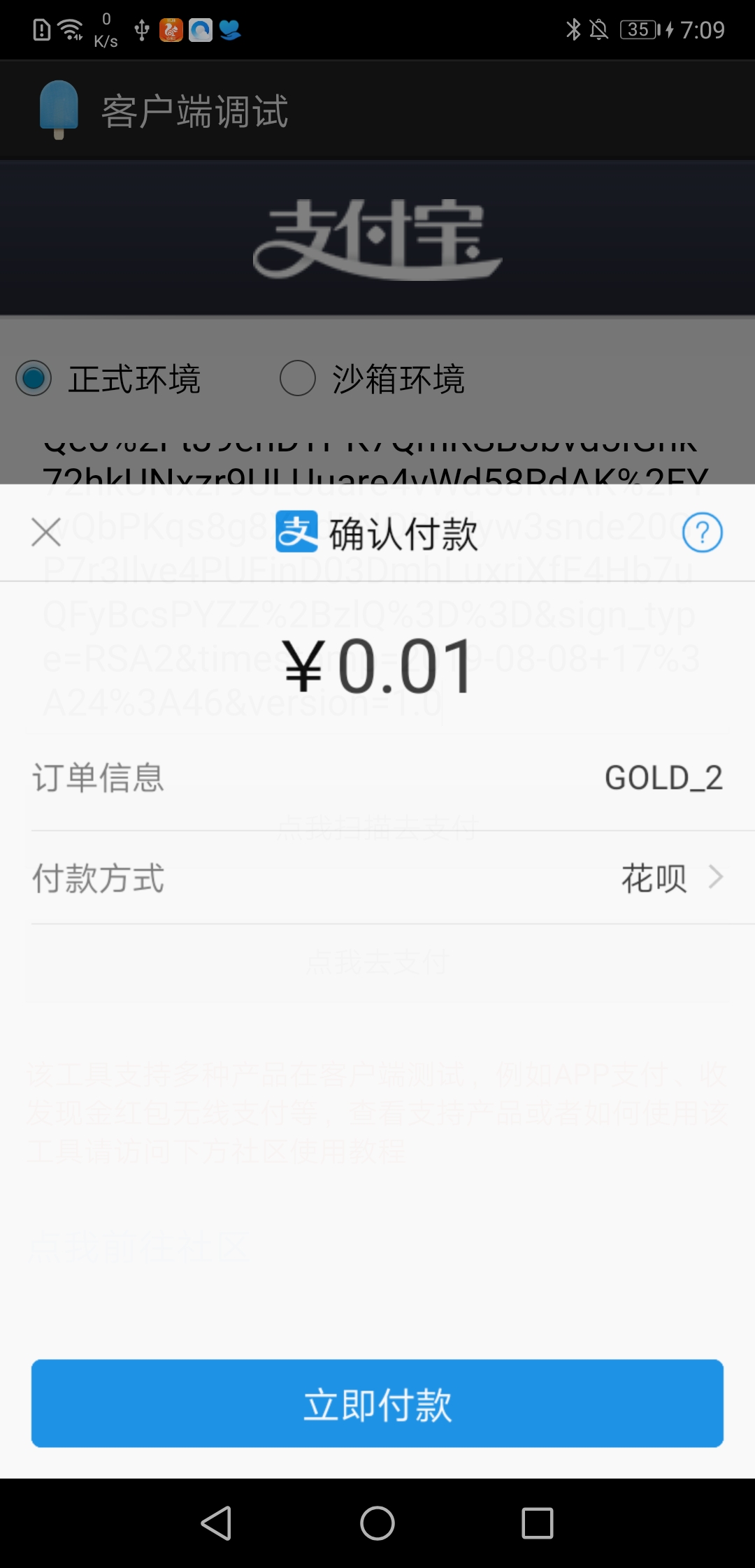
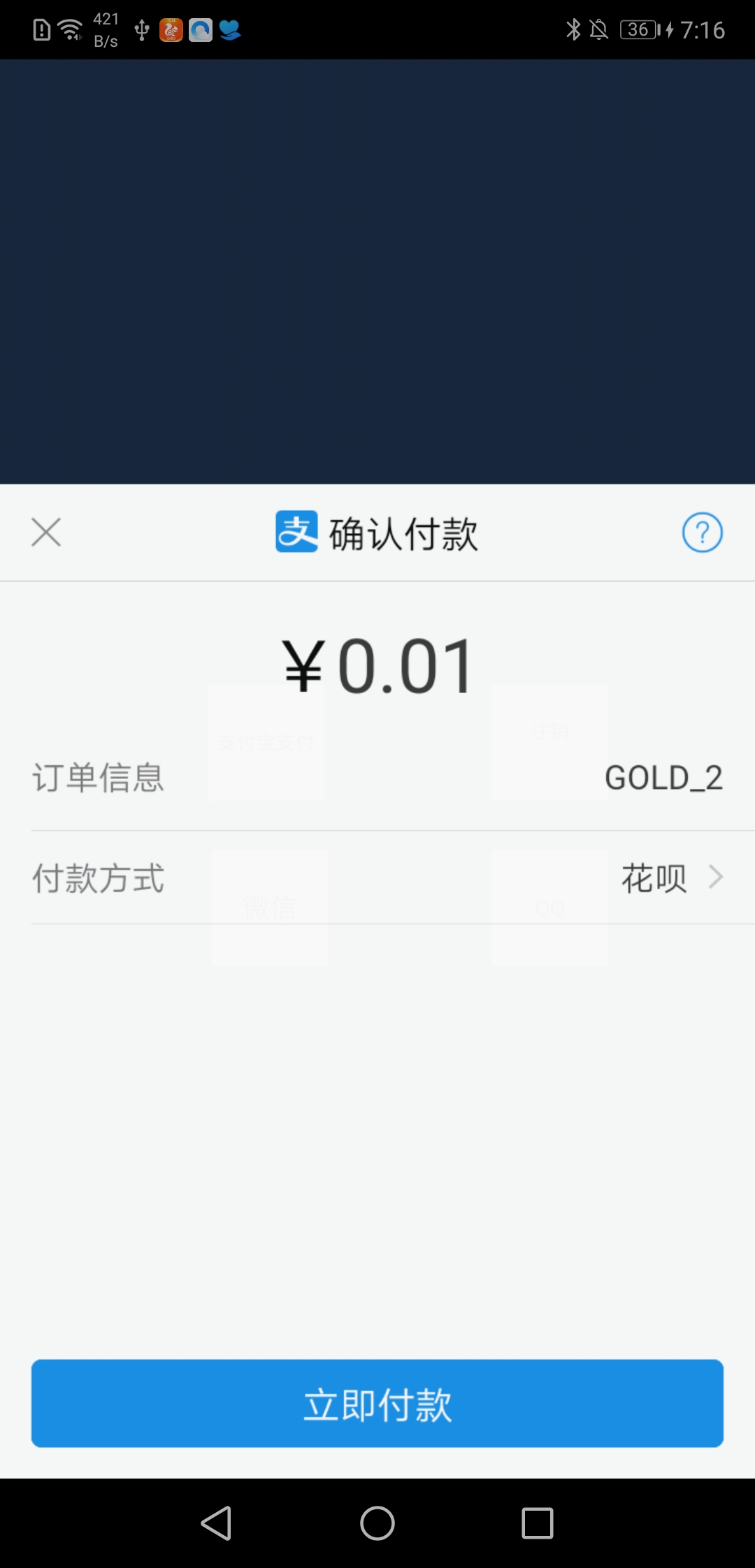
在支付宝所提供的客户端调试工具中,我把订单信息复制上去之后:显示可以支付

但是再自己的工程中,唤起支付宝,就会报ALI38173的错误..于是,我跟web大佬对了一遍又一遍,两边都没有问题..

我就去找支付宝客服,客服很耐心的回答,然后说这边没有什么问题..

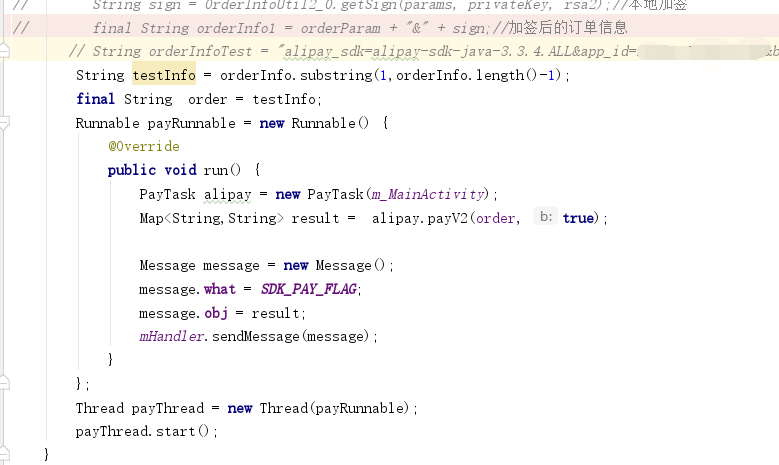
他提出了一个解决方案是 : 让我把订单信息直接复制到Android Studio中: ,orderInfoTest里面的内容就是web端所传递的内容

这个时候重新编译,发现: ….这不就是我想要的结果吗…

这个让人崩溃的原因来了..

先提供一下 打印信息:,乍一看..没什么问题对吧,这就是一句正常打印..

然而 就是因为 打印的时候 我们习惯写 ” “,才忽略掉这个..

没错..就是打印里面的 ” “,首位各一个..找出来后,做一个截取:

iOS开发:Sign In With Apple(使用Apple登录)

1、什么是Sign In With Apple

苹果在WWDC2019推出了Sign In With Apple(以下简称SIWA),即用户通过端上的Apple ID就可以登录第三方应用。目的是为用户提供一种快速,安全且隐私友好的方式来设置帐户并开始使用您的服务。这次苹果提供的Sign In With Apple快捷登录,也是通过这个跨平台的功能使得在这个生态环境中的应用操作更加方便简洁。详情请参考:WWDC2019 Sign In With Apple 视频

官方文档介绍:https://developer.apple.com/cn/sign-in-with-apple/get-started/

https://developer.apple.com/cn/news/?id=09122019b

通过视频观看,苹果反复的阐述安全性,包括本身Apple ID具备的双重认证、用户可以隐藏自己的Apple ID等,这些都使得用户隐私得到了最大的保护,虽然我们依然可以通过API来获取到诸如用户姓名这样的信息,但是最为关键的user则是毫无规律可言的(至少在我们开发者看来),而这个user则为同一个开发者账号下的所有app中保持有且仅有一个,这个特点看上去能够和已有的帐号体系打通。

Sign In With Apple特点:

Streamlined account setup(简化帐户设置)

Verified email addresses(验证电子邮件地址)

Built-in security(内置安全性)

Anti-fraud(反欺诈):包括:

Cross-platform(跨平台):支持苹果生态的所有系统。eg: iOS,macOS, watchOS, tvOS, JavaScript等。

接入Sign In With Apple的好处:应用程序或网站中显示“使用Apple登录”按钮意味着人们可以使用他们已有的Apple ID进行点击或登录,而无需填写表格,验证电子邮件地址和选择密码。使用Apple登录提供了一种新的,更私密的方式,可以简单快速地登录应用程序和网站,同时为人们提供他们可以信赖的一致登录体验,以及不必记住多个帐户和密码的便利。如果您选择询问姓名和电子邮件地址,人们可以选择保留其电子邮件地址的私密性,而共享一个唯一的随机电子邮件地址。有关开发人员的指导,请参阅AuthenticationServices

2、如何接入Sign In With Apple

2.1:系统配置:苹果开发文档明确规定:苹果电脑系统macos(10.15)(吓的我赶紧升级我的笔记本系统),手机iOS系统ios(13.0)(毫不犹豫的升级)。由于只有Xcode11才支持Sign In With Apple接入代码的开发,所以Xcode我升级到了11.1正式版。

上面三个条件缺一不可。

开发文档规定的系统版本号

2.2:工程配置

2.2.1按照下图所示

工程配置顺序

2.2.2:点击 “+”号,在弹出的框里搜索 Sign In With Apple,然后双击菜单中的 Sign In With Appple,添加到工程中。

搜索Sign In With Apple

2.2.3:添加成功Sign In With Apple,如下图所示

添加成功所示

2.2.4:如果项目中没有 AuthenticationServices.framework ,请务必添加 AuthenticationServices.framework 。

添加系统支持的framework

2.3:集成Sign In With Apple 流程

集成苹果ID登录流程

3、集成Sign In With Apple

3.1:集成SIWA,一般用到的是下面几个类:

Sign In with Apple Entitlement:一种权利,可让您的应用程序使用“通过Apple登录”。Key: com.apple.developer.applesignin

class  ASAuthorizationAppleIDProvider:一种用于基于用户的Apple ID生成用于验证用户身份的请求的机制。

class  ASAuthorizationController:一个控制器,用于管理提供者创建的授权请求。

class  ASAuthorizationAppleIDCredential:成功的Apple ID身份验证产生的凭证。

class ASAuthorizationAppleIDButton:苹果封装的关于SIWA的按钮类。

calss ASPasswordCredential:密码认证管理类

3.2:集成SIWA开发

主要通过使用#import <AuthenticationServices/AuthenticationServices.h>框架来实现整个的苹果ID登录流程。而核心的类是ASAuthorizationAppleIDProvider,它是来创建和发起苹果ID登录请求的提供者。

3.2.1:SIWA按钮

SIWA按钮实现的代码

3.2.2按钮的点击实现:

点击按钮实现的功能

3.2.3:授权代理方法:

3.2.3.1:授权成功的方法:

– (void)authorizationController:(ASAuthorizationController *)controller didCompleteWithAuthorization:(ASAuthorization*)authorization  API_AVAILABLE(ios(13.0))

授权成功

3.2.3.1:授权失败的方法:

– (void)authorizationController:(ASAuthorizationController *)controller didCompleteWithError:(NSError*)error  API_AVAILABLE(ios(13.0))

授权失败

3.2.4:授权页面显示

初次授权和已经授权再次点击时所展现出的界面是不一样的,如下图所示:左边图片是初次登陆页面展示,右边图片是再次登陆页面展示

授权登录页面展示

弹出页面后,按页面所示进一步操作即可。

在初次授权中,姓名这一栏是可以自己修改的,点击<姓名>这一栏,就可以根据需要修改

电子邮件:

可以选择显示或者隐藏,也可以选择其他的邮箱,点击共享我的电子邮件,可以弹出你自己所有的APPID邮箱账号,你可以选择其他的账号。

如果你选择<共享我的电子邮件>,那么在授权成功后,你会拿到真实的邮箱:

真实的邮箱

如果你选择<隐藏邮件地址>,那么在授权成功后,你会拿到一个经过处理后的混乱的邮箱:

混乱的邮箱

相关示例代码,请点击这里

4、Sign In With Apple按钮样式

样式介绍:官方介绍

4.1:Sign In with Apple 提供了两种按钮样式变种:【Sign In with Apple】 和 【Continue with Apple】。根据需要,选择最适合自己服务的登录场景所需要的样式。

俩种按钮样式

4.2:根据平台的不同,该系统最多可以为使用Apple登录按钮提供三种外观:白色(white),带有轮廓的白色(white with an outline)和黑色( black)。选择最适合您在其上显示按钮的背景的外观。

4.2.1:白色:

白色样式在iOS,macOS,tvOS和Web中可用。在提供足够对比度的深色或彩色背景上使用此样式。

白色样式

4.2.2:白色带轮廓

白色轮廓样式可在iOS,macOS和Web中使用。在无法提供足够对比度的白色或浅色背景上使用此样式;不要在黑暗或饱和的背景上使用它。

白色带轮廓

4.2.3:黑色

黑色样式适用于所有平台和网络。在可提供足够对比度的白色或浅色背景上使用此样式;不要在黑色或深色背景上使用它。

黑色

4.3:按钮尺寸和位置

4.3.1:突出显示“使用Apple登录”按钮。使“使用Apple登录”按钮与其他登录按钮的大小相同,并避免使人们滚动查看该按钮。

4.3.2:调整拐角半径以匹配应用程序中其他按钮的外观。默认情况下,“使用Apple登录”按钮具有圆角。在iOS,macOS和网络中,您可以更改转角半径以产生带有方形角的按钮或弧形形的按钮。有关开发人员的指导,请参阅cornerRadius(iOS和macOS)和“使用Apple Buttons显示和配置登录”(Web)。

按钮样式所示

4.3.3:保持最小的按钮大小和按钮周围的边距。请注意,按钮标题的长度可能会因地区而异。使用以下值作为指导:

按钮尺寸参考

5、关于使用Sign In With Apple审核的问题

关于苹果对Sign In With Apple适配审核的规则,官方文档说明 第4.8条

Apps that exclusively use a third-party or social login service (such as Facebook Login, Google Sign-In, Sign in with Twitter, Sign In with LinkedIn, Login with Amazon, or WeChat Login) to set up or authenticate the user’s primary account with the app must also offer Sign in with Apple as an equivalent option. A user’s primary account is the account they establish with your app for the purposes of identifying themselves, signing in, and accessing your features and associated services.

仅使用第三方或社交登录服务(例如Facebook登录,Google登录,Twitter登录,LinkedIn登录,Amazon登录或微信登录)的应用来设置或验证用户的主帐户该应用程序还必须提供“与Apple登录”作为等效选项。用户的主要帐户是他们在您的应用中建立的帐户,用于识别自己的身份,登录并访问您的功能和相关服务。

如果是下面这类类型的应用则不需要添加:

您的应用专门使用公司自己的帐户设置和登录系统。

您的应用是教育,企业或商业应用,要求用户使用现有的教育或企业帐户登录。

您的应用程序使用政府或行业支持的公民身份识别系统或电子ID来对用户进行身份验证。

您的应用是特定第三方服务的客户端,要求用户直接登录其邮件,社交媒体或其他第三方帐户才能访问其内容

另外需要注意,关于何时接入Sign In With Apple,苹果在有关“通过 Apple 登录”的指南更新有说明:

We’ve updated the App Store Review Guidelines to provide criteria for when apps are required to use Sign in with Apple. Starting today, new apps submitted to the App Store must follow these guidelines. Existing apps and app updates must follow them by April 2020. We’ve also provided new guidelines for using Sign in with Apple on the web and other platforms.

我们更新了《 App Store审查指南》,为何时需要应用程序使用“使用Apple登录”提供了标准。从今天开始,提交到App Store的新应用必须遵循这些准则现有应用程序和应用程序更新必须在2020年4月之前进行。我们还提供了有关在网络和其他平台上使用Apple登录功能的新指南。

查看《App Store 审核指南》 (英文)

6、关于Sign In With Apple登录后和服务器交互的问题,

Sign In With Apple 从登陆到服务器验证

Sign in with Apple(苹果授权登陆)

快速配置 Sign In with Apple

苹果官方文档之生成并验证token

7、附录:

苹果最新更新:https://developer.apple.com/news/

APP添加apple登录https://developer.apple.com/documentation/authenticationservices/adding_the_sign_in_with_apple_flow_to_your_app

作者:狂奔的蜗牛_
链接:https://www.jianshu.com/p/efb02bc8935a
来源:简书
著作权归作者所有。商业转载请联系作者获得授权,非商业转载请注明出处。

解决-bash:mysqldump: command not found问题

备份数据库时,直接使用命令 :mysqldump -h127.0.0.1 -p3306 -uroot -p123456 db t1 t2 > /data/backup/db_t1_t2.sql

有的数据库版本会提示错误-bash:mysqldump: command not found,解决这个问题的可以设置软连接,也可以将mysqldump所做目录补全执行备份。

/mysql/bin/mysqldump -h127.0.0.1 -p3306 -uroot -p123456 db t1 t2 > /data/backup/db_t1_t2.sql

php服务端处理 ios内购充值

app一直没有接入iOS内购充值,随着业务支付功能越来越多,ios内购充值就提到日程上来了。那么,ios内购充值怎么做呢?

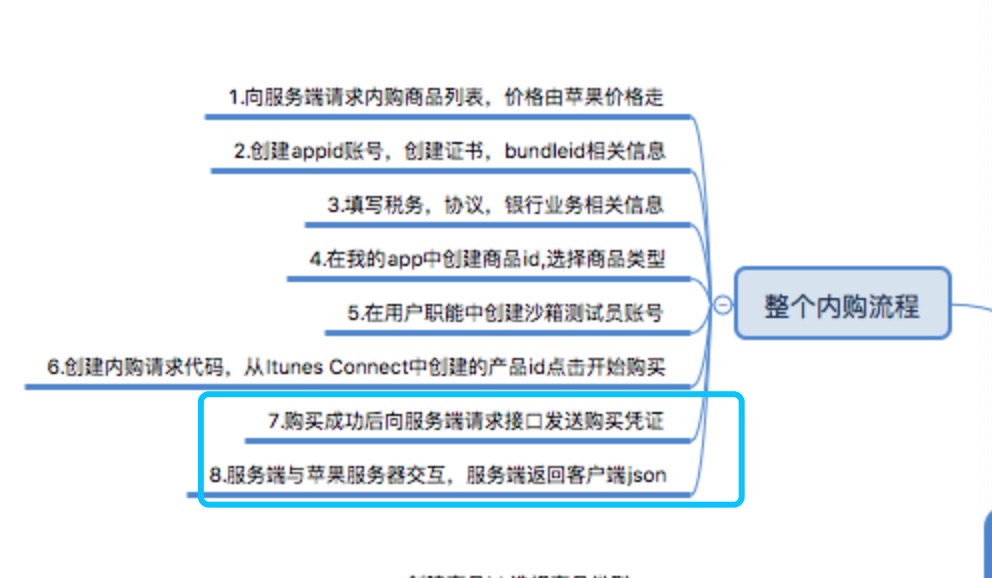
其实iOS内购充值是通过客户端接入iOS的IAP模块(In-AppPurchase)后,由客户端发起充值,然后再把充值数据(receipt)发给服务端,最后由服务端远程调用AppStore服务器验证。

具体的流程如图:

111.png

服务端连接AppStore验单

验单的过程是,服务端发起HTTP Post请求,将以下字段的数据以json格式请求 AppStore 服务器,解析返回数据来验证。

字段:receipt-data

来源:ios端内置的生成base64编码的token。

AppStore 服务器有两个,对应测试环境(沙盒测试)和正式环境:

测试环境: https://sandbox.itunes.apple.com/verifyReceipt

正式环境: https://buy.itunes.apple.com/verifyReceipt

// $verification_uri = 'https://buy.itunes.apple.com/verifyReceipt';$verification_uri = 'https://sandbox.itunes.apple.com/verifyReceipt'; $post_data = array(    'receipt-data'=>$receipt_data // 此处的值 是ios客户端生成的验签token);$ch = curl_init($verification_uri);curl_setopt($ch, CURLOPT_RETURNTRANSFER, true);curl_setopt($ch, CURLOPT_POST, true);curl_setopt($ch, CURLOPT_POSTFIELDS, json_encode($post_data)); $response = curl_exec($ch);$errno    = curl_errno($ch);$errmsg   = curl_error($ch);curl_close($ch); if ($errno != 0) {throw new Exception($errmsg, $errno);}$data = json_decode($response, 1);

服务端验证返回数据

iOS发起票据验证请求后,通过处理AppStore返回数据来验单。下面举两个示例,同时说明不同iOS版本的返回数据不同,服务端要做好区别。

1、iOS7及以上获取的票据返回数据:

{receipt =  {        "adam_id" = 0,        "app_item_id" = 0,        "application_version" = 1,        "bundle_id" = "com.test",        "download_id" = 0,        "in_app" = {{    "is_trial_period" = false,    "original_purchase_date" = "2017-01-01 01:01:01 Etc/GMT",    "original_purchase_date_ms" = 1483203661000,    "original_purchase_date_pst" = "2017-01-01 01:01:01 America/Los_Angeles",    "original_transaction_id" = 1000000000000001,    "product_id" = "com.test.10",    "purchase_date" = "2017-01-01 01:01:01 Etc/GMT",    "purchase_date_ms" = 1483203661000,    "purchase_date_pst" = "2017-01-01 01:01:01 America/Los_Angeles",    "transaction_id" = 1000000000000001},//......},        "receipt_type" = ProductionSandbox,        "request_date" = "2017-01-01 01:01:01 Etc/GMT",        "request_date_ms" = 1483203661000,        "request_date_pst" = "2017-01-01 01:01:01 America/Los_Angeles",        "version_external_identifier" = 0,    },    status = 0}

2、iOS7以下获取的票据返回数据(不包括iOS7):

{    receipt = {        "bid" = "com.test",        "bvrs" = 1,        "item_id" = 573837050,        "original_purchase_date" = "2017-01-01 01:01:01 Etc/GMT",        "original_purchase_date_ms" = 1483203661000,        "original_purchase_date_pst" = "2017-01-01 01:01:01 America/Los_Angeles",        "original_transaction_id" = 1000000000000001,        "product_id" = "com.test.10",        "purchase_date" = "2017-01-01 01:01:01 Etc/GMT",        "purchase_date_ms" = 1483203661000,        "purchase_date_pst" = "2017-01-01 01:01:01 America/Los_Angeles",        "transaction_id" = 1000000000000001    },    status = 0}

验证订单是否成功,关键看这几个数据:

1、status为 0 表示成功;其他都为失败,表示失败原因

2、根据 receipt.in_app 字段判断iOS版本,验证方法也不同

iOS7及以上:有in_app字段,验证 receipt.bundle_id 是否为你 App 的 bundle id,根据 in_app 处理充值的每一笔订单, 根据 product_id 判断用户充值了哪个档位,同时取出 transaction_id

iOS7以下:没有in_app字段,验证 receipt.bid 是否为你 App 的 bundle id,根据 product_id 判断用户充值了哪个档位,同时取出 transaction_id

3、根据 transaction_id 对比数据库历史订单判断是否已处理过,没有则认为本次充值是有效的。

iOS充值坑点: in_app 究竟是什么

receipt.in_app 是请求AppStore验单后返回的数据,前面有提及,为用户的充值订单数据。

有两个问题要注意:

1、iOS内购充值时,客户端充值后从iOS得到的票据 receipt_data 不是针对本次充值的,而是相当于给一个授权 token, 获取用户 appleid 账号在本 App 中所有未关闭的充值记录,包括刚刚发起的充值。

2、根据这个票据查到的充值数据(receipt.in_app) ,除了最近发起的充值,还包括了非消耗品型,订阅型的充值数据。其中,最近发起的充值,不只是刚刚发起的充值,还可能是最近的几笔充值。特别是沙盒测试,还可能拿到已经确认关闭了的充值订单

所以,取到充值数据,不是取 receipt.in_app 中的第一个数据、或最后一个,而是在客户端完成充值后,将AppStore回调给到的 transaction_id 拿来做匹配。

iOS充值坑点:App审核不通过

苹果审核App时,是在沙盒环境下测试。所以,当App提交苹果审核时,服务端需换成沙盒环境,否则就无法通过苹果审核。通常游戏开发商都会搞一个审核服来给苹果审核,这样,审核服用沙盒环境,正式服用正式环境。

但对于很多App应用开发商来说,专门搞一个服务器显然增加了不少成本。其实还是有办法处理的,方法如下:

根据验单返回的 status 字段:

222.png

当 status = 21007 时,把请求地址换成沙盒测试地址,再次请求验单。

php苹果内购支付验证

/**

  • 验证AppStore内付
  • @param string $receipt_data 付款后凭证
  • @return array 验证是否成功
    / function validate_apple_pay($receipt_data){ /*
    • 21000 App Store不能读取你提供的JSON对象
    • 21002 receipt-data域的数据有问题
    • 21003 receipt无法通过验证
    • 21004 提供的shared secret不匹配你账号中的shared secret
    • 21005 receipt服务器当前不可用
    • 21006 receipt合法,但是订阅已过期。服务器接收到这个状态码时,receipt数据仍然会解码并一起发送
    • 21007 receipt是Sandbox receipt,但却发送至生产系统的验证服务
    • 21008 receipt是生产receipt,但却发送至Sandbox环境的验证服务
      */
      function acurl($receipt_data, $sandbox = 0){
      //小票信息
      $POSTFIELDS = array(‘receipt-data’ => $receipt_data);
      $POSTFIELDS = json_encode($POSTFIELDS); //正式购买地址 沙盒购买地址
      $url_buy = ‘https://buy.itunes.apple.com/verifyReceipt’;
      $url_sandbox = ‘https://sandbox.itunes.apple.com/verifyReceipt’;
      $url = $sandbox ? $url_sandbox : $url_buy;
      // dump($url);die;
      // $url = $url_sandbox;
      //简单的curl
      $ch = curl_init($url);
      curl_setopt($ch, CURLOPT_RETURNTRANSFER, 1);
      curl_setopt($ch, CURLOPT_POST, 1);
      curl_setopt($ch, CURLOPT_POSTFIELDS, $POSTFIELDS);
      curl_setopt ($ch, CURLOPT_SSL_VERIFYPEER, 0); //这两行一定要加,不加会报SSL 错误
      curl_setopt ($ch, CURLOPT_SSL_VERIFYHOST, 0);
      $result = curl_exec($ch);
      curl_close($ch);
      return $result;
      }
      // 验证参数
      if (strlen($receipt_data)<20){ $result=array( ‘status’=>false,
      ‘message’=>’非法参数’
      );
      return $result;
      }
      // 请求验证
      $html = acurl($receipt_data);
      $data = json_decode($html,true);
      // dump($data);die;
      // 如果是沙盒数据 则验证沙盒模式
      if($data[‘status’]==’21007′){
      // 请求验证
      $html = acurl($receipt_data, 1);
      $data = json_decode($html,true);
      $data[‘sandbox’] = ‘1’;
      // dump($data);die;
      }
      if (isset($_GET[‘debug’])) {
      exit(json_encode($data));
      }
      // 判断是否购买成功
      // if(intval($data[‘status’])===0){
      // $result=array(
      // ‘status’=>true,
      // ‘message’=>’购买成功’
      // );
      // }else{
      // $result=array(
      // ‘status’=>false,
      // ‘message’=>’购买失败 status:’.$data[‘status’]
      // );
      // }
    return $data;
    }

PHP后端处理苹果内购对接

苹果内购流程:

iOS App上次苹果商店审核对于虚拟金币类必须要用苹果支付,不能使用第三方支付,苹果支付还要3/7分成,呵呵…

1、前六步有IOS端处理,最终获取购买凭证

2、POST请求,发送购买凭证receipt-data到服务端接口

复制代码
    /**
     * 苹果内购
     * @param receipt-data 购买凭证(必传)
     * @param is_test 是否沙盒数据(选填,1是 0否,默认否)
     * @return json
     **/
    public function actionsApple_pay(){

        if (!framework::post('is_test')) {    //沙盒购买地址
            $url = "https://sandbox.itunes.apple.com/verifyReceipt";
        }else{  //正式购买地址
            $url = "https://buy.itunes.apple.com/verifyReceipt";
        }

        $receipt_data = framework::post('receipt-data');
        // 验证参数
        if (strlen($receipt_data) < 20){
            $result = array(
                'status'=>false,
                'message'=>'非法参数'
            );
            echo json_encode($result);
            return false;
        }

        $post_data = json_encode(array("receipt-data" => $receipt_data));
        $response = https::curlHttps($url, $post_data);
        $res = json_decode($response, true);

        $err_msg = array(
            '21000' => 'App Store不能读取你提供的JSON对象',
            '21002' => 'receipt-data域的数据有问题',
            '21003' => 'receipt无法通过验证',
            '21004' => '提供的shared secret不匹配你账号中的shared secret',
            '21005' => 'receipt服务器当前不可用',
            '21006' => 'receipt合法,但是订阅已过期。服务器接收到这个状态码时,receipt数据仍然会解码并一起发送',
            '21007' => 'receipt是Sandbox receipt,但却发送至生产系统的验证服务',
            '21008' => 'receipt是生产receipt,但却发送至Sandbox环境的验证服务'
        );

        // 判断是否购买成功   
        if(intval($res['status']) === 0){   
            $result = ['status'=>true, 'message'=>'正式购买成功'];   
        }else{   
            $result = ['status'=>false, 'message' => '购买失败 status:'.$res['status'].' - '.@$err_msg[$res['status']] ];
            framework::logWrite('苹果支付失败 ---res---'.json_encode($result));
        }

        echo json_encode($result);
        return false;
    }
复制代码

php-fpm: 某项目网站频繁出现503问题解决( WARNING: [pool www] server reached pm.max_children setting (50), consider raising it)

服务是nginx+php-fpm配置,

在运行过一段时间后,会经常出现:

12WARNING: [pool www] server reached pm.max_children setting (50), consider raising it子进程达到最大数量,需要提供子进程数

503/502一般是因为服务器维护或者过载,近期服务器并未进行维护,查询监控记录发现负载也不是很高,猜测是不是服务器对项目的某些配置产生了限制,查看nginx,php日志发现:

找到php-fpm.conf 文件 ,查找php日志错误

12345[15-Nov-2017 15:23:51] WARNING: [pool www] server reached pm.max_children setting (5), consider raising it[15-Nov-2017 17:10:53] WARNING: [pool www] server reached pm.max_children setting (5), consider raising it[15-Nov-2017 17:12:56] WARNING: [pool www] server reached pm.max_children setting (5), consider raising it[15-Nov-2017 18:29:28] WARNING: [pool www] server reached pm.max_children setting (5), consider raising it[16-Nov-2017 10:25:17] WARNING: [pool www] server reached pm.max_children setting (5), consider raising it


该警告频繁出现,子进程达到最大数量,查询php-fpm配置文件www.conf,发现pm.max_children采用的是默认配置,显然是因为设定值过小导致

问题解决:

修改

1234pm.start_servers = 10   //php-fpm启动起始进程数pm.min_spare_servers = 10   //php-fpm的最小空闲进程数pm.max_spare_servers = 24   //php-fpm的最大空闲进程数pm.max_requests = 500   //所有子进程重启时间
参考:https://lirongyao.com/server-reached-pm-max_children-setting.html